Your Team Already Has an AI Policy
They made it themselves.
Executive decision: Give employees a simple, usable AI operating boundary now. Name which tools are allowed, what data stays out, what requires human review, what AI may never do alone, and where employees bring useful new workflows. Let formal policy mature from that operating practice.
An employee needs to finish a customer proposal. There's no approved AI tool, or the approved path isn't clear. They use a personal account. A colleague pastes in customer information. A third avoids AI entirely because nobody has said what's acceptable. Each of them is making an AI policy decision in the moment, and none of them are coordinating with each other.
Your team already has an AI policy. They made it themselves.
What the evidence says
Employees are adopting AI faster than most organizations can formally govern it. Public research from Microsoft and IBM shows unsanctioned AI use already exists at work, and that people reach for outside tools when the sanctioned option is missing or inadequate.
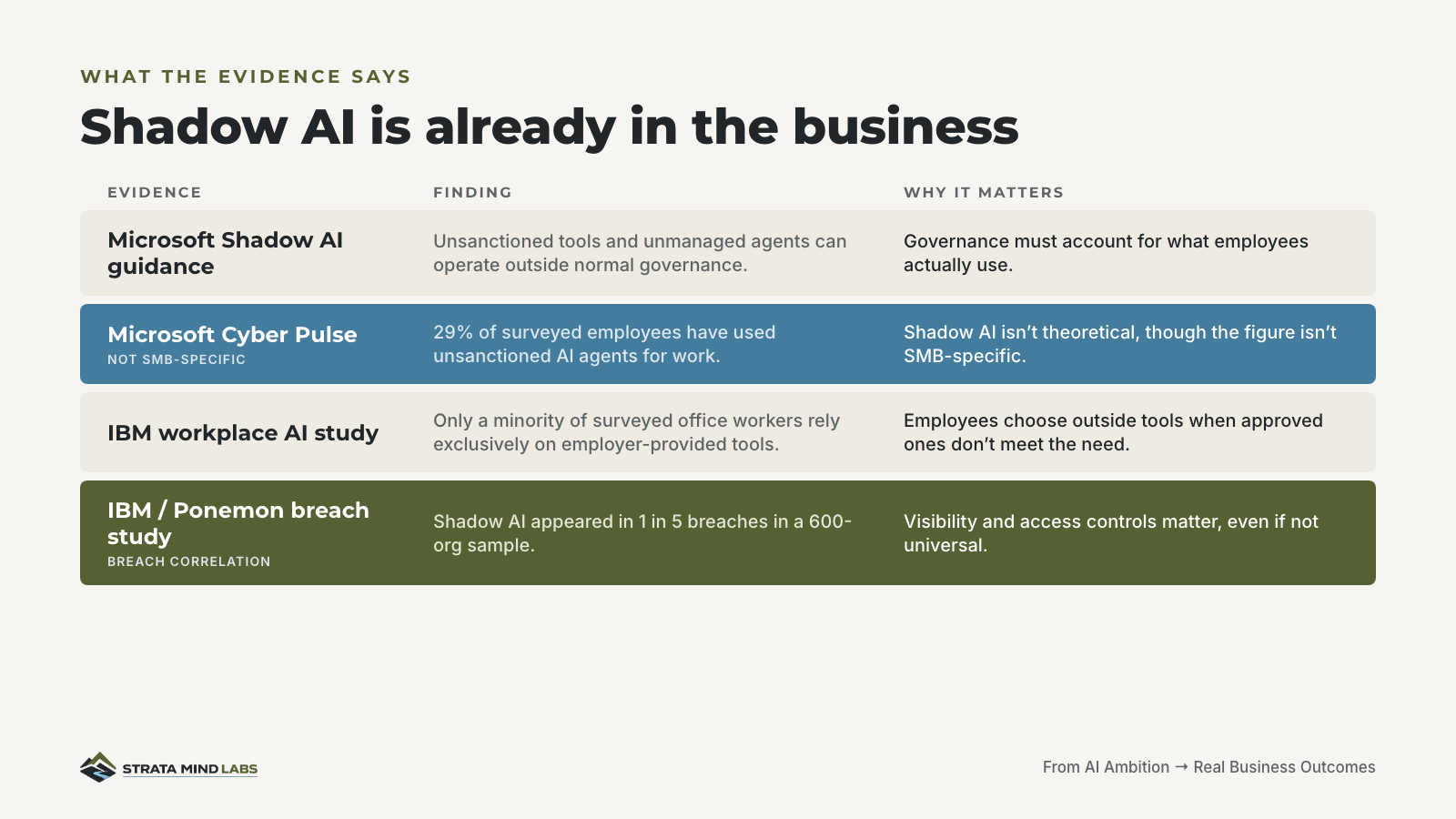
This isn't a claim that every SMB has a shadow AI problem, or that a ban always creates one. It's narrower than that: the evidence says employees are making these calls on their own, and most leaders don't yet have visibility into which calls they're making.
The business already has AI rules
If leadership hasn't made the rules explicit, employees still make them. Which tool can I use? What can I put into it? Do I trust the output? Can I send this to a customer? Can it update a system? Who do I ask when I find something better? Those decisions become the de facto operating policy, one person and one judgment call at a time.
The risk isn't that employees are using AI. It's inconsistency. One person works from public information only. Another pastes confidential material into a personal account. A third avoids AI entirely. The business ends up with uneven productivity, uneven controls, and almost no visibility into either.
Start with an operating boundary
A useful first boundary answers four questions, not forty.
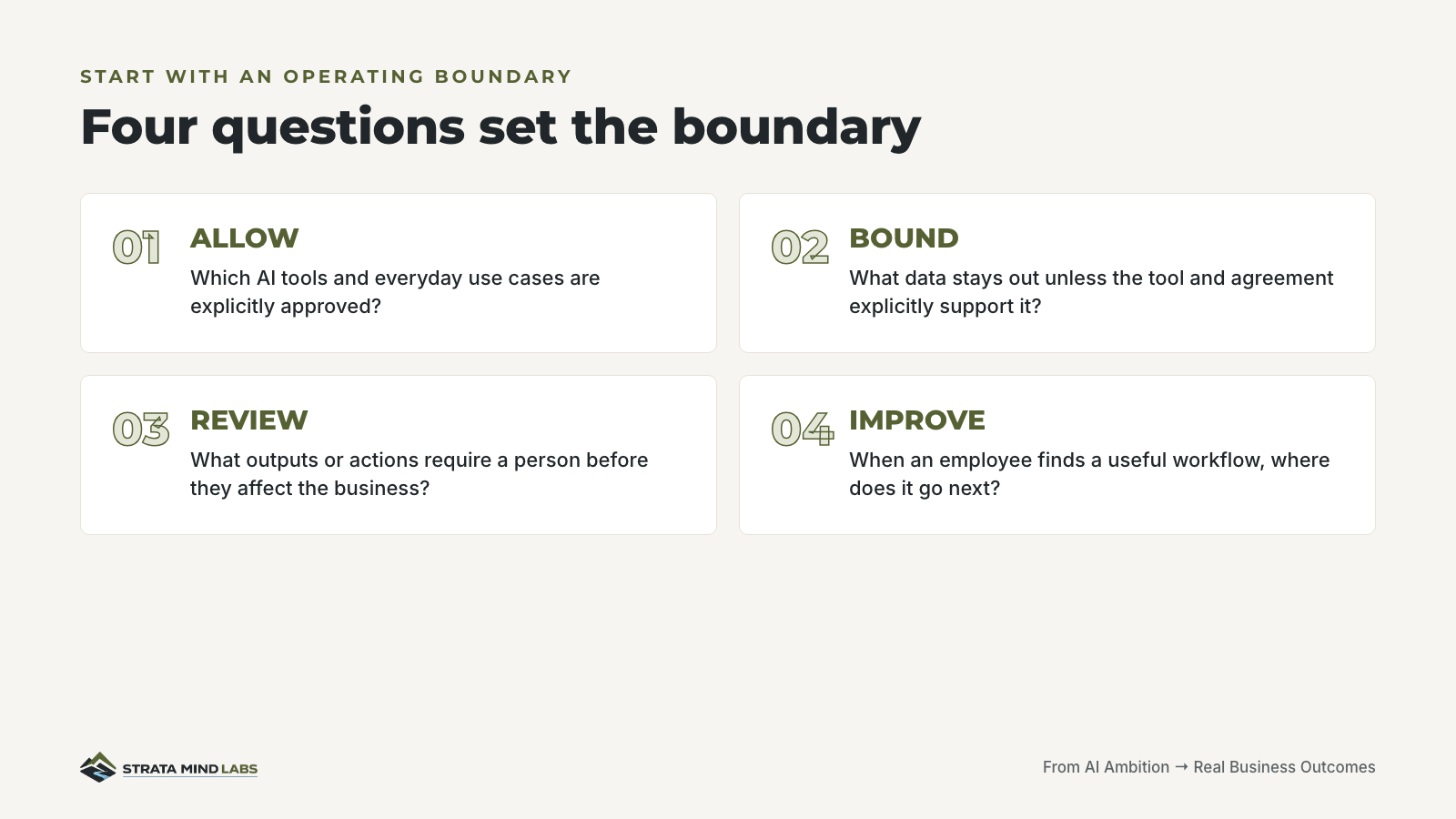
A practical one-page card names the approved tools, the approved use cases, the data that never goes in, the work that needs a human before it ships, the actions AI should never take on its own, how a new use case gets escalated, who owns the card, and when it gets reviewed again. None of that requires a legal department to draft.
Found a useful AI workflow? Bring it forward. We'd rather make it safe than make it invisible.
That line does more governance work than most policy documents. It turns employee experimentation into a discovery channel instead of an invisible risk.
Five prompts to build the boundary yourself
You don't need a consultant to draft the first version. These prompts work in any capable model. Run them in order, on your own team's real tools, and hold the line on one rule: the model classifies and drafts, it doesn't invent facts about what your people are actually doing.
Discover actual AI use
Copy this prompt
I am going to describe how my employees currently use AI. Build an inventory of tools, use cases, data involved, outputs produced, and who reviews the work. Separate known use from assumptions. Flag any missing information.
Draft the boundary
Copy this prompt
Using the inventory above, draft a one-page AI Use Boundary Card with these sections: Approved AI Tools, Approved Use Cases, Never-Enter Data, Human-Review-Required Work, Prohibited Autonomous Actions, New-Use-Case Escalation Path, Owner, and Review Date. Use plain language suitable for a small business. Do not create legal conclusions.
Classify use cases
Copy this prompt
For each AI use case I provide, classify it as Allow, Allow With Boundaries, Human Review Required, or Prohibit For Now. Explain the reason in one sentence and identify the specific data, action, or consequence driving the classification.
Identify the safe path
Copy this prompt
Review the use cases employees want to perform and recommend the smallest set of sanctioned tools, data boundaries, and review controls needed to make the safe path practical. Prefer simple controls over broad policy language.
Turn discovery into improvement
Copy this prompt
For every useful employee-discovered AI workflow, create a short intake record containing: business task, current manual process, AI-assisted approach, data involved, human checkpoint, measurable benefit, key risk, owner, and next test. Do not approve the workflow automatically.
What to do this week
A fair limit on all this
This isn't a claim that every business has a shadow AI problem, that bans always create shadow AI, or that a one-page boundary replaces legal, security, privacy or compliance review. The point is narrower. Employees are already deciding how AI fits into their work. Leadership can leave those decisions informal, or make the boundary explicit. The first move doesn't have to be a comprehensive governance program. It has to be useful enough that people actually follow it.
CIO Question of the Day
Do your employees know what AI use is actually allowed?
Sources
- Microsoft Learn. Shadow AI governance guidance. https://learn.microsoft.com/en-us/microsoft-agent-365/guidance/govern-shadow-ai
- Microsoft Security Insider. Cyber Pulse AI security report. https://www.microsoft.com/en-us/security/security-insider/emerging-trends/cyber-pulse-ai-security-report/
- IBM Think. Rising AI adoption is creating shadow risks. https://www.ibm.com/think/insights/rising-ai-adoption-creating-shadow-risks
- IBM Newsroom. Cost of a Data Breach 2025, shadow AI findings. https://newsroom.ibm.com/2025-07-30-ibm-report-13-of-organizations-reported-breaches-of-ai-models-or-applications%2C-97-of-which-reported-lacking-proper-ai-access-controls
Make the safe path easier.
New briefings land as soon as the signal is worth your time.