
Who Still Has a Key to Your Store?
Shopify's December 1 token rule covers new custom apps. The older ones keep whatever access they already have, and only an inventory tells the owner which is which.
Executive decision: Inventory every existing custom app on the store. Assign a technical review to any app whose purpose, owner or token behavior is unclear, and leave live access alone until that review is done.
The new rule changes the locks on doors you haven't built yet. The doors you already have keep the keys they were cut with.
The signal this week
On November 19, Shopify posted a developer changelog entry with a firm date. From December 1, 2026, "every new custom app must request and use expiring offline access tokens" for Admin API requests. The entry says the requirement now reaches new partner-created custom apps and apps that merchants create themselves (source 1).
Public apps have been under the same requirement since April 1, 2026. The new entry closes the gap for custom work (source 1).
The sentence that matters for an owner is the one about the past. Custom and merchant-created apps set up before December 1 "can keep using their existing offline tokens" (source 1).
What a non-expiring token actually means
An offline access token is how an app talks to your store when nobody is logged in. It's the kind of credential that lets an order sync or an inventory feed run overnight.
Shopify's own guide spells out the difference. An expiring offline token lasts one hour, and Shopify replaces the refresh token every time the app uses it. A non-expiring offline token "stays valid until the store uninstalls your app or you revoke your client secret" (source 2).
So the older kind works like a key handed to a contractor. It keeps opening the door after the job ends, after the contractor moves on and after everyone forgets who had it. The app nobody remembers installing doesn't forget its access.
None of that proves a problem on your store. An old token held by a well-run app with a named owner is a known quantity. The gap is the app nobody can explain.
Why the careful move can break something
The obvious reaction is to tell the developer to switch everything to expiring tokens this week. Slow down.
Shopify's migration guide asks the app to store the new access token, the refresh token and their expiry values, then use the newest refresh token each time (source 3). If that refresh handling is missing or half-built, the app loses access when the hour runs out. One of the migration options described in the guide "permanently invalidates the old token" for Admin API requests (source 3). There's no quiet undo on that path.
An app that feeds orders to a warehouse or a shipping tool is the worst place to learn this. The credential gets better and fulfillment stops. That's why the owner's first job is a list, and the developer's first job is evidence.
The register for the first session
This is a proposed Strata Mind Labs operator framework, not a measured case. No merchant store was examined to build it.
Plan on an estimated 60 to 90 minutes if someone already has store-admin access. That's a planning estimate. You need the person who manages app integrations, a blank sheet and no new software.
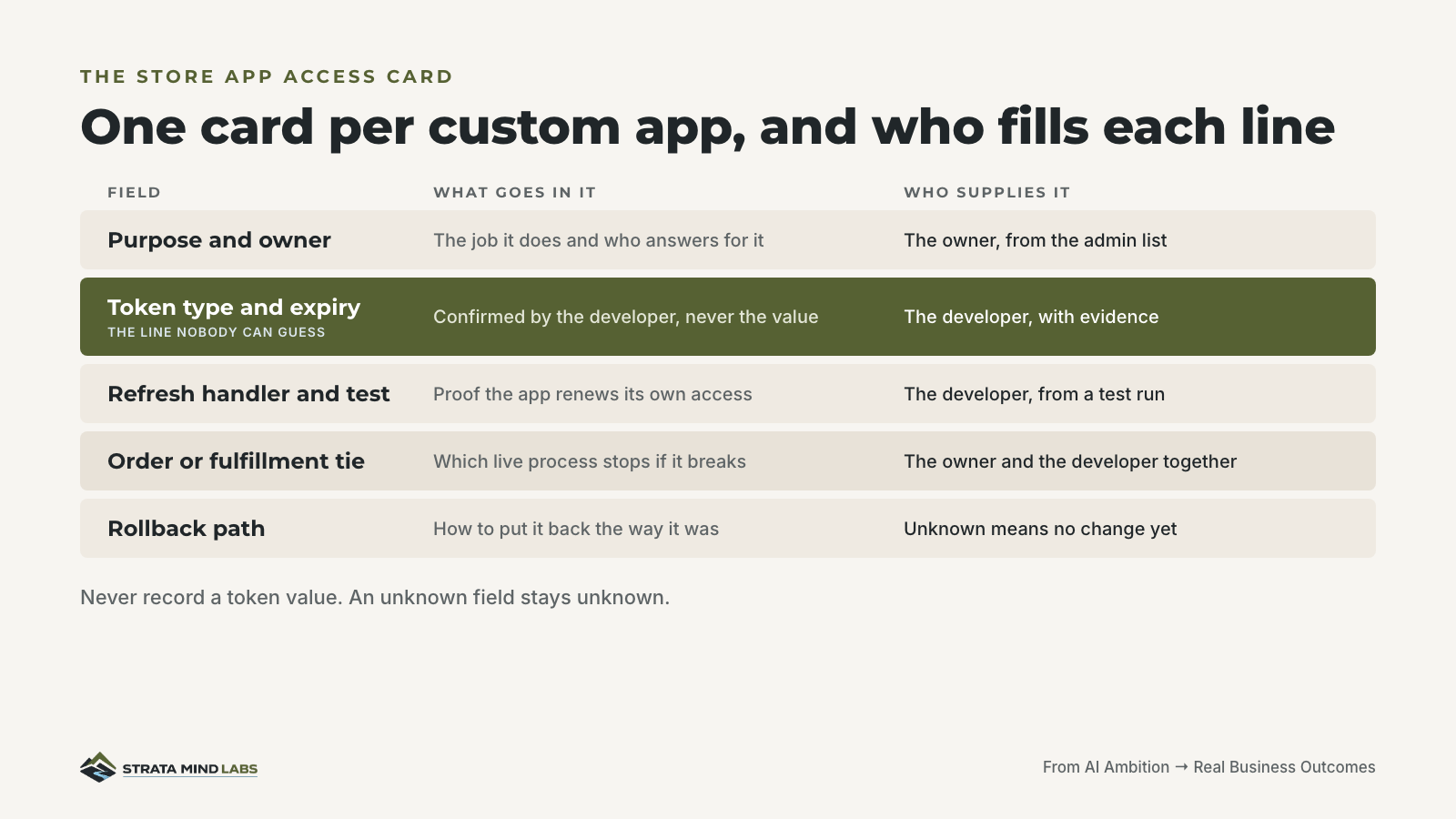
Open the installed-apps view in the store admin and make one card per custom app. The owner fills in purpose and business owner. The developer supplies the token facts. Secret values never go on the card.
Then sort every app into one of four states. Only a tested change moves an app into the last one.
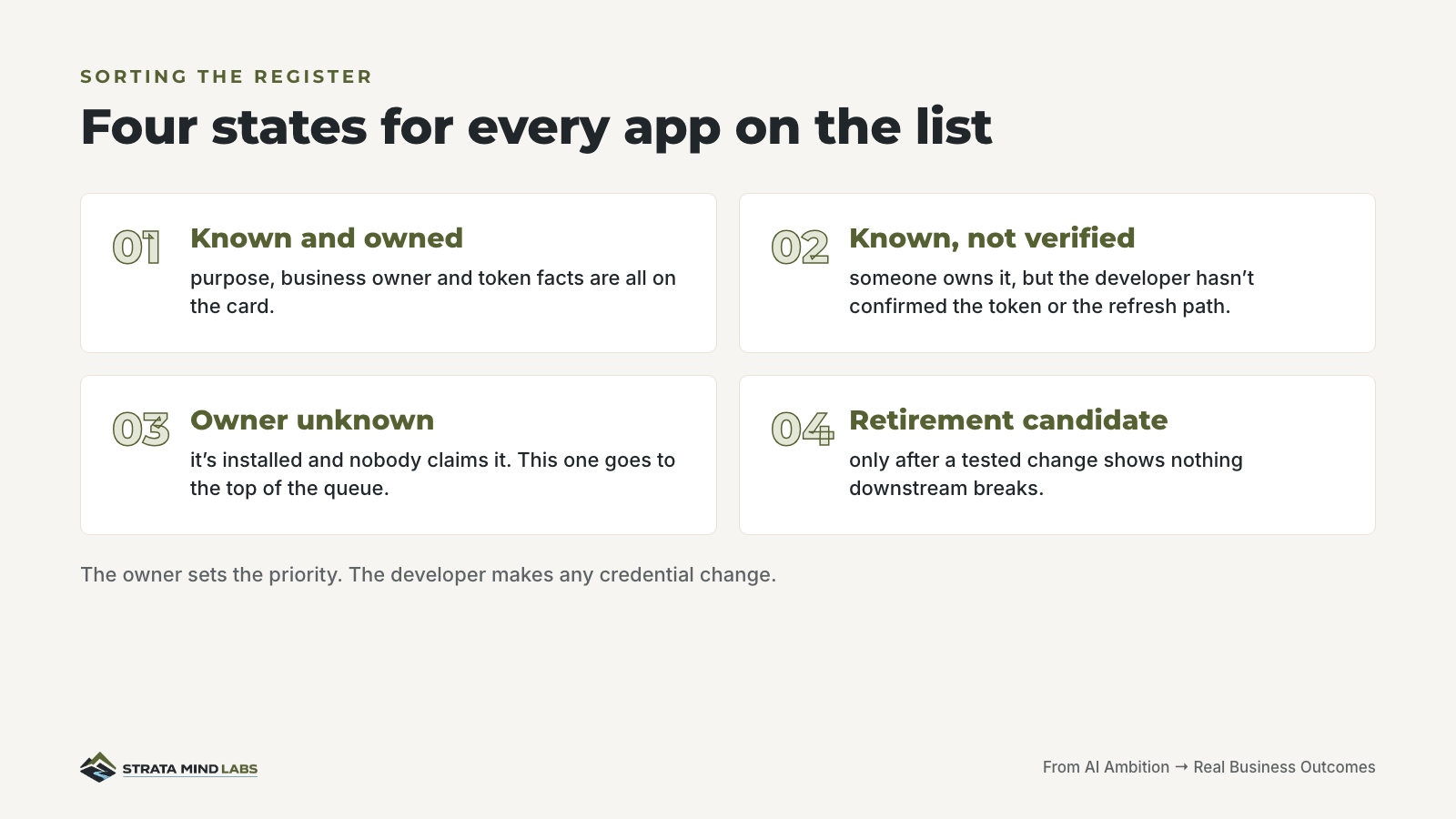
The useful first output is a marked app inventory. Read it as a review queue. It isn't a count of exposed credentials, and nobody should present it that way. One stop condition applies: if an app serves orders or fulfillment and its rollback path is unknown, stop before anyone changes its access.
Five prompts to run this week
Run these in order with your existing AI tool, using a redacted app list and developer replies with no secrets in them.
Build the app register
Copy this prompt
Using this redacted list of installed store apps, make one row per app with name, stated purpose, installer, current user and business owner. Leave missing fields blank and mark them unknown. Do not infer token type or copy any secret value.
What this should tell you: Check the row count against the admin list and look for missing or duplicate apps. A complete register shows where ownership is missing without claiming any credential exposure. Decide whether the list is complete enough to hand to a developer.
Sort the unknowns
Copy this prompt
Using the verified app register, identify rows with no owner, no documented purpose or unclear order and fulfillment dependency. Return the exact missing field for each row. Do not rank risk from guesses.
What this should tell you: Confirm each flagged field is really blank in the source. Missing responsibility is an operating gap. It isn't proof of a leaked or non-expiring token. Pick which app owner or developer you contact first.
Request token evidence
Copy this prompt
Draft a short request to the responsible developer for each marked custom app. Ask for token type, expiry, refresh handler, scopes, last successful operation and a safe rollback plan. Ask for descriptions and evidence links only, never token values or secrets.
What this should tell you: Every request should name the app and ask for evidence without asking for credentials. If a draft asks for a token value, rewrite it. Decide who sends the requests and when replies are due.
Map the change dependency
Copy this prompt
With verified developer replies and no secrets, make a dependency table for each app: business process, token behavior, refresh path, test environment, rollback owner and evidence link. Label every unsupported statement unknown.
What this should tell you: Look for missing refresh tests, order-flow dependencies and absent rollback owners. A credential improvement can still break a live process when refresh handling is incomplete. Approve a test plan only where the dependencies and rollback are clear.
Prepare the owner decision
Copy this prompt
Summarize each app as keep, investigate, plan migration or plan retirement using only verified fields. For every recommendation show the source evidence, missing facts, technical owner, test needed and stop condition. Do not issue a credential-change instruction.
What this should tell you: Check every proposed action against the source rows and reject anything built on a guessed token type. The register becomes a decision queue with a human name on each line. The owner picks the review order and authorizes only a tested technical plan.
What to do this week
A fair limit on all this
Shopify's pages establish how the platform behaves. They say nothing about any particular merchant's apps, how those tokens are actually used or whether anything has gone wrong. No exposure rate or loss figure appears in them, and none is implied here.
An older custom app with a non-expiring token isn't automatically a problem. An app with a named owner and documented evidence goes straight into the first state. The register exists to find the ones that don't.
The card, the four states, the five prompts and the 60 to 90 minute estimate are Strata Mind Labs proposed practice. They haven't been tested on a merchant store, and no reduction in risk or return is assumed.
CIO Question of the Day
When you put a business owner's name next to every custom app on your store, which one came back blank?
Sources
- Shopify. (2026, November 19). Expiring offline access tokens required for new custom apps as of December 1, 2026. Shopify developer changelog. Retrieved November 23, 2026, from https://shopify.dev/changelog/posts/expiring-offline-access-tokens-required-for-new-custom-apps-as-of-december-1-2026
- Shopify. (n.d.). Use expiring offline access tokens. Shopify developer documentation. Retrieved November 23, 2026, from https://shopify.dev/docs/apps/build/security/credentials-and-data/use-expiring-offline-access-tokens
- Shopify. (n.d.). Migrate to expiring offline access tokens. Shopify developer documentation. Retrieved November 23, 2026, from https://shopify.dev/docs/apps/build/authentication-authorization/migrate-to-expiring-offline-access-tokens
The creation date tells you which rule applies. It doesn’t tell you who still holds the key.
New briefings land as soon as the signal is worth your time.