
Who Can Reach the Walk-In Cooler?
A practical remote-access check for an owner and a refrigeration contractor
Executive decision: Decide, controller by controller, whether remote access is necessary, documented and restricted. Make that decision with the contractor who keeps the equipment running. If the contractor can't name the route or the login holder, mark the row unresolved and have a qualified technician restrict access once an alarm and service fallback is agreed.
A walk-in cooler can have a remote service door the owner has never seen. Somebody should know who holds the key.
The signal this week
BleepingComputer reported on November 2 that more than 115 stores across Belgium, the Netherlands, Sweden, Luxembourg, Ireland and Estonia had refrigeration trouble. Per the article, settings were changed remotely, units were shut down or pushed into defrost, and stock was thrown out. An ICA store manager in Sweden told the outlet the settings were changed overnight to +50°C (122°F) and couldn't be changed back, so the store discarded its frozen food (source 1).
The same article has a detail worth more attention than the temperature. Ahold Delhaize warned its managers by SMS around 4 a.m., and some stores used refrigerated trucks to protect stock. Alarms and a fallback mattered as much as the controller itself.
On November 6, Unit 42, the threat research team at Palo Alto Networks, published its own account. It says unidentified actors gained unauthorized access to refrigeration controllers and set them to defrost mode. It also says the initial access vector "remains unconfirmed," and it treats claims of responsibility by two hacktivist groups as unverified (source 2).
Unit 42 ran a scan too. On November 5 and 6 it found more than 5,000 internet-exposed devices from manufacturers named in a CERT-FR advisory. I haven't opened that advisory. Unit 42 is explicit that the count doesn't mean those devices run vulnerable software. Reachable is not the same as vulnerable. Unit 42 also sells exposure-scanning products and its post describes them, so read the scan as a vendor's measurement.
What the evidence adds, and where it stops
Claroty's Team82 published research on August 9 describing three flaws in one controller family, the Danfoss AK-SM 800A, and says Danfoss released firmware that addresses them (source 3). The post predates the October and November incidents. I found no claim in it that attacks were seen in the wild, and it doesn't show those flaws caused the later events. BleepingComputer does say the French attacks involved Danfoss and Copeland controllers, which makes the research relevant background. Relevant isn't causal.
CISA's May 2025 fact sheet, written with the FBI, EPA and Department of Energy for critical infrastructure operators, says to remove operational technology from the public internet. It adds that if remote access is essential, it should run over a private connection with a strong password and phishing-resistant multifactor authentication, scoped to the least access the job needs. The same page tells operators to keep the ability to run equipment manually and to test it (source 4). A single shop may not count as critical infrastructure, so treat this as general guidance for the control choice. It says nothing about any particular cooler.
The strongest counterargument is operational. A contractor may need remote access to catch a fault at night, and a blanket shutdown could slow a repair. BleepingComputer quotes Stephan Moelans, a director at Sabcobel, a refrigeration company named in the article: "The simplest solution is to manage the refrigerators via a secure internet connection." That's one person's view, but the tradeoff he describes is real. So don't ask for the door to be welded shut. Ask the technician how alarms will reach a person and how they'll step in if the remote route changes.
Identify, draw, name, agree
Think of the controller as a key to the stockroom. The key can be useful. Its holder and the route it takes should still be known.
This is a proposed Strata Mind Labs sequence, not a standard. The outside sources support limiting remote access and keeping a manual fallback. They don't say this four-step check works.
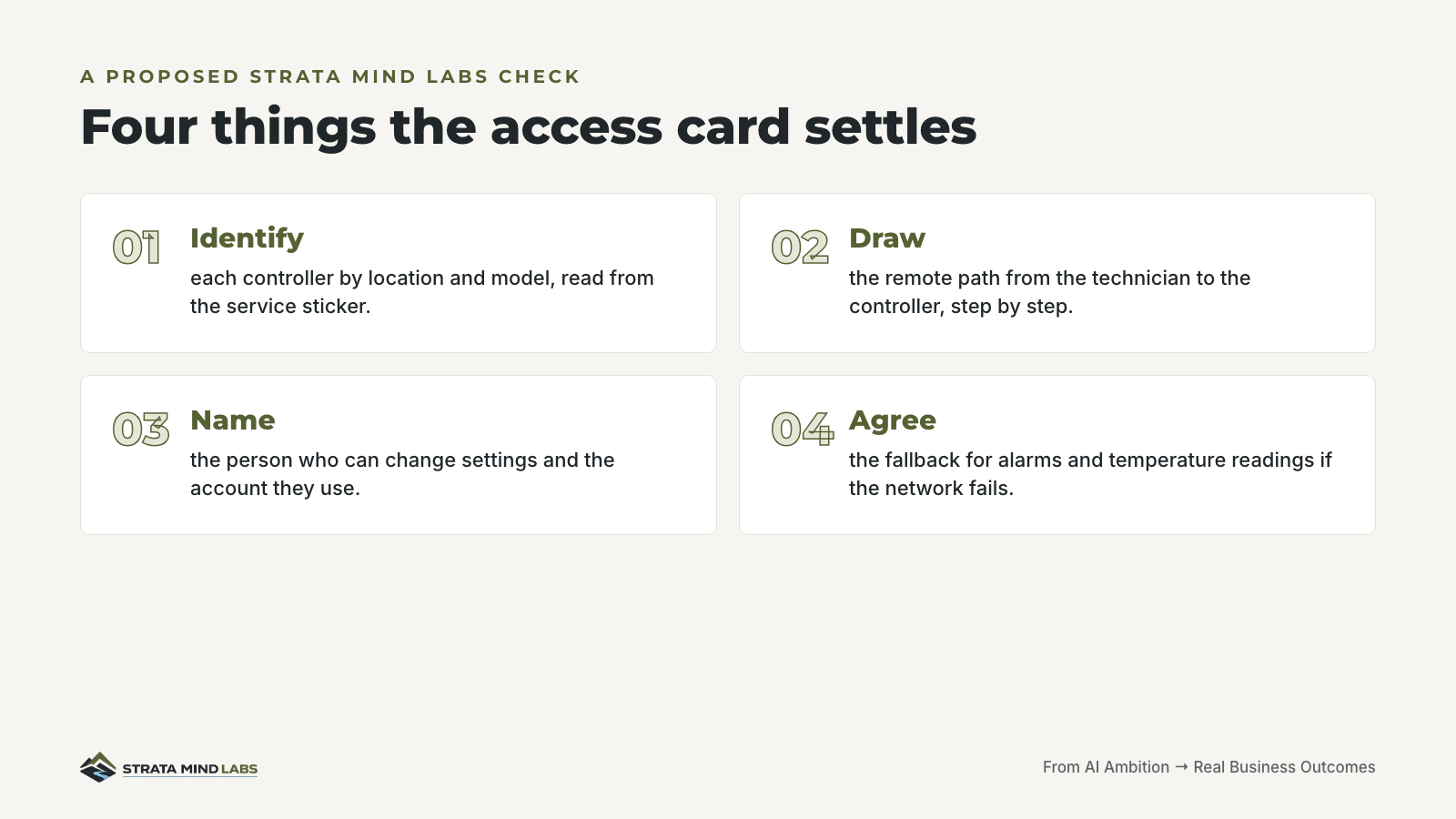
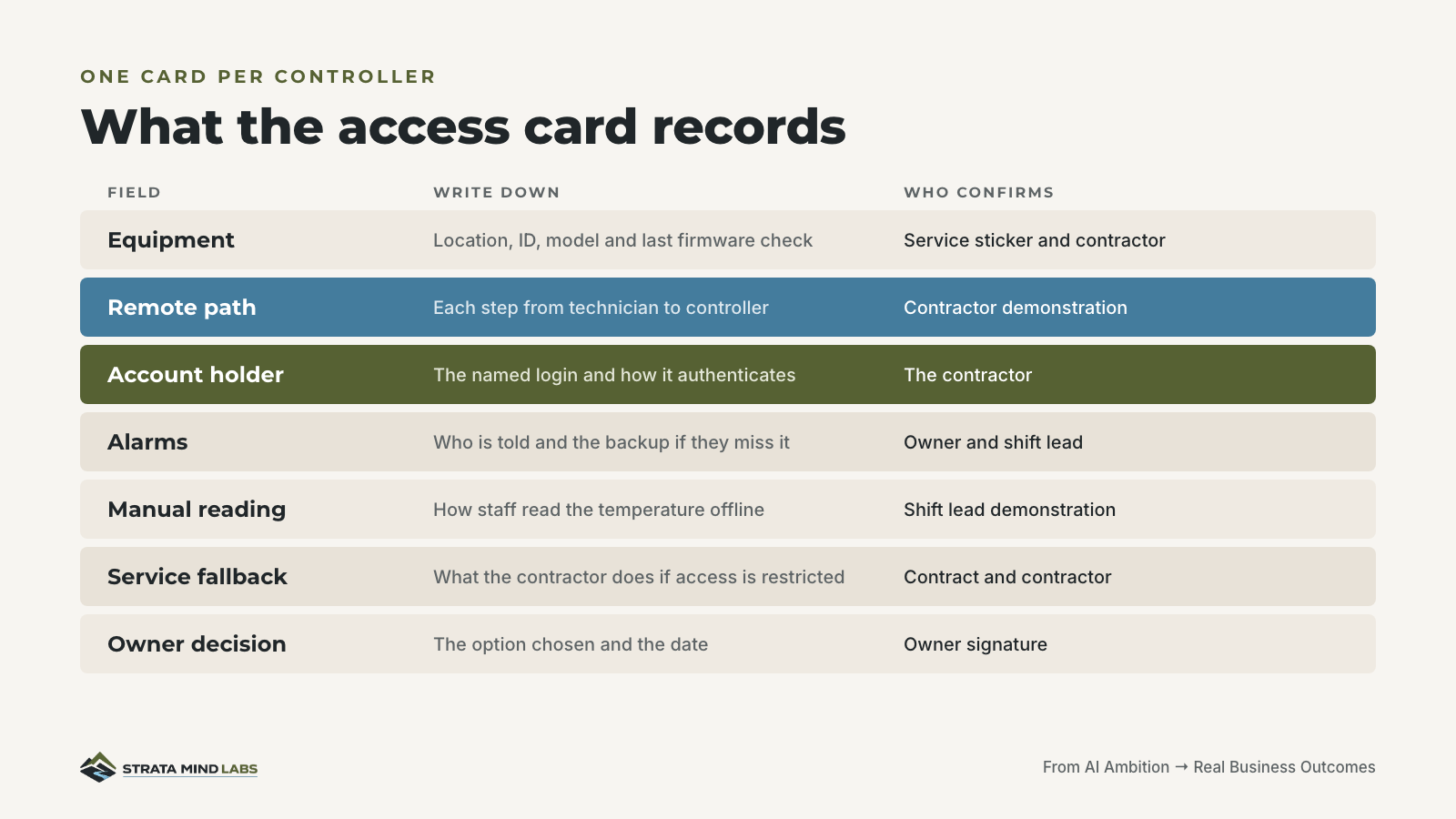
Roles matter here. The owner holds the decision. The refrigeration contractor verifies the live settings and handles any change. The shift lead knows how to spot a temperature problem and whom to call. Write all three on the same card as the equipment service record.
The card is one row per controller on a blank page or spreadsheet. It's a proposed tool, and a pen works as well as software. Any field nobody can fill stays blank and visible.
A first session for this week
Book the contractor for a 45-minute planning session and fill one card for the walk-in cooler. That duration is a planning estimate, not an observed result. It needs no new software, but it does need the service record, the contractor in the room and a shift lead who can show how the temperature gets read.
Start with the service sticker. Record the location and model. Then ask the contractor three things. Is the management interface reachable from outside the site, through what path and under which named account? When were the password and firmware last checked? Where do the alarms go, and how do staff read the temperature if the network fails?
Don't probe an unknown public address and don't change live settings yourself. If the contractor can't identify the route or the account holder, mark that row unresolved and have a qualified technician restrict access after you've agreed on a service and alarm fallback. If settings changed without authorization or an unknown login shows up, stop the routine review and call your incident response contact.
The first useful output is a completed access path and fallback with the blanks left showing.
Five prompts to run this week
Use redacted equipment notes only. Don't paste passwords, public IPs or live credentials into a chat tool. The machine organizes evidence. The owner and technician verify every answer before acting.
Inventory the equipment
Copy this prompt
Use only the redacted service notes below. Create a table with location, controller model, service company, contact, last visit and missing fields. Mark every unknown as UNKNOWN. Do not infer connectivity or safety. Notes: [paste redacted notes].
What this should tell you: Check the rows for missing equipment IDs and contacts, and for any model or status the machine made up. A complete-looking inventory can hide an undocumented controller. Decide which device gets a physical label and contractor confirmation first, then take the verified row to prompt 2.
Map the remote path
Copy this prompt
From this verified controller row and the contractor's redacted access description, list each access step from technician to controller. Mark the account holder, authentication method and every unverified step. Do not suggest probing or changing the live system. Inputs: [paste verified row and redacted description].
What this should tell you: Look for an unexplained direct internet path, a shared account or a blank access owner. The path shows who can reach the controller and where the owner has no evidence. Ask the contractor to confirm or correct each step before any access decision, then bring the confirmed path to prompt 3.
Check service dependency
Copy this prompt
Using this confirmed access path and the service contract excerpt, list what the contractor does remotely, which alarms depend on that path and what response changes if it is restricted. Separate documented facts from questions. Inputs: [paste redacted path and contract excerpt].
What this should tell you: Check for missing after-hours alarm handling, a missing response owner and a missing manual method. Remote access may support a necessary service, so the fallback matters as much as the restriction. The owner and contractor decide which access is needed and which can go. Use that agreement in prompt 4.
Draft the access card
Copy this prompt
Draft a one-page controller access card using only the confirmed facts below. Include equipment, service contact, access path, named login holder, credential review date, firmware check date, alarms, manual temperature method and unresolved items. Do not fill blanks. Inputs: [paste verified facts].
What this should tell you: Inspect every field against your source notes and keep unresolved items visible. A card is only useful if the owner and technician can trust where each line came from. Assign the owner and contractor to resolve each remaining blank, then bring the reviewed card to prompt 5.
Prepare the owner decision
Copy this prompt
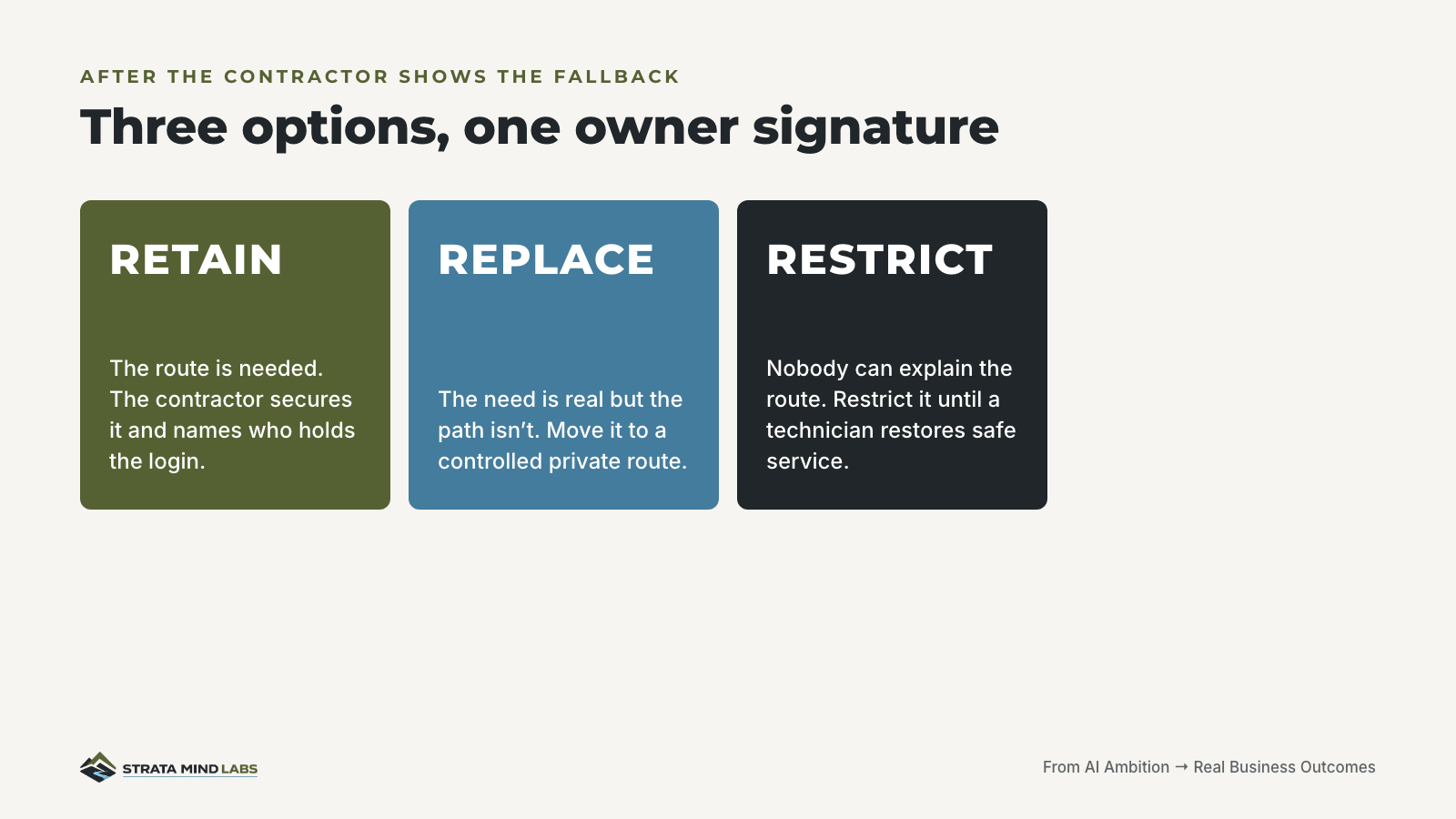
From this reviewed access card, prepare three options: retain and secure the route, replace it with a controlled private route or restrict it until the technician restores safe service. For each option state prerequisite, alarm impact, service impact, evidence gap and who approves. Recommend no live change. Inputs: [paste reviewed card].
What this should tell you: Watch for a favored option that ignores alarms, contractor access or unknown settings. The decision is about safe operation and accountability, and a generic security score doesn't capture either. The owner signs one option only after the technician confirms the operating fallback. Then schedule the technician's change window and a follow-up check, or hold if evidence is missing.
Reading the full result
The business value is a visible access decision and a usable fallback for the next refrigeration fault. Neither has been measured here. The uncertain parts stay on the card as questions. The owner owns the service-risk choice, the technician owns technical verification and staff own temperature escalation.
Sign the card only when a qualified contractor has shown the live access path, the alarm recipient and the manual temperature procedure. Record the date, the approver and the next check. A chat response is a draft, not equipment evidence.
What to do this week
A fair limit on all this
One case isn't a frequency. The European reports show that controller manipulation happened in those stores. They don't show that your shop is exposed. How the attackers got in remains unconfirmed, and the claims of responsibility are unverified per Unit 42. BleepingComputer is a secondary report built on store statements, and it says Sabcobel hadn't responded when it published.
Vendor claims are vendor claims. Unit 42's scan counts reachable devices, not vulnerable ones, and its publisher sells related products. Claroty studied one controller family. CISA wrote general guidance for critical infrastructure, not for a single walk-in cooler.
The access card, the four-step sequence, the 45-minute estimate and the five prompts are Strata Mind Labs proposed practice. No standard requires them and nobody has measured them. The check reduces uncertainty and doesn't certify a system safe. A controller with no internet path can still fail mechanically, and a needed remote path can be secured instead of removed. No return is assumed. What you get from the first session is a card with the path drawn and the unknowns in plain view.
CIO Question of the Day
Can you name who holds the login that can change your walk-in cooler's settings, and how they reach it?
Sources
- Toulas, B. (2026, November 2). Hackers disrupt refrigeration systems at European supermarkets. BleepingComputer. https://www.bleepingcomputer.com/news/security/hackers-disrupt-refrigeration-systems-at-european-supermarkets/
- Brady, M., & Valentine, J. (2026, November 6). Turning up the heat: Inside the attacks on Europe's refrigeration system. Unit 42, Palo Alto Networks. https://unit42.paloaltonetworks.com/europes-refrigeration-systems-attacks/
- Zaltzman, A. (2026, August 9). Freeze the controller, defrost the food: Uncovering vulnerabilities in Danfoss refrigeration controllers. Claroty Team82. https://www.claroty.com/team82/research/freeze-the-controller-defrost-the-food-uncovering-vulnerabilities-in-danfoss-refrigeration-controllers
- Cybersecurity and Infrastructure Security Agency, Federal Bureau of Investigation, Environmental Protection Agency and Department of Energy. (2025, May 6). Primary mitigations to reduce cyber threats to operational technology [Fact sheet]. CISA. https://www.cisa.gov/sites/default/files/2025-05/fact-sheet-primary-mitigations-to-reduce-cyber-threats-to-operational-technology-508c.pdf
A remote path can be useful. Its holder and route should still be known.
New briefings land as soon as the signal is worth your time.