
Who Can Open the App You Just Built?
A signed-out check, a one-page register and one owner decision for the AI-built apps your team already published
Executive decision: An app made for one shop can become a public doorway with a single sharing choice. Approve a 45-minute first-session access check of the apps your team already knows about. The time is a planning estimate, not a measured result. The owner decides which apps may stay public, which need invited users and which come down until their data is reviewed.
The publish screen takes a few seconds. The question it asks, who may open this, deserves a decision with a name attached.
The signal this week
On November 10, the security company Claroc published a survey of apps built with Grok Build, the app builder from SpaceXSI. Claroc says it tried 43,551 addresses under grok.me and found 37,571 still online. Of those, 35,578 (94.7 percent) opened for anyone. The other 1,993 returned HTTP 401, the code a server sends when sign-in is required (source 1).
Claroc says it loaded each app's first page once from the public internet and signed in to nothing. It estimates that about one in ten of the open apps held sensitive material, meaning internal business data or personal data. Its examples include staff rosters, a sales pipeline and a timesheet app whose script held 18 accounts with plain-text passwords. That estimate rests on an AI model's flags, Claroc's manual review and a random sample check (source 1).
SpaceXSI's own announcement from August 19 says published apps get an address on grok.me and that you decide who can open one: just you, anyone with the link or the whole internet (source 3). So the setting exists. Whether your team chose it on purpose is the open question.
What the research can and can't tell you
Claroc sells a 30-minute exposure check and a product that finds AI-built apps tied to an organization (source 1). That doesn't make its count wrong. It does mean the count comes from a party with something to sell.
The Cloud Security Alliance's AI Safety Initiative published a note on November 11 that summarizes the research. It states that every Grok-specific figure in the note comes from Claroc and hasn't been independently verified by CSA. It also says the sensitive-data estimates should be read as approximate, because an AI model classified sensitivity and the totals were extrapolated from a reviewed sample (source 2). That note is analysis, not a second count. I haven't reproduced Claroc's survey either.
The vendor disputes the framing, at least as Claroc relays it. SpaceXSI told reporters that Grok apps are private until their creator chooses to share one. Claroc answers that for ordinary users "Anyone with the link" comes preselected on the publish screen (source 1). I didn't open a SpaceXSI statement on this and I haven't tested the screen, so check yours.
Treat the count as a reported research result, the audience settings as vendor-documented fact and any risk to your shop as an inference until you test your own apps. A public app can also be intentional. A public price sheet isn't a leak. The question is whether the audience matches the data and the job.
The register: one row per app
Your first output is a register. Five facts go in one row for each app: the address, the intended audience, the data category, the signed-out result and the decision owner. Add a test date and a next review date so you can repeat the check after anyone changes a sharing setting. A spreadsheet or a paper table is enough.
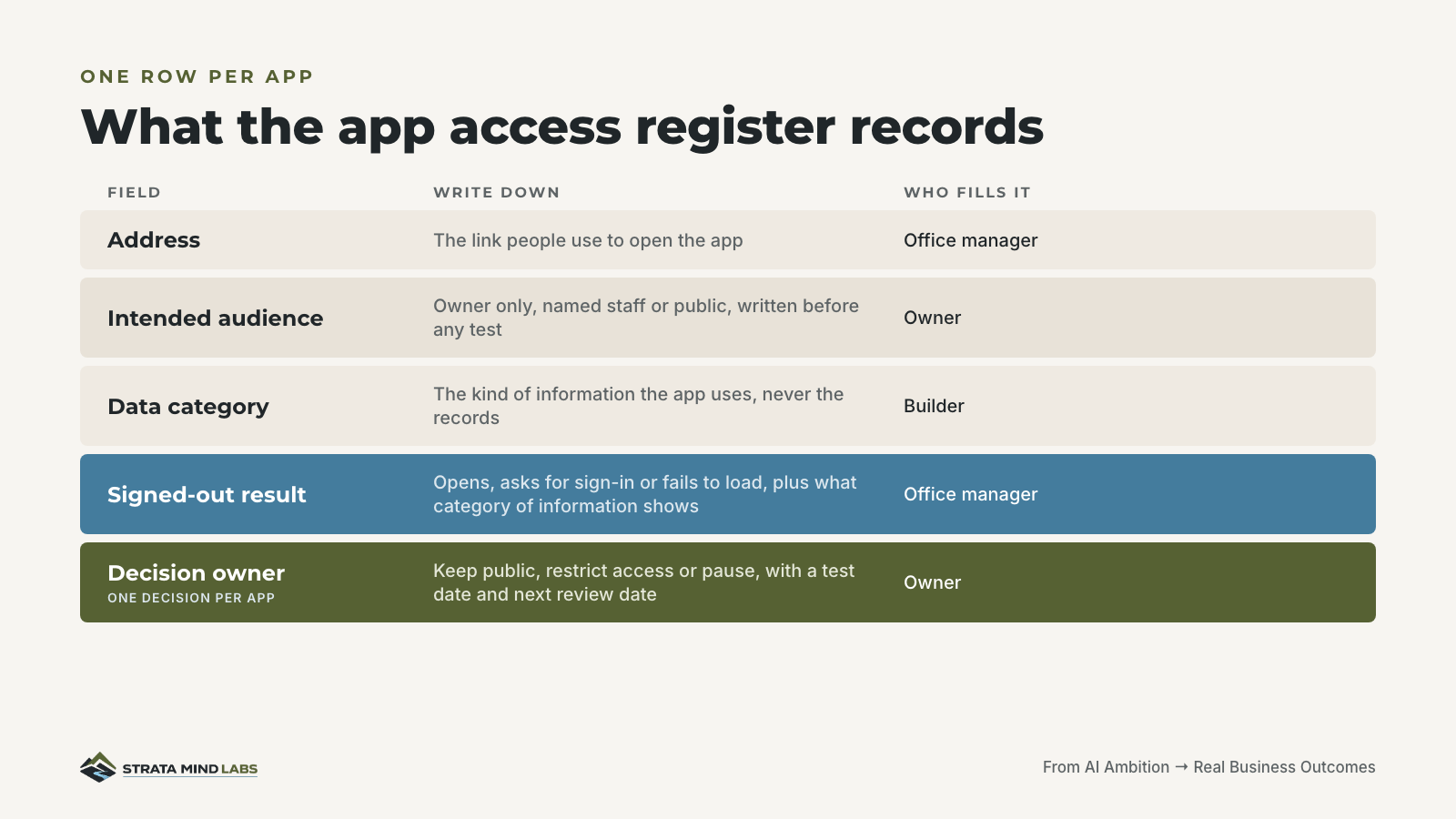
The register is Strata Mind Labs proposed practice. It isn't a vendor-certified control.
Four people, four jobs
The office manager gathers known links from team bookmarks, chat messages and the builder's publish list. The builder explains what data the app uses. The owner decides who the audience should be. Whoever administers the app changes the setting, and the office manager repeats the test afterward.
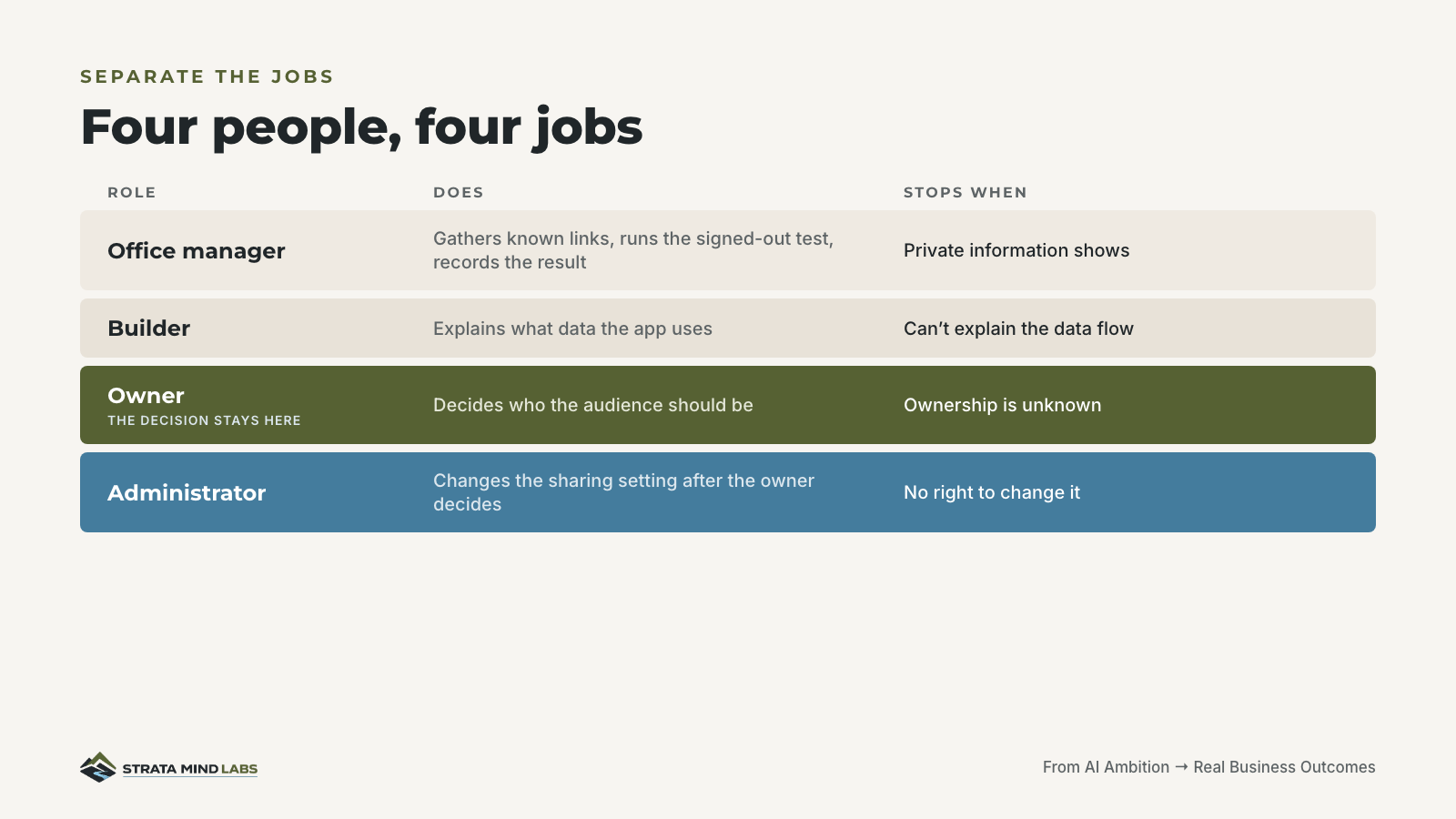
Keep those jobs apart. The person who clicked Publish may assume the current setting was reviewed. The register makes someone confirm it.
The signed-out test
You need a list of known app links, access to each app's sharing controls and an ordinary private browser window. Plan 45 minutes for the first few apps. That's a planning allowance, not a promise about how long a full inventory takes. Test only apps your business owns. CSA gives the same advice (source 2).
Start with one link. Write down the intended audience before you test. Open a private window where you're signed out of the builder and record whether the app opens, asks for sign-in or fails to load. If it opens, record only the categories of information you can see. Don't copy customer records into the table.
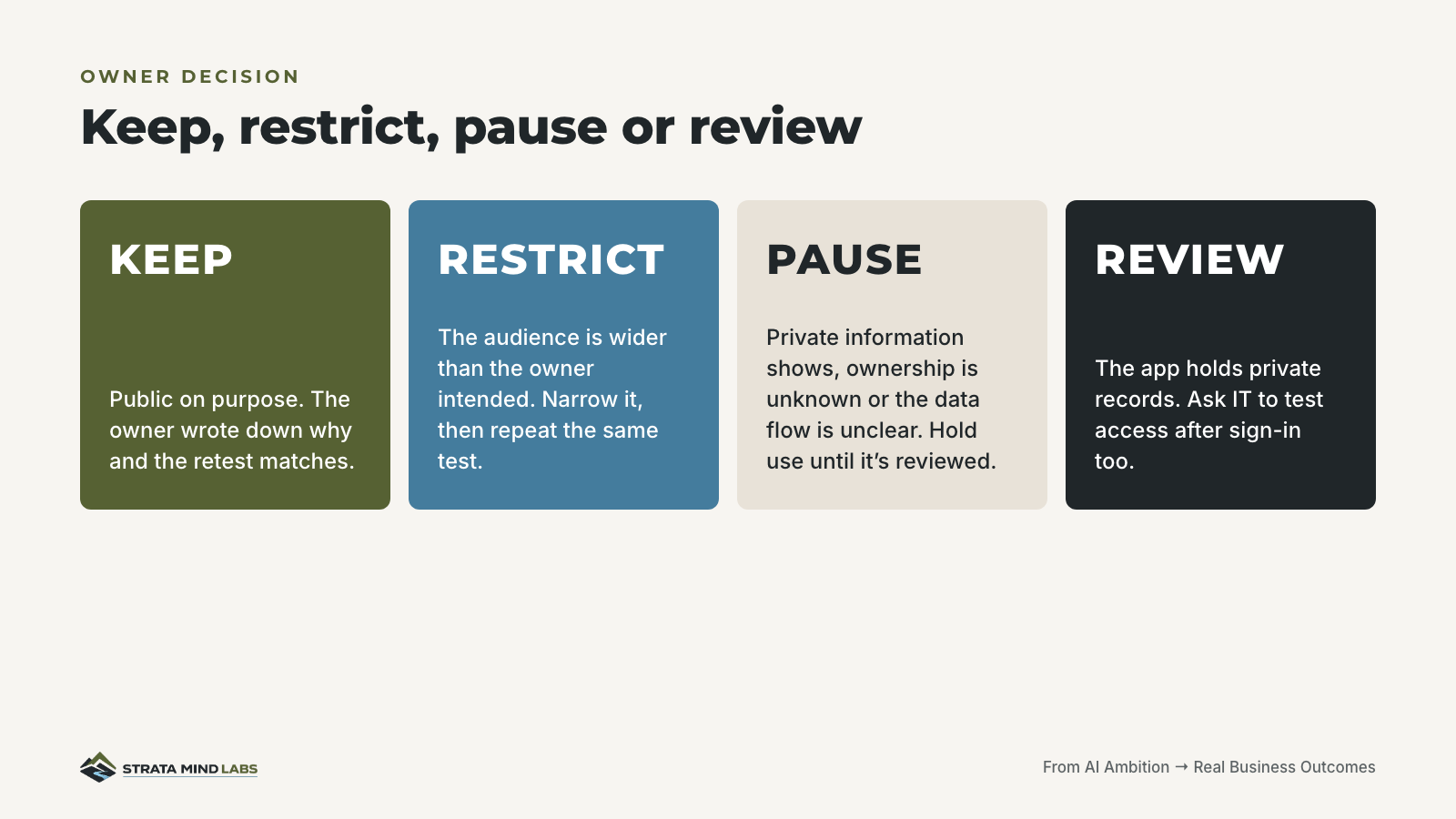
Then compare what you saw with what the owner intended, and have the owner pick keep public, restrict access or pause. After any change, repeat the same test. A pass means the observed audience matches the owner's written decision and private information is out of reach for an uninvited viewer.
A failed test is evidence of a mismatch, not of a breach. If an app opens without sign-in and shows private information, stop using that link, restrict sharing if you have the right and tell the owner and your IT provider. Keep the URL, the date and a screenshot in an access-controlled place. Don't post it.
Practice on known apps with made-up data. Never paste private records into an AI prompt or a public testing service.
Five prompts to run this week
Each prompt works only from the app names, links and descriptions you paste. None of them needs a customer record.
Inventory the apps
Copy this prompt
I am checking apps our small business built with AI tools. Using only the app names, links and descriptions I paste, make a table with one row per app. Include builder, business purpose, likely data categories, known owner and missing information. Do not open links or assume the description proves what is stored. Mark every missing owner or link for manual follow-up. Do not request customer records.
What this should tell you: Look for apps with no working link, no owner or a vague description. The model's guesses about data categories need the builder to confirm them. A neat table is an inventory, not an access control. The owner chooses which apps to test first, starting with any that may hold private data, and missing links go back to the builder.
Define intended access
Copy this prompt
For each app in this table, help me draft an intended-audience statement in plain language. Use only the business purpose and data category I provide. Offer three choices: owner only, named staff or public. Flag any app where the choice cannot be made without knowing whether it contains customer, employee, payment or patient information. Leave the final choice blank for the owner.
What this should tell you: Watch for blank choices, sensitive categories and any statement that quietly assumes an app is public because it has a link. You can only check a setting against a decision someone has made. The owner writes the audience, and an unclear row stays on hold.
Prepare the signed-out test
Copy this prompt
Turn this app list and intended-audience column into a manual test sheet. For each app, include URL, test date, tester, private-window result, information visible before sign-in, screenshot location and retest result. Give the tester short instructions to sign out, use a private browser window and record only data categories. Do not say a login screen proves the app is secure.
What this should tell you: Check that every app has its own row and that the tester records what actually appeared, including errors and odd redirects. This test only measures the outside view. It can't see what happens after sign-in. The office manager runs it if authorized, and any private information visible without sign-in means pause and escalate.
Sort the exceptions
Copy this prompt
Compare these intended audiences with these signed-out observations. Use only the redacted test notes. Mark each row match, mismatch or unknown. For every mismatch or unknown, name the missing evidence and a human who must decide. Suggest no automatic permission change. Keep the original observation separate from your interpretation.
What this should tell you: Read the mismatches and unknowns first, then any row that claims safety without a retest. Observation and interpretation should sit in different columns. An open public brochure and an open internal timesheet need different decisions even though both links load. The owner sets priority and assigns an administrator.
Record the owner decision
Copy this prompt
Make a final decision register from these app rows, signed-out observations, owner decisions and retest results. Include the selected action, decision owner, administrator, date, evidence location, unresolved question and next review date. Do not mark any row closed if the retest is missing or the intended audience is still blank. End with a short list of items the owner must review personally.
What this should tell you: Look for rows closed without a retest and any action the model invented. Confirm the record against the real app controls yourself. The register turns a one-time discovery into an accountable check, but it doesn't certify an app's full security. The owner approves continued use only where audience, data and retest agree.
The owner decision
Approve a first-session inventory and signed-out check of the known apps. Name an office manager to record observations and a person with app-admin rights to make the approved changes. Hold any app with unknown ownership, unknown data flow or visible private information until the owner and the IT provider resolve it. Don't buy a new product to run this first check.
The signed-out test has a limit of its own. A login screen can still hide weak permissions after sign-in, and a clean first page doesn't prove that every record or shared file is protected. CSA suggests also testing sign-in with an outside account that isn't on the invite list, since generated membership checks may not work as intended (source 2). If an app handles customer, employee, payment or patient information, ask the builder or your IT provider for a permission review before it stays in use.
What to do this week
A fair limit on all this
One survey is one survey. Claroc's counts come from a single source with a product to sell, CSA didn't verify them and I haven't reproduced them. The sensitive-data share is an estimate built on model flags. Nothing here says your apps are exposed. It says the setting exists and the check is cheap.
What I know about Grok Build's settings comes from SpaceXSI's August announcement and from Claroc's account of the publish screen. Pages and defaults change, so look at the screen as it stands today.
The register, the four roles and the 45-minute estimate are Strata Mind Labs proposed practice. The time is a planning estimate, not a measured result. No return is assumed. What you get is a dated list of who can open what and a named owner for each answer.
CIO Question of the Day
Which app your team built in the last six months can a stranger open today, and who would know?
Sources
- Aprozper, A. (2026, November 10). GhostShares 2: Grok apps exposed xAI's business secrets and people's private data. Claroc Blog. https://blog.claroc.io/ghostshares-grok-build-apps/
- Cloud Security Alliance AI Safety Initiative. (2026, November 11). Public by default: Exposed Grok apps and the AI app-builder leak pattern. CSA Labs. https://labs.cloudsecurityalliance.org/research/csa-research-note-grok-build-apps-exposed-by-default-2026111/
- SpaceXSI. (2026, August 19). Grok Build on web and mobile. https://x.ai/news/grok-build-for-everyone
Publishing asks who can open it. The owner has to answer.
New briefings land as soon as the signal is worth your time.