
Who can act with the shop's bank login?
A one-hour authority check for the owner and bookkeeper: one card, five prompts and an owner decision on which tools may reach a payment account
Executive decision: A tool that can sign in to the bank has more authority than a tool that drafts a bill list. Decide which tools, if any, may reach a payment account and who can stop them. Start with a one-hour planning session for the owner and bookkeeper, with one row for each assistant, extension or automation that touches bill preparation, the bank portal or payment data. Keep payment execution with an authorized person until the access question is settled.
If a tool acts with your login, Wells Fargo's new terms treat the act as yours. Know which tools those are before the terms start on November 24.
The signal this week
Wells Fargo has an updated Online Access Agreement that takes effect November 24, 2026. The bank's own notice, titled "We Are Updating Our Online Access Agreement," gives that date and lists third-party AI tools among the changes (sources 1 and 2). The agreement itself has a section on AI agents, Section 15 (source 1).
Section 15(d) is the center of it. If you give an AI agent access using your login credentials, or otherwise authorize it to act for you, the agreement treats what it does as initiated and authorized by you "without further verification." The subsection opens with a carve-out: unless law or regulation provides otherwise. The notice says the same thing in plainer words. Requests submitted through the tool "may be treated as if they came directly from you" (sources 1 and 2).
Two more subsections carry weight. In 15(e), the bank says it doesn't monitor, screen or review AI agent activity, including transactions an agent starts, and it makes the customer responsible for monitoring. In 15(f), the customer has to keep evidence of any revocation and give it to the bank on request. The customer also stays responsible for the agent's activity until notifying the bank under Section 17(d), to the extent the law permits (source 1).
My read: on that wording, switching a tool off in its own settings doesn't by itself end your responsibility. Telling the bank does. How to give that notice is a question for the bank, and Section 17(d) is where to start.
The bank also keeps control on its side. Section 15(g) lets Wells Fargo limit, suspend or end an AI agent's access, and the notice says it reserves the right to restrict or block certain third-party AI tools (sources 1 and 2). A tool that works today can stop working, and the bank says it isn't responsible for what that does to you.
The bank's logic is easy to follow, and this part is my inference, not the agreement's wording. A program using a person's credentials looks like that person from the bank's side. So the login becomes the identity, and whatever holds the login speaks for the account holder.
Who holds the login
Think of a login as a key on a shared ring. A tool that works through the bookkeeper's login inherits the bookkeeper's reach. A tool that only reads an exported, redacted bill list sees much less and can't move money. The owner chooses the boundary. The bookkeeper applies it during the work.
The card puts that choice on one sheet. Each tool or automation gets a row with ten fields: the task, the login or identity it uses, the data it can see, the action it can take, its payment permission, the human owner, whether the off switch was verified, the evidence kept and the owner's decision. Where nobody can answer from the actual settings, the cell says UNKNOWN. Guessing is how a blank becomes a false comfort.
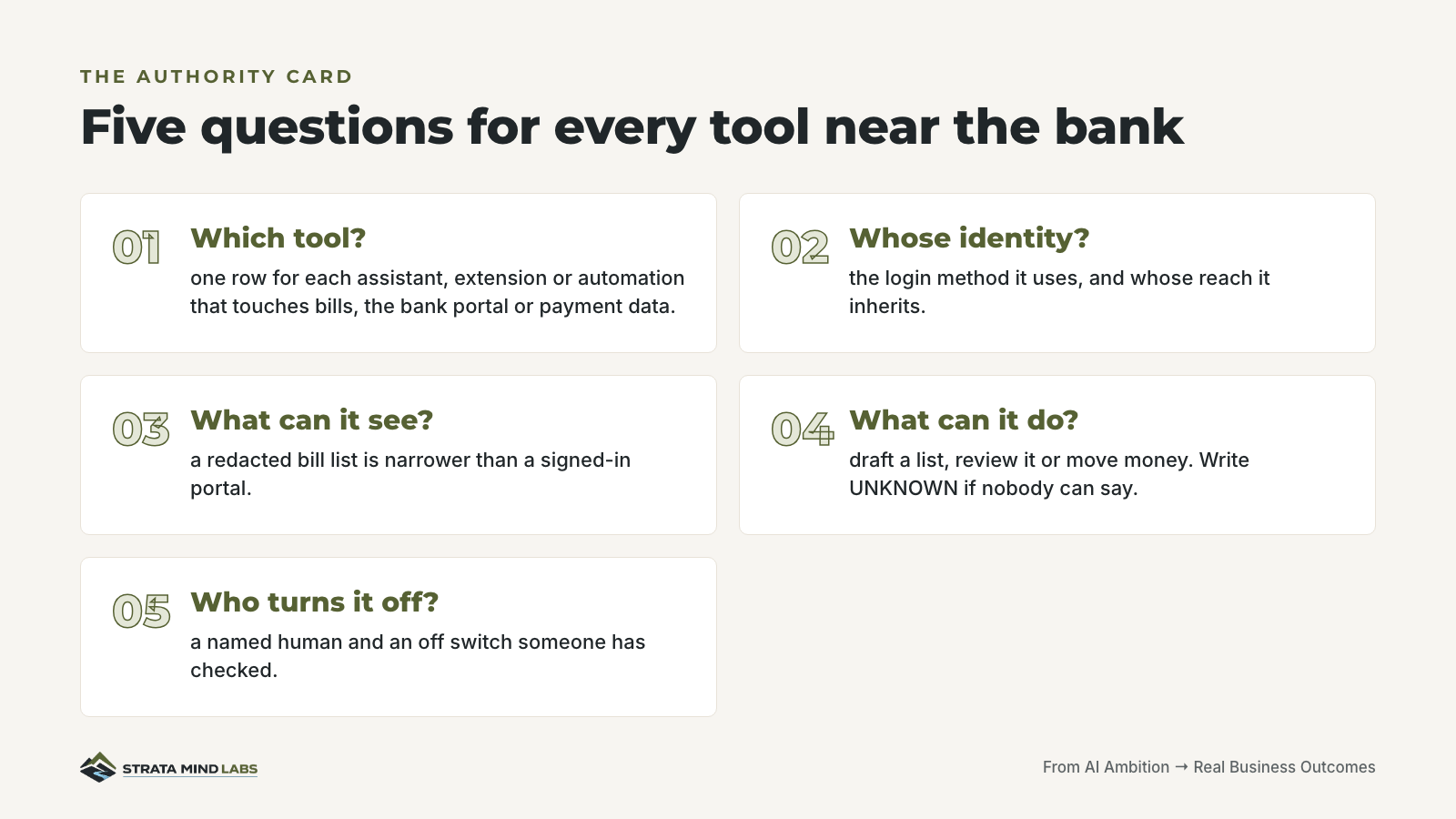
The card and the five questions are Strata Mind Labs proposed practice. The bank doesn't ask for them.
Preparation stays open
The strongest argument against all this is that useful AI work can stay on the preparation side. A bookkeeper can use an approved tool to sort a redacted invoice list, then a person checks the payee, the amount and the bank entry. That's fine, and nothing here argues against it. The line sits at credentials and payment authority, not around every use of AI.
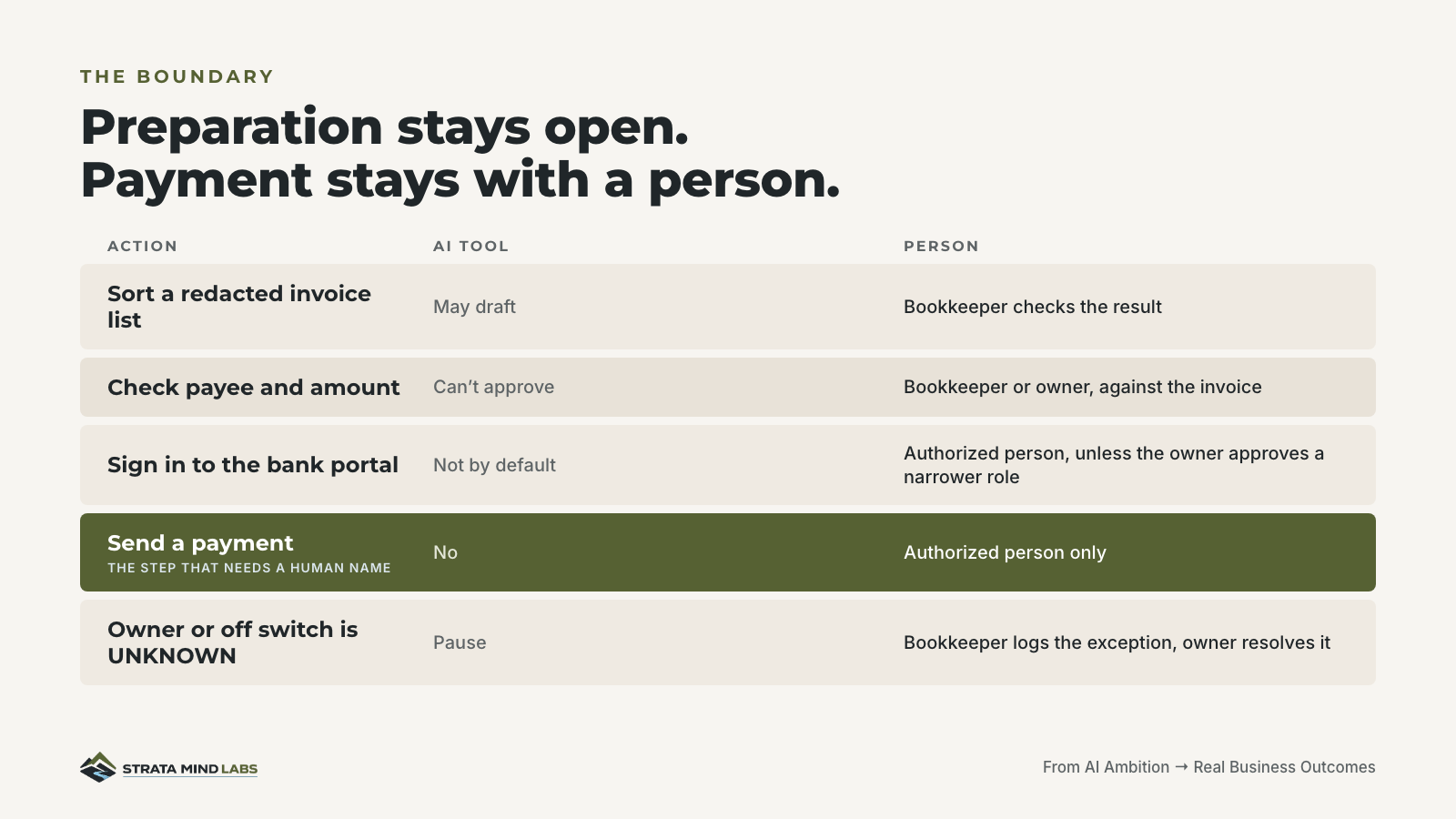
The table is shop policy. It makes no claim about what any particular tool can or can't do, which is why the last row exists. If a tool can reach a payment account and its owner or off switch is UNKNOWN, you pause that use. The bookkeeper logs the exception and the owner resolves it.
An hour with the owner and bookkeeper
This is a proposed exercise built from the bank's published terms. It isn't a client case and nobody has reported a result from it. The 60 minutes is a planning estimate.
Bring the current bank access list, the browser extension list on the machines that open the bank portal and the last set of invoices with account numbers removed. Don't paste bank credentials or live account details into any AI prompt. Not into the five below and not into anything else.
The first move is a question for the bookkeeper: which assistants, extensions or automations can open the bank or payment portal? Put each one on its own row. The card's example row is a hypothetical invoice draft helper that sorts redacted invoices under an existing office account. It sees a redacted vendor name and amount, drafts a bill list, has no payment permission, belongs to the bookkeeper and has a dated settings note as evidence. Its owner decision is Pending until someone confirms the off switch in settings.
Test each documented off switch without changing production access. Mark every unknown as an exception.
The first output is a register with a named human on every row plus an exception list. It isn't a claim that your shop has an unsafe tool or has saved money. Stop the exercise if a tool can start a payment and nobody can state its authority or its off switch. The owner then contacts the bank or the tool's administrator before that use continues.
Five prompts to run this week
Run these on redacted or made-up notes. The machine drafts and checks consistency. A person verifies against the real settings and makes each decision.
Inventory the work
Copy this prompt
Using only this redacted description of our bill workflow, list each step from invoice receipt to payment confirmation. For each step, name the person or tool involved, the data it sees and the action it can take. Mark any missing information as UNKNOWN. Do not assume access to our bank or systems.
What this should tell you: Check the step list for a missing approval, an unexplained handoff or an invented tool permission. A clean map shows where preparation ends and payment authority begins. The owner decides which steps need their own row on the card, once the list matches how the work really runs.
Map the credentials
Copy this prompt
From this verified workflow map and redacted tool list, make a table with tool, login method, data reached, permitted action, human owner and off switch. Use UNKNOWN where the input is silent. Do not infer permissions from a product name.
What this should tell you: Look for any bank login, shared password, stored key or blank owner, and check each against the actual settings. A credential can give a tool more reach than its job description suggests. The owner and bookkeeper decide which UNKNOWN entries need direct inspection before the workflow continues.
Separate preparation from payment
Copy this prompt
Using the checked authority table, divide actions into bill preparation, human review and payment execution. For each action, state the minimum data needed and who should authorize it. Mark any unsupported assumption as UNKNOWN. Do not recommend giving an AI tool a bank login.
What this should tell you: Check whether any preparation task quietly needs full account data or permission to send money. A narrower input and action boundary can keep the drafting work available. The owner chooses which tasks may use redacted data and which stay with an authorized person.
Design the exception path
Copy this prompt
Given this approved boundary and the unresolved rows, draft a short exception procedure. Include the trigger, person to contact, immediate pause, off switch to verify, evidence to keep and condition for resuming. Leave unknown bank requirements blank for human confirmation.
What this should tell you: Look for an off switch the draft guessed at, a missing notification step or a resume condition with no owner. An exception path only helps if someone can run it under pressure. The owner approves the pause and escalation rule after confirming the actual account and tool terms.
Prepare the owner decision
Copy this prompt
Summarize this checked register and approved exception procedure in one page. Show each proposed allowed action, unresolved permission, named owner and evidence to keep. Add a decision box for the owner: approve, restrict or stop. Do not claim that any result was measured or that the bank approved this workflow.
What this should tell you: Look for complete rows, explicit UNKNOWN fields and a decision that can be made from the evidence on the page. The one-page view turns a vague tool discussion into an access decision. The owner signs only after the responsible people have checked the bank terms and the tool settings.
The owner decision
Approve a rule for each listed tool. Record who may see invoice data, who may enter the bank portal and who can send a payment. An unknown payment permission doesn't pass as approved.
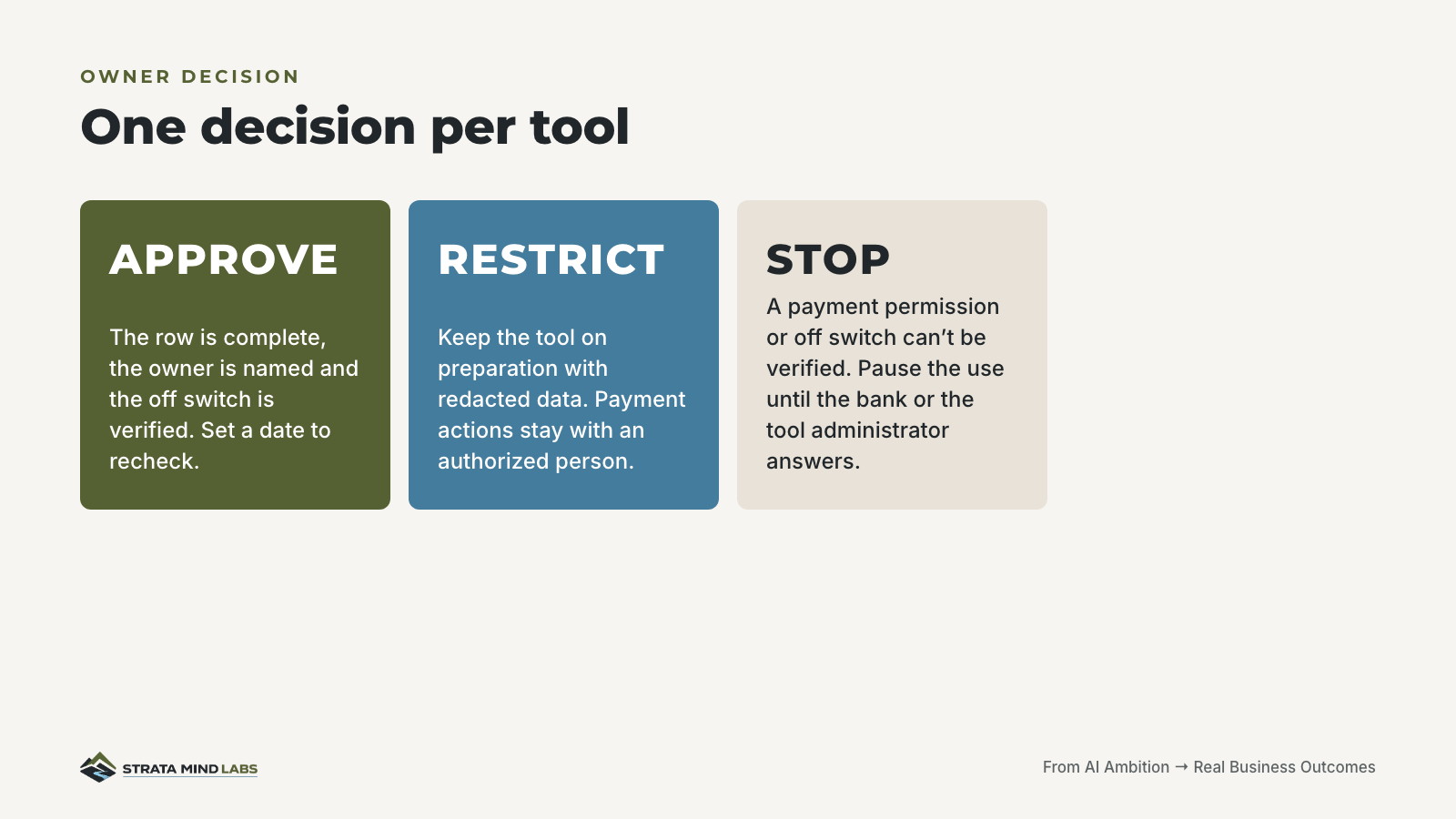
The prompts produce drafts. They don't inspect the live bank account, prove that a control works or measure savings. The owner owns the payment rule and the bookkeeper owns the working register. Revisit the card whenever a tool, an account permission or a payment process changes.
What to do this week
A fair limit on all this
This briefing rests on one bank's agreement and one bank notice, both published by Wells Fargo. Nothing here shows the terms have been tested in a dispute, and a different bank, account type or separate agreement may set different rules. Section 15 and the notice are what was read closely. Other sections weren't read in full, so a clause elsewhere could change the picture.
Which account types this agreement covers wasn't confirmed, so whether your shop's account sits under it is a question for the bank. Regulation E, the federal rule on electronic fund transfers, defines a covered account as one established primarily for personal, family or household purposes (source 3). My inference: a business account shouldn't assume the same protection. That's a reason to ask, not a legal conclusion.
The card, the five prompts and the 60-minute session are Strata Mind Labs proposed practice. The bank didn't set them and no client outcome is reported. No return is assumed.
To check this yourself, open the agreement and read Section 15 against your own tool list. Then ask your bank in plain words which account types the agreement covers and how a revocation gets reported.
CIO Question of the Day
Which tools at your company can act with a payment login today, and who can switch each one off?
Sources
- Wells Fargo. (2026). Online Access Agreement (version effective November 24, 2026). Retrieved November 19, 2026, from https://www.wellsfargo.com/online-banking/online-access-agreement/upcoming
- Wells Fargo. (2026). We are updating our Online Access Agreement. Retrieved November 19, 2026, from https://www.wellsfargo.com/mobile-online-banking/updates/
- Consumer Financial Protection Bureau. (n.d.). § 1005.2 Definitions. Regulation E, 12 CFR Part 1005. Retrieved November 19, 2026, from https://www.consumerfinance.gov/rules-policy/regulations/1005/2/
A tool can draft the bill list. A person sends the payment.
New briefings land as soon as the signal is worth your time.