
Where Your AI Prompt Goes
A prompt can pass through more than one company before a model answers it. One route register tells the owner which data is allowed to make that trip.
Executive decision: Build one route register for one routine AI task. The office manager names the app, the account and the company that finally processes the prompt. Then the owner decides which kinds of data may travel that route.
The app on the screen is the first company that sees your prompt. It may not be the last.
The signal this week
On November 19, Dragos published research led by its chief research officer, HD Moore. Over five months, July through November 2026, his team sent roughly two million prompts to AI providers. Each prompt carried a unique, trackable secret: a planted link or a fake cloud credential that would raise an alert if anyone used it (source 1).
Some of those secrets got used. Dragos says it "observed activity indicating that data from at least three AI providers was exposed." Two details make this worse than a headline count. Some of the stolen requests in two of the breaches were marked Zero Data Retention. And some stolen keys came from requests the provider rejected before a model ever ran (source 1).
Dragos puts the mechanism in one line: "every hop can see the entire prompt and response." On the privacy flag it's even shorter: "A privacy flag doesn't help when the attacker is already inside" (source 1).
Three days later, OpenRouter, a service that routes requests to many model providers, posted its response. It says it off-boarded three providers based on its investigations and removed 125 endpoints from Zero Data Retention eligibility. Some were flagged by the researchers and some were pulled as a precaution. OpenRouter also says its findings "did not show any breach or unauthorized access of OpenRouter" (source 2).
Why a privacy setting at the first app isn't the whole answer
The route works like this. Your office manager types into an AI app. The app may send the request to a router. The router picks a provider, and that provider's servers run the model. Each of those is a company that can see the request.
OpenRouter's own documentation shows how this works on its platform. By default it sends requests "to the best available providers for your model," weighing price, speed and reliability. A failed request gets retried with one of the providers left (source 3). Customers can restrict which providers are used, and they can require Zero Data Retention on every request or account-wide. OpenRouter defines that as "no routine storage of prompts or responses after processing." It also says the setting only applies to provider routing for model requests, not to tools such as web search (source 4).
So the controls exist. They just aren't the same as knowing where the prompt landed. A retention switch tells you what a company promised to do with your data. The Dragos results show a promise doesn't stop someone who's already inside that company's systems.
Think of it like a parts order that ships through a distributor. The invoice says who you paid. It doesn't tell you whose warehouse the box sat in overnight.
The practical question for a shop owner is whether anyone in the building can name the final processor for a given task and show the setting or contract that covers it. When nobody can, you pay the Verification Tax later, when someone has to reconstruct the route after a notice arrives.
What the register looks like
This is a proposed Strata Mind Labs operator framework, shown as a labeled reconstruction of a shop office workflow. No client deployment or measured benefit is claimed.
Pick one task, such as drafting a customer follow-up from a work order. Record the app, the login that runs it, any router, the final processor and the kinds of data the task sends. Unknown fields stay marked UNKNOWN. That's information too.
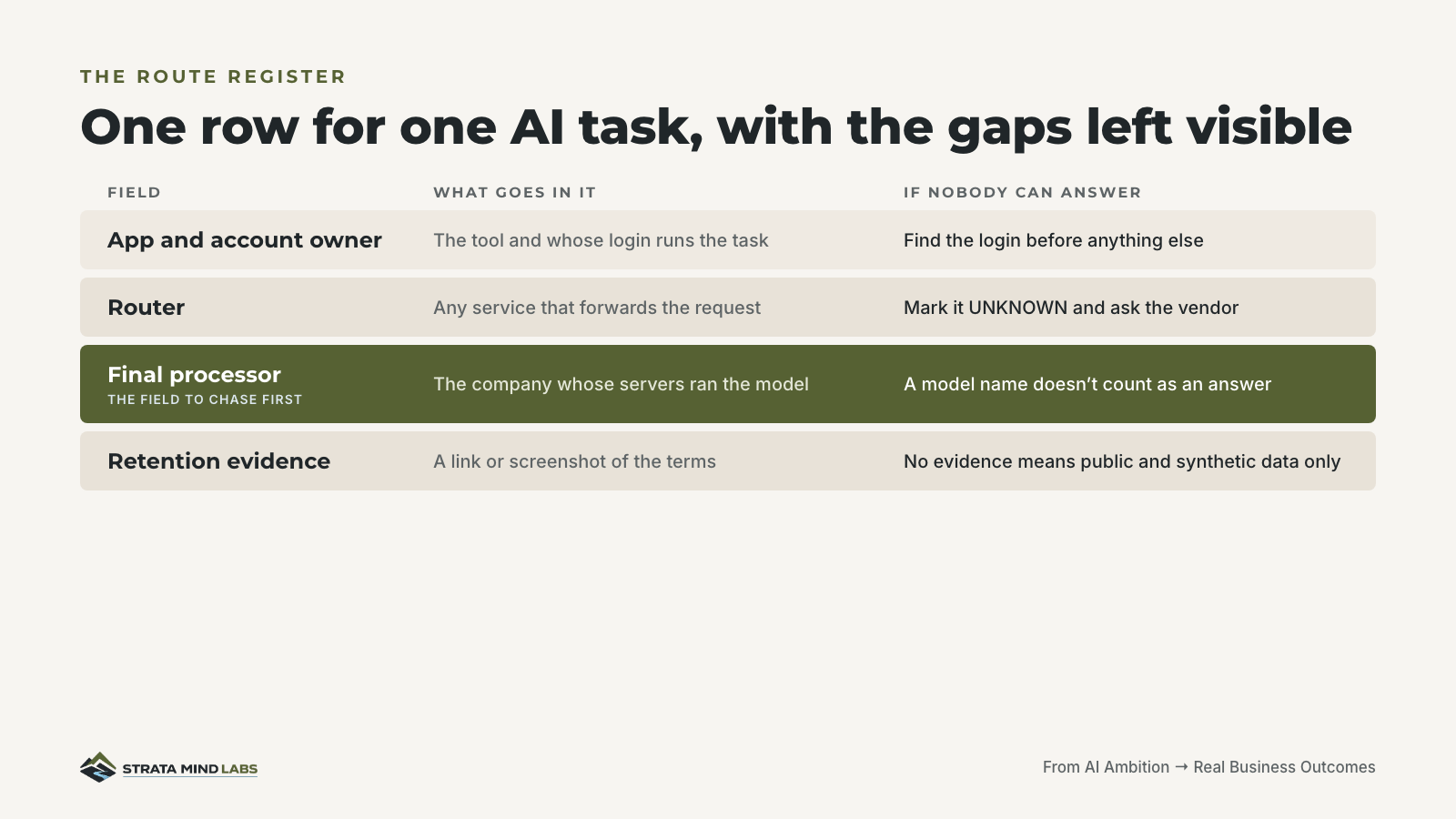
Plan on about 45 minutes of owner and office-manager time for the first session. That's a planning estimate, not a measurement. No new software is needed. A spreadsheet works.
The person who runs the task opens the app and account settings while the office manager copies the vendor's named processor and retention terms into the row, with a link or a note on where the screenshot is saved. Test with a synthetic customer request, never a real one.
Then sort what the task sends. Credentials never ride any route. Customer identifiers wait until the route is documented and the owner accepts it.
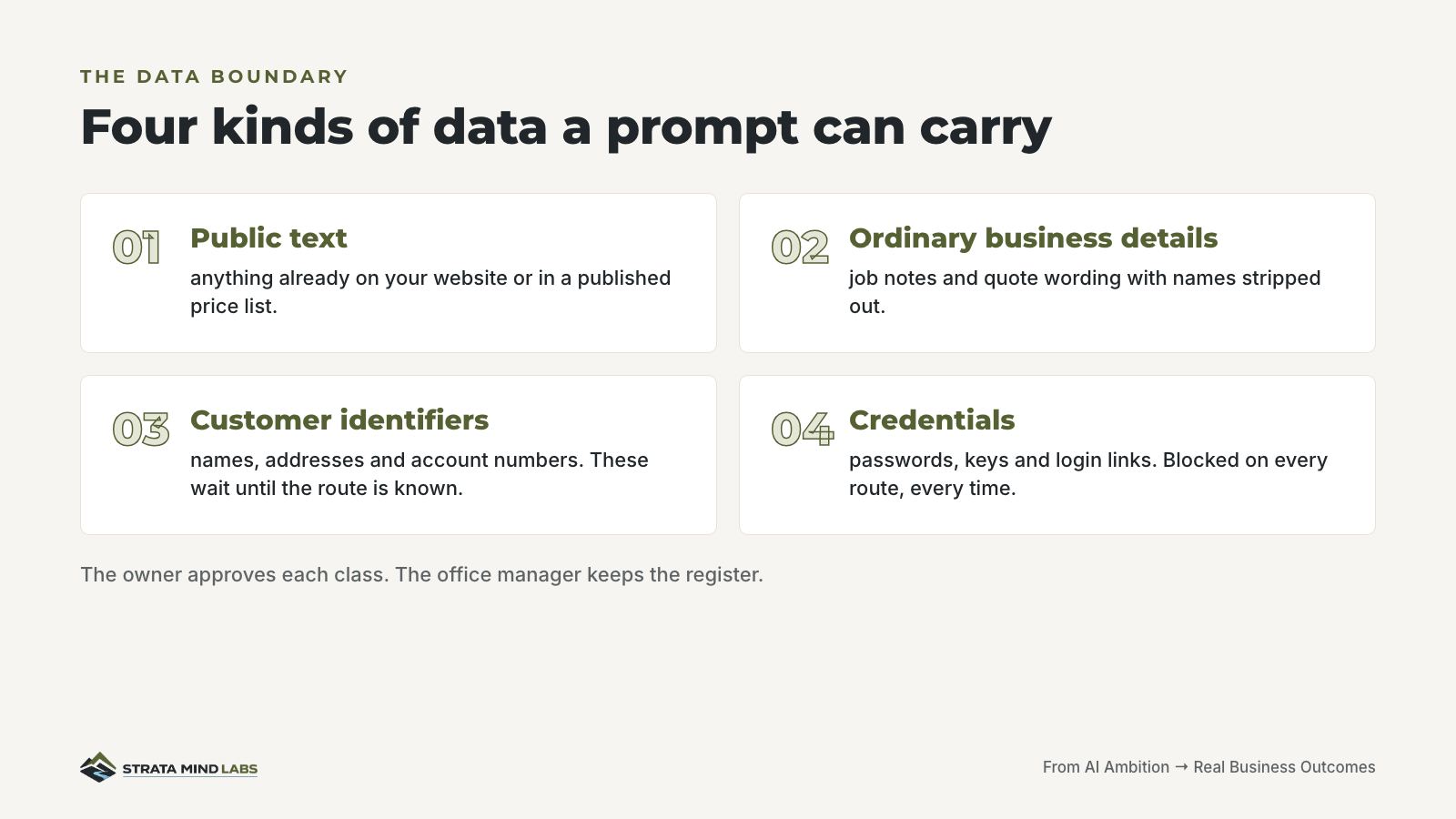
Two stop conditions apply. If a live password or key shows up in a prompt, or a provider notice names your account, stop that route. Remove the credential, rotate it through your normal process and bring the owner and your IT provider in. An unknown final processor is an exception to chase, not proof of a leak.
Five prompts to run this week
Run these in order with your existing AI tool, using only vendor pages, your own setting notes and synthetic data.
List the route
Copy this prompt
Using only the supplied app name, vendor help page and account setting notes, produce a route table with columns for app, account owner, router, final processor and evidence link. Put UNKNOWN wherever the material is silent. Do not infer a provider from a model name.
What this should tell you: Check every route cell against its evidence link. A model name with no named processor is a gap, not an answer. If the row is documented, move on to data. If it's full of UNKNOWN, send those questions to the vendor first.
Check the data boundary
Copy this prompt
Using the route row and the vendor's current terms, list the data classes this task might send. Separate public text, ordinary business details, customer identifiers and credentials. Quote the exact supplied evidence for retention or training controls, then mark unsupported claims UNKNOWN. Do not paste live records.
What this should tell you: Look for the evidence behind each data class and each control, and watch for a privacy label that only covers the first hop. The owner allows only the classes whose route and terms they accept, and credentials stay blocked in every case.
Design the safe test
Copy this prompt
Draft one synthetic customer follow-up request for this task. Replace every name, address, account number and password with visible placeholders. State which worker submits it, which account they use and where they save the output. Include a check that no live secret entered the prompt.
What this should tell you: Every field should be realistic but fictional. A placeholder that quietly got filled with something real is a warning. Authorize only the synthetic test while the route is under review, and stop if live data appears.
Read the observed result
Copy this prompt
Compare the actual synthetic test output with the supplied request. Identify missing details, invented facts, useful draft text and any sign the tool stored or exposed information beyond the stated terms. Say when visibility is insufficient. Do not claim a security result from a normal response.
What this should tell you: A sentence the request didn't support is a quality defect, not evidence of a leak. Draft quality and route assurance are separate calls. Decide whether the worker can use drafts with human review while the route evidence gets finished.
Write the owner decision
Copy this prompt
Draft a one-page owner decision with the task, approved account, named processor, permitted data classes, prohibited data, reviewer, open evidence gaps and stop condition. Label every assumption. Offer three dispositions, each on its own line: permit with human review, restrict to synthetic or public data, stop. Leave the final choice blank for the owner.
What this should tell you: The page should name a human, an evidence link and a stop condition. An approval filled in that no owner actually gave is invalid. The owner picks one disposition after seeing the route and the test record.
What to do this week
A fair limit on all this
Dragos ran one research program and reported what it saw. It doesn't give a failure rate, a full list of affected providers or any result for your business. A canary alert proves that one planted secret was exposed. It doesn't measure what else traveled with it.
OpenRouter's post is OpenRouter's account of its own platform and actions. Its documentation describes what its controls are designed to do, which is a vendor claim until you check your own settings. A shop on a direct managed service may already have a short, documented route. If so, the register should say that and keep the contract or setting that proves it.
The register, the four data classes, the five prompts and the 45-minute estimate are Strata Mind Labs proposed practice. No time saving or return is assumed.
CIO Question of the Day
When you traced one AI task end to end, could anyone in the building name the company that actually processed the prompt?
Sources
- Moore, H. D. (2026, November 19). Three breaches, endless leaks: Your AI supply chain needs canaries. Dragos. Retrieved November 22, 2026, from https://www.dragos.com/blog/ai-supply-chain-security-canary-tokens
- OpenRouter. (2026, November 22). Data processing incidents on inference providers. Retrieved November 22, 2026, from https://openrouter.ai/blog/announcements/data-processing-incidents-on-inference-providers/
- OpenRouter. (n.d.). Provider routing. OpenRouter documentation. Retrieved November 22, 2026, from https://openrouter.ai/docs/features/provider-routing
- OpenRouter. (n.d.). Zero data retention. OpenRouter documentation. Retrieved November 22, 2026, from https://openrouter.ai/docs/features/zdr
A good draft can’t prove where the prompt went. Name the final processor before the data travels.
New briefings land as soon as the signal is worth your time.