
Where Does the Quote Request Go?
Microsoft's November 12 email outage delayed business mail and lost none of it. A quote form that alerts a single inbox can still leave a customer waiting, and one synthetic test shows whether yours would.
Executive decision: Trace one synthetic quote request from the website form to a human acknowledgment. Then decide whether the current route has a workable exception for the day email is unavailable.
The form tells the customer someone will be in touch. The form can't tell you whether anyone will.
The signal this week
On November 12, a latent Windows defect caused widespread failures in the Microsoft 365 gateway servers that Exchange Online uses. Microsoft's post-incident report, dated November 20, says most users couldn't reach their mailboxes through Outlook or other mail clients and that "email delivery was delayed for most users" (source 1).
The report also lists a quieter casualty: "Business applications and integrations that connect to Exchange Online experienced failures" (source 1).
For business mail, the ending was good. Microsoft stretched its retry window to 48 hours before bouncing anything, and says all queued enterprise messages "have since been delivered," with none found permanently lost. Some delayed messages to consumer mailboxes that had been inactive for more than 30 days did expire (source 1). The Register and GeekWire reported the same findings from the final report (sources 2 and 3).
One note on the source. The copy of the report cited here sits on an independent mirror, not a Microsoft web page. Its incident numbers are EX1550543 and MO1550821 if your administrator wants to compare it with Microsoft's own copy.
Delivered late still means answered late
Nothing was lost. That's true and it's reassuring, for the mail Microsoft carried.
Now run a hypothetical against your own business. A homeowner fills in the quote form on a plumbing company's website at nine in the morning. The confirmation screen appears. The only alert goes to the office inbox, and nobody in the office can open that inbox until mid-afternoon. The request wasn't lost. It sat. If the homeowner called the next company on the list in the meantime, the mail arrived intact and the job went somewhere else.
That scenario is illustrative, and whether it applies to you depends on how your form is built. Some form tools keep every submission in a dashboard or send alerts through more than one channel. Others hand everything to one mailbox and stop there. You won't know which kind you have until you look, and looking takes about 20 minutes.
Five links, and who checks each one
Treat a quote request as a short chain. The form accepts it, something stores it, an alert goes out, a person acknowledges it and someone calls back. Each link has an owner.
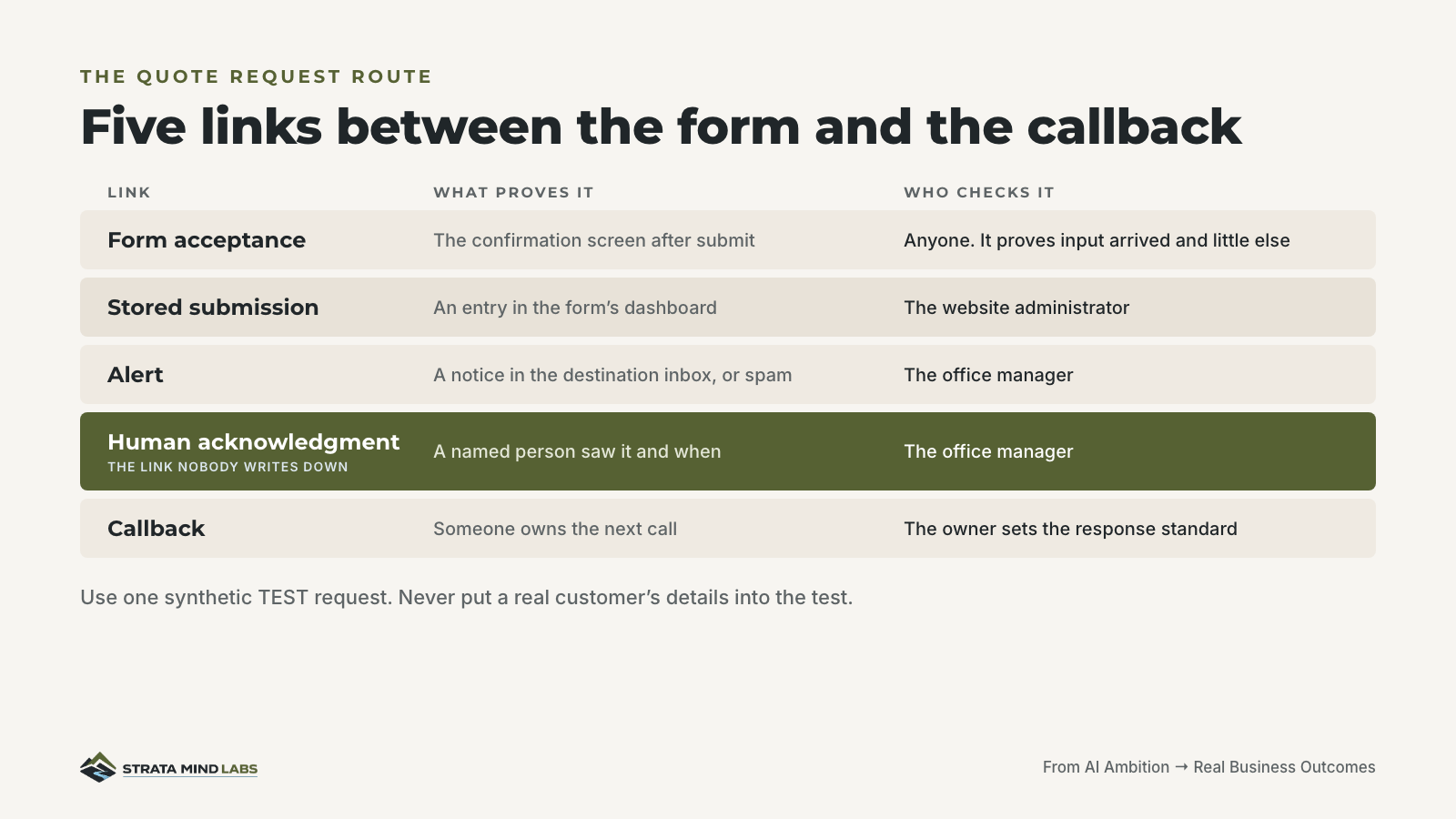
The confirmation screen is the only link the customer sees, and it proves the least. An auto-reply is evidence that a message went out. Neither one shows that a person picked up the request. Watch the fourth link: a named person saw it, at a known time.
The roles split cleanly. The office manager checks the destination inbox and any backup view. The website administrator confirms where the form stores entries and how it sends alerts. The owner decides the response standard and who handles an exception when email is down.
The first session
This is a labeled reconstruction for a small shop, not a reported client case. Plan on an estimated 20 minutes. You need the live form URL, access to its destination inbox or dashboard, a synthetic test identity and the office manager who normally sees inquiries. No new software.
Send one inquiry clearly marked TEST through your own form. Record the submit time and the confirmation screen. Then check the inbox, the spam folder and any form dashboard. Write down where the alert arrived and when a person saw it. Then note who would make the callback. Don't put a real customer's details into the test or into an AI prompt.
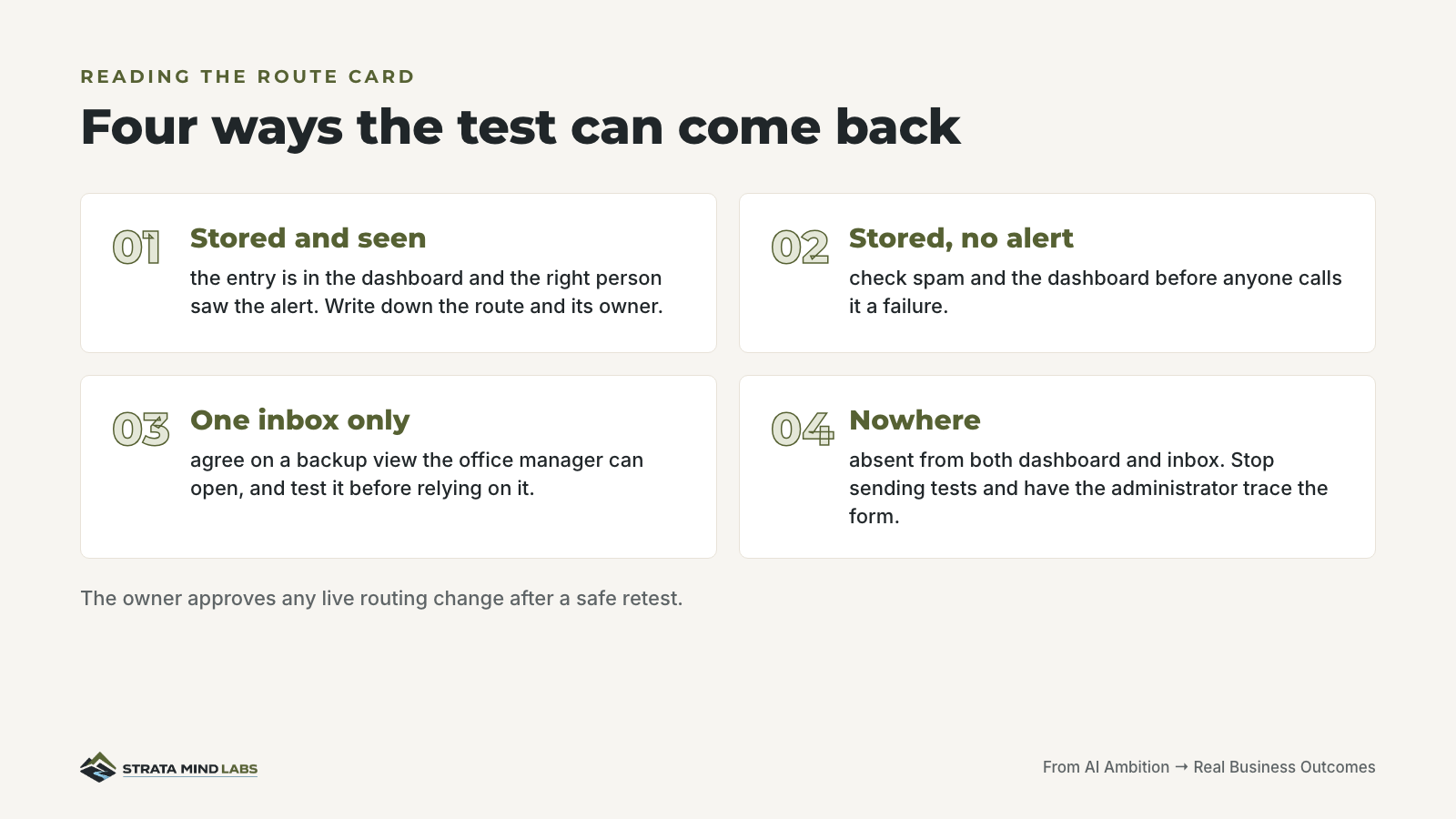
The first useful output is one completed route record. A missing email doesn't prove the request is gone. A confirmation screen doesn't prove anyone received it. If a dashboard stores the entry, confirm the office manager can actually open it on a day the inbox can't be reached.
There's no universal response-time target here. The owner sets one from the service promise the business already makes to customers, and the test shows whether the route can meet it.
Five prompts to run this week
Run these in order in the AI tool you already use, with redacted descriptions and the synthetic test only.
Map the current route
Copy this prompt
Using only this redacted description of our website form, destination inbox and any form dashboard, draw the current path from submit button to human callback. List each system and named role. Mark every unknown as UNKNOWN. Do not invent a stored-entry location or use customer data.
What this should tell you: Look for a source of truth, a destination and a named person, then check every arrow against the actual form settings. The UNKNOWN links are the office manager's and the administrator's homework. Decide whether the route is known well enough to run one synthetic test.
Build the test card
Copy this prompt
Create a one-row test card for a clearly marked synthetic quote request. Include test ID, submit time, confirmation, dashboard entry, notification destination, alert arrival, person who sees it and callback owner. Leave observations blank. Never fill a result that has not been observed.
What this should tell you: The card should keep planned fields apart from observed entries and hold no real customer details. If the AI filled in a result, throw that version out. Approve one safe test on the real form with synthetic input.
Locate the handoff gap
Copy this prompt
Compare the observed test card with the verified route map. Identify missing confirmation, absent dashboard entry, delayed alert, unowned inbox and unclear callback step. State what evidence would resolve each gap. Do not call a delayed alert a lost request.
What this should tell you: Check every flagged gap against a screenshot or timestamp, and look for a stored entry before concluding the submission failed. The gap that matters is the point where a request waits with nobody assigned to act. Decide whether the route needs a backup check or an administrator investigation.
Design the exception route
Copy this prompt
Using the verified route and observed test, propose the simplest way an office manager can find new quote requests when email is unavailable. Prefer an existing form dashboard or phone process. Name the person who checks it, the access needed, the privacy boundary and a safe retest. Mark any unverified capability UNKNOWN.
What this should tell you: The proposed backup has to exist already, be reachable by the named person during an outage and not spread customer details more widely. A second view helps only when someone is assigned to use it. Decide whether to test the exception route before anyone touches live notification settings.
Prepare the owner decision
Copy this prompt
Summarize the verified test and exception retest in a decision note. Show what worked, what is missing, who owns each step and what change is proposed. Separate observed facts from inference. Recommend keep, investigate or change only with evidence. Include a stop condition and the next human action.
What this should tell you: Every recommendation should point to an observation, and missing evidence should stay visible. An auto-reply doesn't count as a handled quote. The owner approves the existing route, orders an administrator investigation or authorizes a tested change.
What to do this week
A fair limit on all this
Microsoft's report describes one incident on one platform. It says nothing about any particular website form, and it gives no count of businesses that missed a customer inquiry. None is implied here. One outage is a good reason to run a test. It tells you nothing about how often this goes wrong.
Form tools that advertise dashboards, backup alerts or delivery guarantees are making vendor claims. Your own synthetic test is what confirms how your form behaves.
The five links, the route card, the four outcomes, the prompts and the 20-minute estimate are Strata Mind Labs proposed practice. They haven't been measured at a client, and no recovered revenue or faster response is assumed.
CIO Question of the Day
When your test request landed, could anyone name the person who would call that customer back?
Sources
- Microsoft Corporation. (2026, November 20). Post incident report for Microsoft 365: EX1550543/MO1550821 [Independent mirror]. Retrieved November 24, 2026, from https://www.365fanatic.com/wp-content/uploads/2026/11/postincidentreport-mo1550821.pdf
- Speed, R. (2026, November 23). Microsoft mega outage: Report reveals testing gaps and emails that never arrived. The Register. Retrieved November 24, 2026, from https://www.theregister.com/saas/2026/11/23/microsoft-mega-outage-report-reveals-testing-gaps-and-emails-that-never-arrived/5311656
- Bishop, T. (2026, November 21). Microsoft's final Outlook outage report details testing gaps and safeguards that backfired. GeekWire. Retrieved November 24, 2026, from https://www.geekwire.com/2026/microsofts-final-outlook-outage-report-details-testing-gaps-and-safeguards-that-backfired/
The confirmation screen tells the customer the form worked. It doesn’t tell you who’s calling them back.
New briefings land as soon as the signal is worth your time.