
The Web Address You Forgot to Retire
Researchers claimed cloud IP addresses that other organizations' web addresses still pointed to. The fix for a small shop is an order of operations and a sheet with an owner on every row.
Executive decision: Put a DNS step in every service retirement ticket, and approve one 45-minute session to list the public records your domain already has. The owner holds the budget and the closure decision. The web person verifies and removes. Forty-five minutes is a planning estimate, not a measured result.
A retired service should take its web address with it. When it doesn't, the address keeps working and someone else may be the one answering it.
The signal this week
On November 24 Intruder published research it updated on November 26 (source 1). Its team scanned for Amazon Web Services IP addresses that other people's DNS records still pointed to, using targets drawn from public bug bounty programs. Intruder says it claimed and controlled 28 Elastic IP addresses that matched a live DNS record in that scope. Five of the matches were US Treasury hostnames, and the post puts the cost at $3 per valid takeover.
That's a researcher's account of its own test. It shows the mechanism works. It doesn't tell you how often a small business has this problem.
Amazon Web Services described a related pattern on June 16 (source 2). Its incident response team had seen attackers scanning public CNAME records that point at resources which no longer exist. A CNAME points one web name at another. If the target is a deleted cloud storage bucket, for example, anyone can create a bucket with the same name and serve their own content under your address. The post names storage buckets, CloudFront and Elastic Beanstalk as the AWS resources it covers. It says the tactic doesn't exploit a vulnerability in AWS services, and it leaves the fix with the customer under the shared responsibility model.
Two records, one mistake
Intruder's case is an A record, which points a name at an IP address. AWS's case is a CNAME, which points a name at another name. The sign outlives the shop either way.
AWS's own documentation says an Elastic IP address is allocated to your account and stays yours until you release it, and that you can put it in a DNS record for your domain (source 3). The same page says AWS charges for every Elastic IP address, used or idle. That's a fair reason to release an idle one. It's also the moment the DNS record has to be gone first.
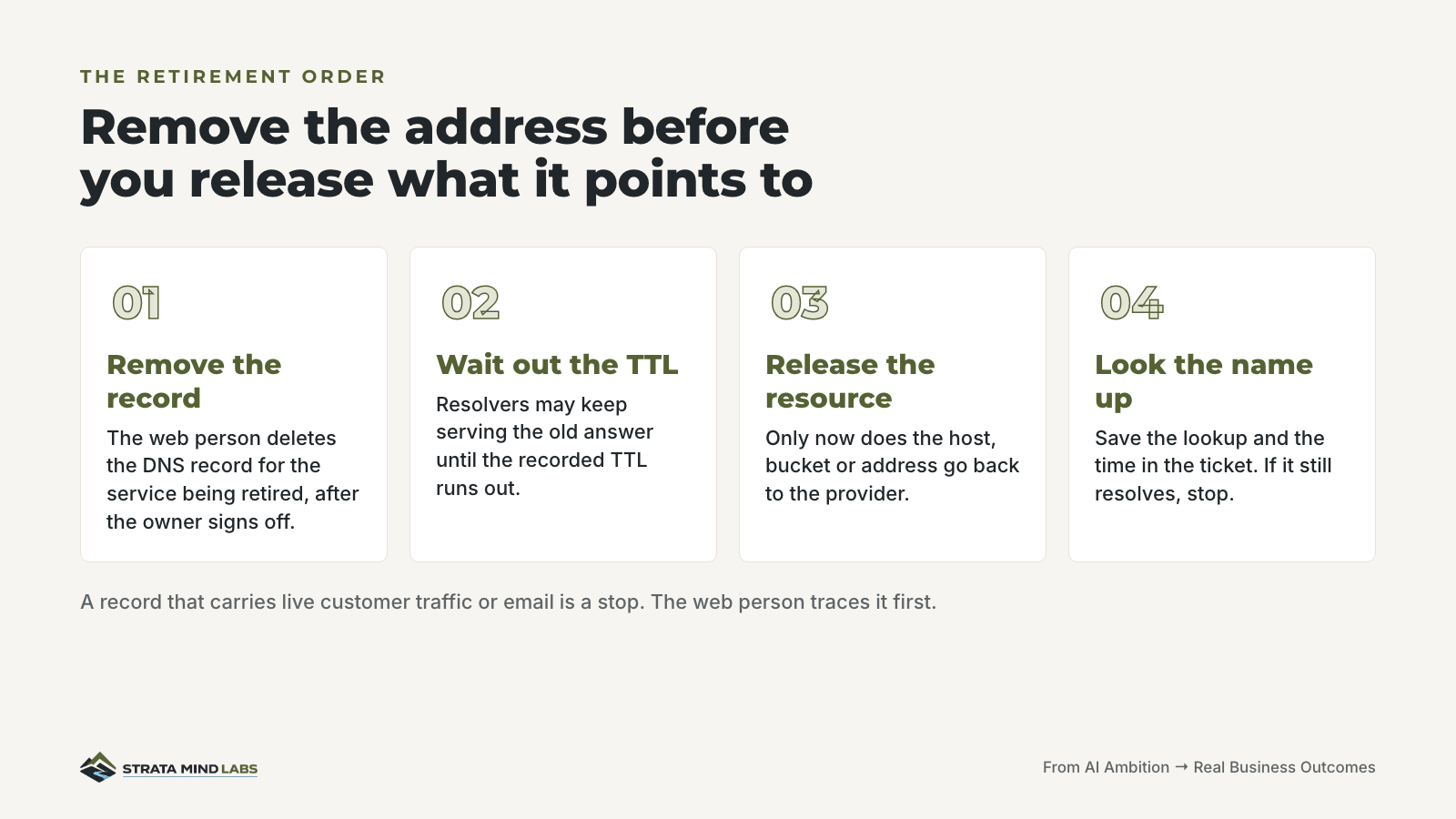
AWS's post gives the order for a CNAME: delete the record, wait for the TTL to run out, deprovision the resource, then look the name up to confirm it no longer resolves. The TTL is how long resolvers may keep serving the old answer, and AWS's example is a TTL of 3600, which means up to an hour. Applying the same order to an A record and a released IP address is our extension of AWS's guidance. AWS doesn't say it.
AWS also offers a detector, a rule that checks CNAME targets for storage buckets, CloudFront and Elastic Beanstalk against your own AWS inventory. The post doesn't discuss A records or Elastic IP addresses. The detector can't see a CNAME that points at a vendor outside AWS either. A clean detector run isn't a clean domain.
Both sources document AWS. The same logic applies to any host, but neither source tested another provider.
The fair counterargument is that your web person may already do this. Ask to see the last retirement ticket. If it has a DNS line and a saved lookup, use that process and skip this one.
The sign and the shop
The DNS record is the sign out front. The server, bucket or booking account is the shop behind it. Close the shop and leave the sign, and anyone who bookmarked the address or types it from a business card still arrives.
Three people each hold a piece. The office manager keeps the sheet. The web person verifies the destination and makes the change. The service owner approves it.
Here's a reconstruction for illustration, not a client account. A shop moves its booking page to a new vendor and cancels the old account on the first of the month. If the retirement ticket has no DNS line, nobody is assigned to look at the record that still names the old vendor's host. Whether that record is exploitable depends on the host and on whether the name can be claimed, and only a lookup and the web person can say.
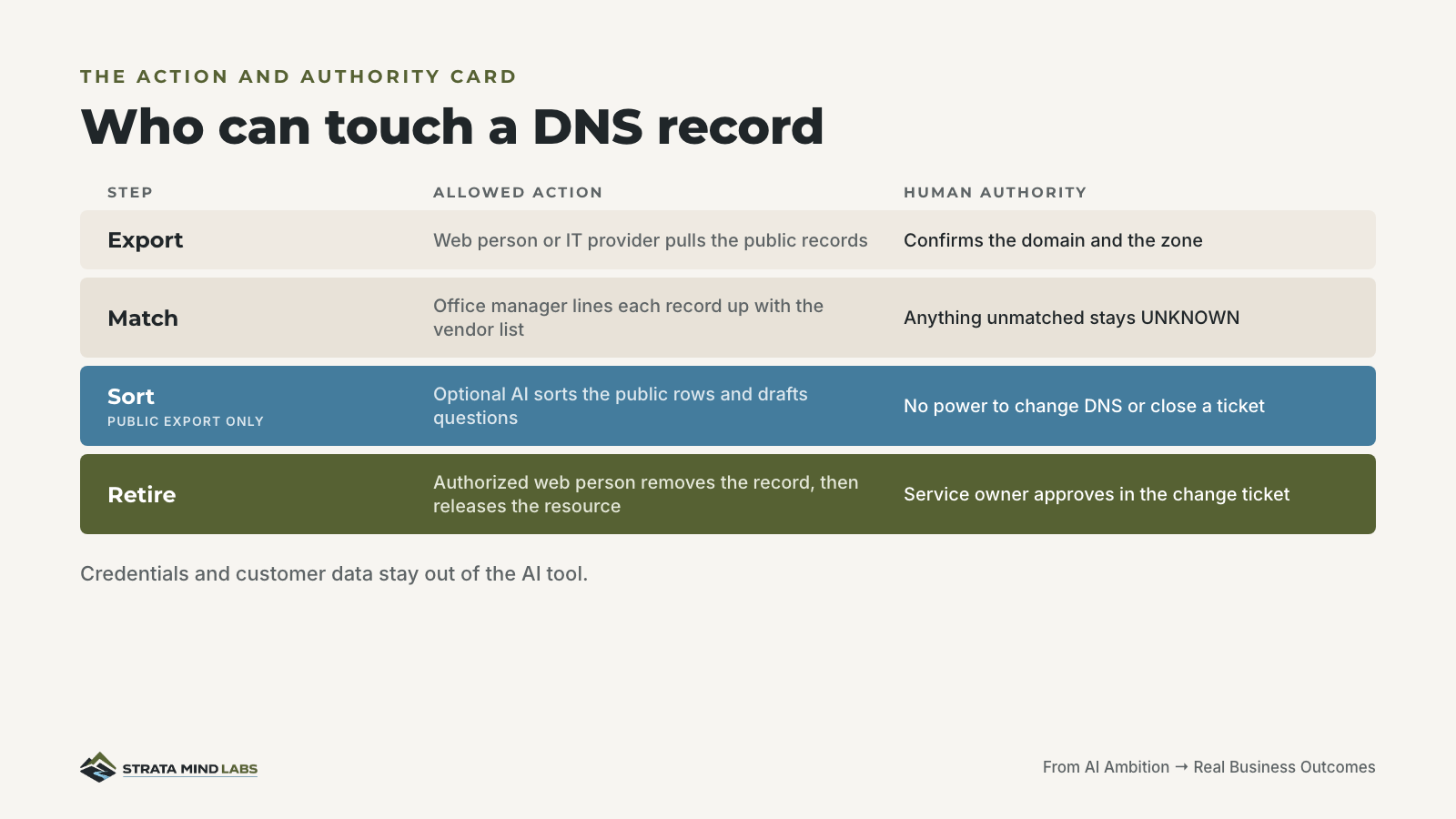
An AI tool can help with one slice of this. Given a public export only, it can sort rows and draft questions. It can't tell you whether a service is still needed, and it can't change DNS or close a ticket.
One sheet, 45 minutes
Start with a public DNS export from your registrar, your DNS provider or your web person. You also need a current list of web and booking vendors and someone authorized to verify changes. Use a spreadsheet you already have.
Make columns for record name, type, destination, service, service owner, last verified date, status, change ticket and follow-up. Copy the public A, AAAA and CNAME records. Start with the services you retired most recently. Mark every destination you can't match as UNKNOWN. The first output is a short list of records with no confirmed owner.
A pass for this first check means every sampled record has a confirmed service and owner, or an open exception with a named person investigating. It doesn't certify the whole domain. Stop if a record carries live customer traffic, email or an unresolved dependency. The web person traces it before anything is removed. The owner then decides whether the unknown list justifies a review of the full zone.
Five prompts to run this week
Run these in order in the AI tool you already use. Paste in the public export only. No credentials and no customer data.
Inventory the public records
Copy this prompt
Using only this public DNS export, create a table with record name, type, destination and any obvious service label. Keep every row. Mark missing or ambiguous destinations UNKNOWN. Do not infer that a record is unused. Do not use private credentials or customer data. Input: [paste the public DNS export].
What this should tell you: Compare the row count with your original export and look for missing A, AAAA or CNAME rows. Unknown labels should stay visible. A complete table gives the web person a worklist but doesn't establish ownership. If rows are missing, ask for a fresh export before you go on.
Match records to active services
Copy this prompt
Compare the public DNS table with this current vendor and service list. Add candidate service and named owner columns. Cite the exact list entry used for each match. Mark every weak or missing match UNKNOWN. Do not recommend deletion. Input: [paste the vendor and service list].
What this should tell you: Check the cited list entries and the unknown-owner rows. Watch for a vendor name that looks similar but has no exact match to the destination. Weak matches show where memory has replaced a current record. Don't approve a change from a guessed match. Send those rows to the web person to trace.
Check retirement dependencies
Copy this prompt
For each candidate record, draft a verification checklist for customer traffic, email, booking flows, redirects and other known dependencies. Use only the supplied change tickets and service inventory. Mark missing evidence. Do not claim a live test occurred. Input: [paste change tickets and service inventory].
What this should tell you: Look for missing tickets and missing dependency evidence. A checklist with no named verifier is incomplete. A stale-looking record may still carry live work. Decide which candidates can go into a controlled change request and which must stop for tracing.
Draft the change order
Copy this prompt
Draft a change ticket for each verified retirement candidate. Include service owner approval, record name and type, current value, TTL, planned removal time, post-removal lookup, resource release only after TTL and rollback contact. Leave all approvals blank for humans. Input: [paste the verified candidates].
What this should tell you: Read the order of the steps and confirm the approval fields are blank. Reject any ticket that releases a resource before the record is removed or leaves out the TTL. The service owner and the web person decide whether to schedule the change, and both sign off on the dependency evidence.
Read the verification record
Copy this prompt
Review the completed change ticket and post-change DNS lookup supplied by the web person. Report whether the record no longer resolves after the recorded TTL. List missing timestamps, conflicting answers and unresolved exceptions. Do not say a change succeeded without a supplied lookup. Input: [paste the ticket and the lookup result].
What this should tell you: Check the lookup time, the TTL and the exact record name. Missing proof means the result is unverified. A closed ticket only counts when its public result can be checked. The owner decides whether the retirement closes or the web person investigates an exception.
What to do this week
A fair limit on all this
The evidence here is two sources and each has a narrow scope. Intruder's 28 matches are a researcher's own claim from bug bounty targets, and AWS describes a CNAME path with a detector for three resource types. Neither gives an incidence rate for small businesses, and neither proves every old record can be taken over. A particular record needs a current lookup, a named service owner and a change record.
The sheet, the 45-minute session, the stop path and the review cadence are Strata Mind Labs proposed practice. They aren't vendor requirements, and they haven't been measured at a client. No savings and no reduction in risk are assumed. One clean sample shows the check ran once.
CIO Question of the Day
When your web person exported the public records, how many rows had no owner?
Sources
- Steer, T. (2026, November 24, updated November 26). Taking over US Treasury subdomains for $3 each. Intruder. Retrieved November 28, 2026, from https://www.intruder.io/research/taking-over-us-treasury-subdomains-for-3-each
- Amazon Web Services. (2026, June 16). Threat tactic spotlight: Subdomain takeover. AWS Security Blog. Retrieved November 28, 2026, from https://aws.amazon.com/blogs/security/threat-tactic-spotlight-subdomain-takeover/
- Amazon Web Services. (n.d.). Elastic IP addresses. Amazon EC2 User Guide. Retrieved November 28, 2026, from https://docs.aws.amazon.com/AWSEC2/latest/UserGuide/elastic-ip-addresses-eip.html
Take the sign down before you hand back the building.
New briefings land as soon as the signal is worth your time.