
The server in the back office needs a decision
A first-session inventory for a Windows Server 2016 transition: one card, five prompts and an owner decision
Executive decision: Ask the person who maintains your back-office server for one written row this week: operating system and edition, the business jobs it carries, the last successful restore and a named owner for the transition. If it runs Windows Server 2016, commission a migration plan and price a paid security-update bridge only if its edition is eligible. The first session is an inventory, not a migration.
A server nobody can describe is a server nobody can price.
The signal this week
Microsoft's own pages put the end of Windows Server 2016 extended support in January 2027. That's under two months away. The lifecycle page lists January 13, 2027. The release information table lists January 12, 2027 as the end of updates (sources 1 and 2). Microsoft's Extended Security Updates FAQ agrees with the 12th in its date table, then says in one answer that extended support ends on January 12, 2026 (source 3). That looks like a typo, and it was still there when I read the page on November 14.
The pages don't explain the one-day gap, so this article uses the month. Ask your IT provider to confirm the date in writing before anyone buys anything.
The date matters less than the question under it. You can't choose a migration window or a temporary bridge until someone can say what the machine runs, what depends on it and whether a backup has ever been restored. Those answers live with different people. That's why the first session is a meeting and not a purchase.
What the bridge covers and what it asks of you
Microsoft calls Extended Security Updates, or ESU, a "last resort paid option" and a "temporary bridge" to stay secure while you move to a supported version (source 3). For Windows Server 2016 its table runs the bridge in yearly blocks, with Year 1 ending January 11, 2028 and Year 3 ending January 8, 2030. Three years is the ceiling.
Coverage is narrow. It means security updates rated critical or important, delivered "if and when available." It doesn't mean new features. Microsoft also says customers on ESU won't get troubleshooting or bug fixes for problems unrelated to security updates. If your job software misbehaves on an unsupported server, the bridge doesn't make that Microsoft's problem.
Eligibility has two layers. The FAQ names Windows Server 2016 Standard and Datacenter as the editions available for ESU. It doesn't name Essentials, which the lifecycle page lists as a 2016 edition (sources 1 and 3). I can't tell you whether an Essentials server qualifies, so ask your Microsoft partner and get the answer in writing.
The second layer is licensing. For servers running on your own premises, the FAQ lists three prerequisites: active Software Assurance, active subscription licenses or Windows Server licenses obtained through a hosting partner's service. I read that as trouble for a server that arrived with its license on the box and nothing else. That's my inference, and your partner has to confirm it.
Price has its own catch. When licensing by physical cores, the FAQ describes a 16-core minimum per server. By virtual cores, it's 8 per virtual machine. A small server may be priced as if it had more cores than it does. No price appears in this article because none was supplied and the FAQ doesn't give a per-core figure for 2016.
One more trap for anyone who remembers the older Server 2012 deal. Moving the machine to Azure doesn't make the bridge free for this version. The FAQ says Windows Server 2016 ESUs are a paid offering there too.
Four steps, one card
The setup below is a reconstruction, not a client case. You need the person who maintains the server (an employee or an outside IT provider), your office manager, a spreadsheet and about 45 minutes. The 45 minutes is a planning estimate.
Run four steps in order: identify the machine, map its jobs, prove the recovery route, compare the options. Each one gates the next. You can't map jobs on a machine you've only guessed at, and you can't compare options until you know whether you could go back.
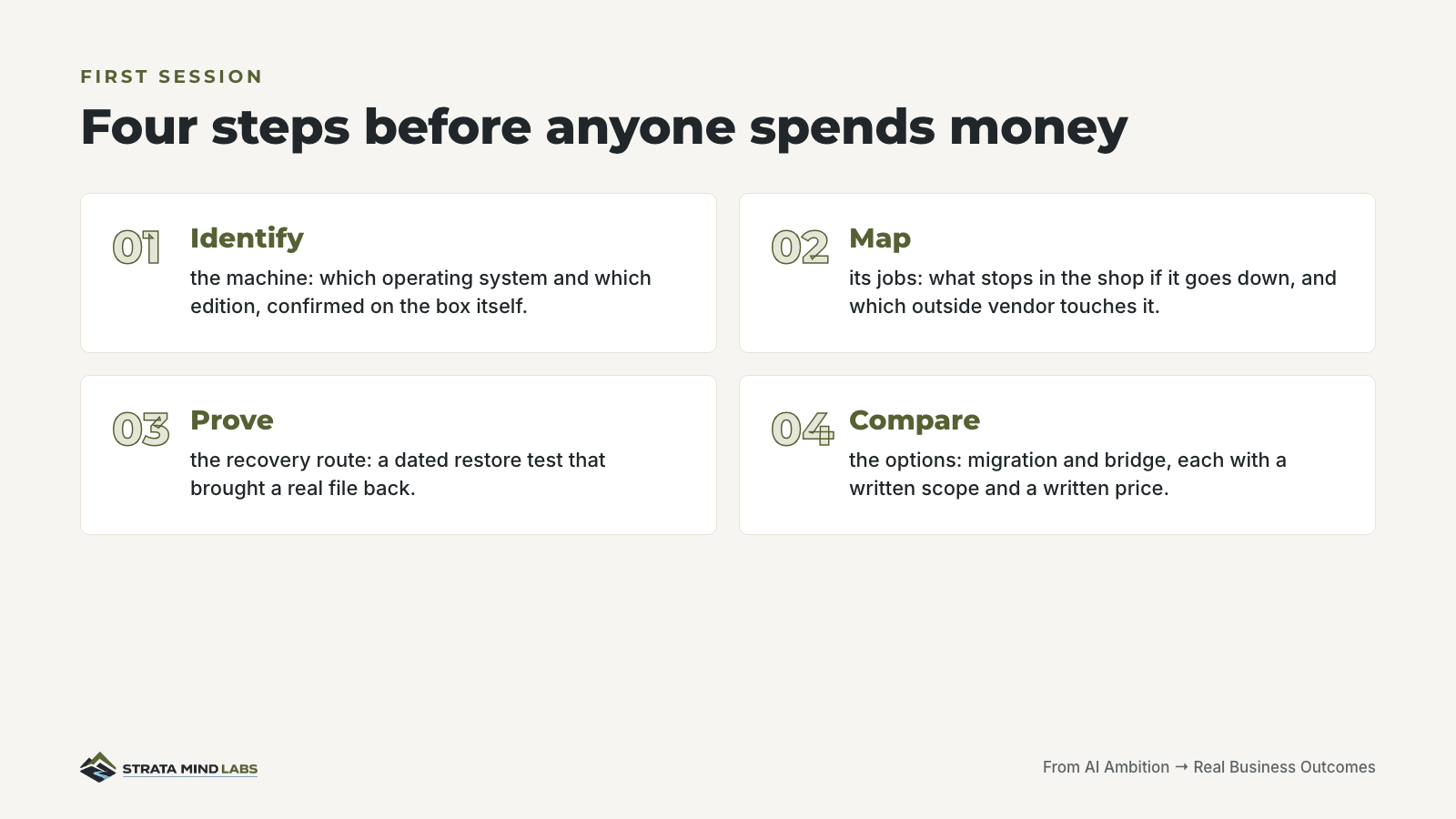
These steps are Strata Mind Labs proposed practice. They aren't a Microsoft method.
Each step lands in a row of one card, and each row records who supplied the answer and where the evidence lives. The full card has eight rows and the graphic groups them into five. "Unknown" is an allowed entry, and it counts as incomplete until someone supplies proof. Keep passwords, customer files and private account data off the card.
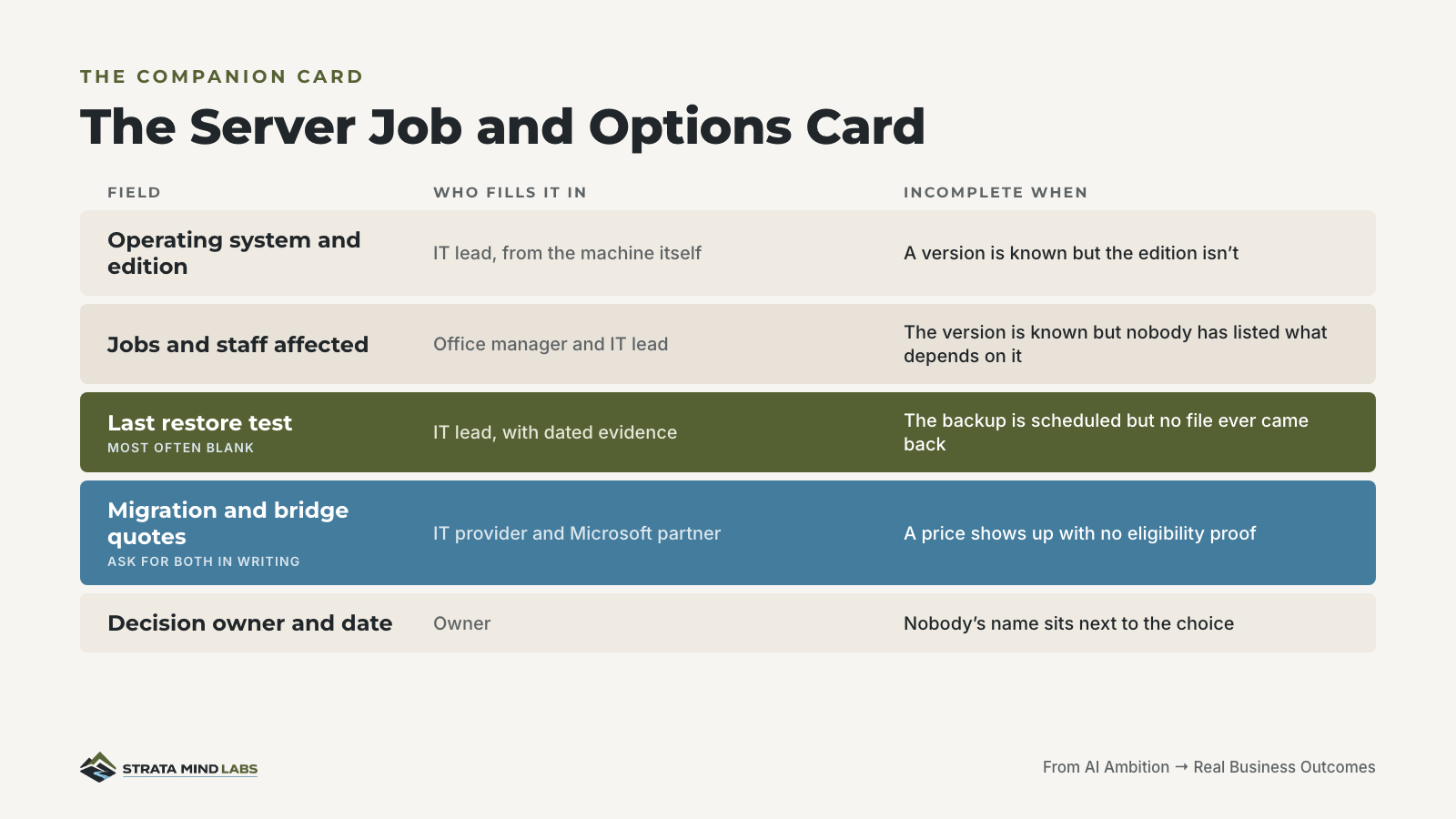
The first 45 minutes
The IT lead, with authorized access, runs winver or systeminfo on each machine that might be a server and writes down what comes back. Microsoft's version-check page lists both, plus msinfo32 (source 4). That check names an operating system. It doesn't list the applications, shared folders or devices that lean on the machine, so the next question goes to someone else.
The office manager names the jobs that stop if the machine goes dark: opening job files, invoicing, dispatch, the scanner folder that sends PDFs to the front desk. The IT lead adds any outside vendor connected to it.
Then the IT lead pulls the last restore test. The card wants a date, what came back and who watched. A backup job showing green with no restore behind it is a gap. Microsoft's upgrade page says to always back up before an in-place upgrade, a clean install or a migration (source 5), and a backup nobody has restored doesn't give you a way back.
The output is one filled row and a list of unknowns. An illustrative first row for a machine called BACKROOM-1 might read: edition Unknown, jobs invoicing and the scanner folder (office manager), last restore test Unknown, decision owner you, decision date two weeks out. That's a made-up row to show the format. A half-Unknown row is a normal first pass, and each Unknown now has a name next to it.
A known version with no job map is incomplete. So is a scheduled backup with no tested restore, or a bridge price with no proof of eligibility.
Stop an upgrade plan if the restore line is blank or a software vendor hasn't confirmed support for the new version. Microsoft's upgrade page maps operating system paths. It lists in-place upgrades from Server 2016 to 2019, 2022 and 2025 as supported with installation media, and it says each Windows Server upgrade needs its own license (source 5). Whether your accounting or job software runs on the new version is a question for that software's vendor.
If nobody can say who maintains the machine, that's the finding. The owner names a person and a date.
Five prompts to run this week
Run these in order on redacted facts only, with no passwords and no customer files. Each one feeds the next.
Build the server inventory row
Copy this prompt
You are helping a small shop organize a server transition. Use only the redacted facts I provide: machine alias, operating system version, edition, location and named IT contact. Return one table row with those fields, a source or person for each field and an Unknown column. Do not infer a Windows version from the machine's age. Do not request passwords or customer files.
What this should tell you: Look for an actual version and edition, a named source for each and an explicit Unknown column. A confident version with no source is a warning sign. If the version or edition comes back Unknown, send the IT lead to read it off the machine before anything else happens. The owner can only price an option for a machine that has been identified.
Map jobs and dependencies
Copy this prompt
Using the confirmed server row and redacted job names, make a dependency table with job, staff user, application or share, outside vendor, outage consequence and verification owner. Put Unknown where evidence is missing. Do not claim a job is hosted on this server unless the IT lead confirms it.
What this should tell you: Every claimed dependency needs a verification owner, and the unknowns should sit in their own list. Be wary of any line that says where software runs when no one confirmed it. Migration effort follows the jobs and their connections, not the server's age. The decision here is which applications need a vendor compatibility check before anyone proposes a migration date.
Check recovery evidence
Copy this prompt
Review a redacted backup and restore record for this server. Output backup date, storage location category, last successful restore-test date, test scope, person who verified it and any gap. If there is no restore-test evidence, say Unknown. Do not treat a scheduled backup as proof of a working restore.
What this should tell you: Look for an item that was actually restored and a person who verified it. A green backup job with no restore test is a gap, however tidy the log looks. A migration plan with no way back can strand the shop's daily work. If the evidence is thin, pause option selection until the IT lead demonstrates a restore.
Compare the two paths
Copy this prompt
Compare a migration plan with a temporary Extended Security Updates bridge using only supplied quotes and confirmed facts. Include eligibility, edition, application test, downtime window, rollback, cost source and owner. Treat ESU as limited security coverage, not full support. Mark any missing quote or eligibility confirmation as Unknown. Do not choose a path for the owner.
What this should tell you: Check that both paths carry a written scope and a written cost. A bridge priced for an edition with no eligibility proof is a warning sign. The cheaper line on the page may leave application testing and recovery work unpriced. If either quote is missing something, ask for a corrected one before the owner compares.
Prepare the owner decision
Copy this prompt
From the documented inventory, job map, restore evidence and option quotes, draft a one-page decision note. Separate confirmed facts, assumptions, open questions and proposed action. Include a named decision owner, a target decision date and a stop condition if restore or application compatibility is unresolved. Do not claim the transition is complete.
What this should tell you: Unknowns should still be visible and every proposed action should have a named person. Reject a note that calls the shop protected because a purchase was proposed. The owner picks a migration plan or a priced eligible bridge while migration proceeds. If the inventory disproves the premise, more investigation comes first.
Five prompts can organize what you supply. They can't look inside a live server, run a restore, establish Microsoft licensing eligibility or approve downtime.
The owner decision
Ask for the first card row this week. If no Windows Server 2016 machine turns up, close the item and keep the dated inventory as proof. If one does, set a decision date. The IT lead verifies application support, the restore and bridge eligibility before money or downtime is committed. The plan stops when any of the three is unresolved.
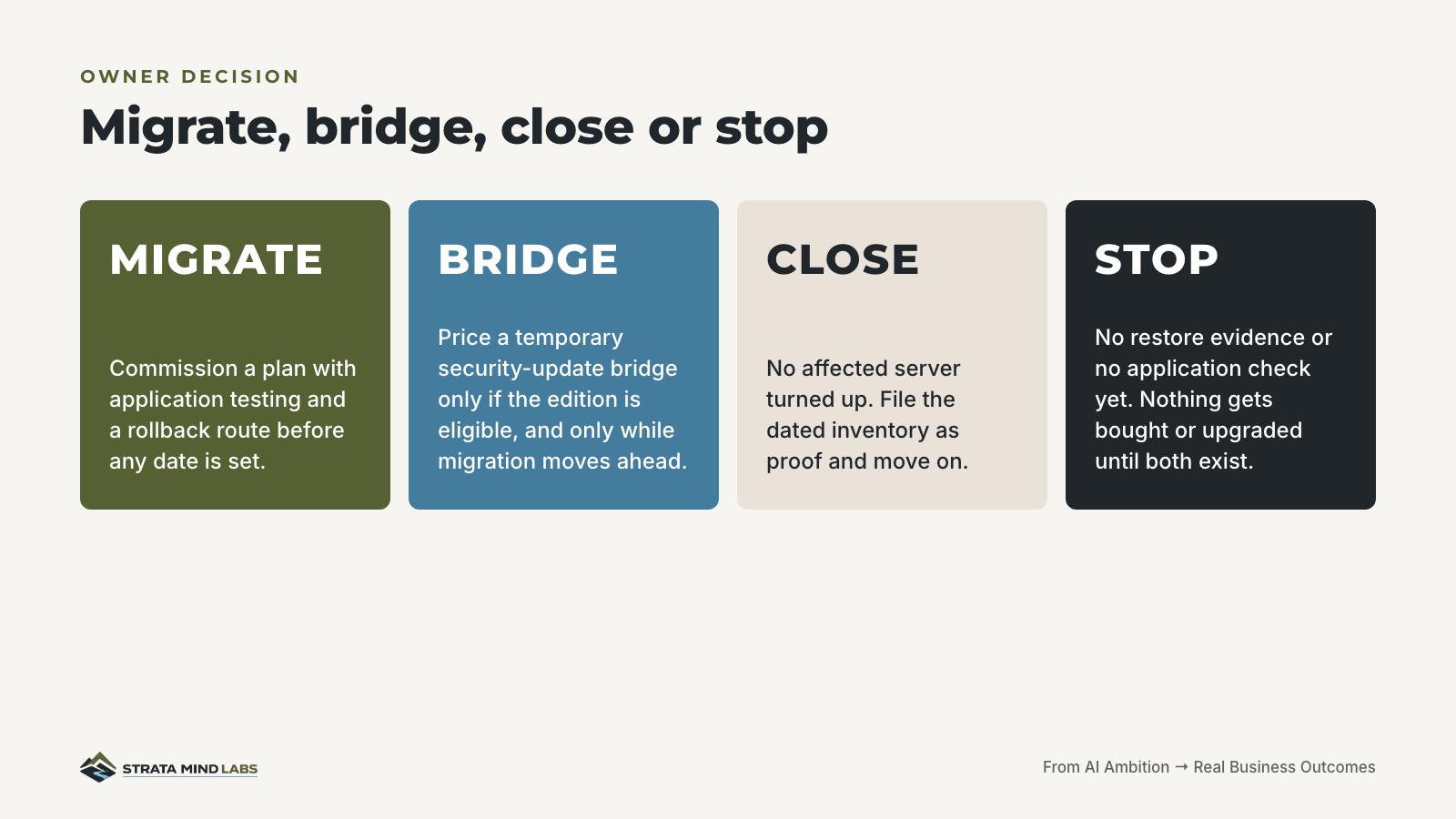
The roles stay narrow. The IT lead inspects the machine with authorized access and collects quotes. The office manager confirms which shop work depends on it. Only the owner approves spending or downtime. No AI output buys a license, logs into the live server, changes a setting or declares a backup restored.
What to do this week
A fair limit on all this
No outage, breach or shop is cited here. A servicing date is a date on a schedule, not a prediction that your server will fail. BACKROOM-1 is one made-up row, so it says nothing about how often shops find a missing restore test.
Every date and term above is Microsoft describing its own product, and Microsoft also sells the bridge. I didn't open an independent source on prices or on how many small shops still run Windows Server 2016, so the article makes no claim about either. The pages disagree by a day and one FAQ answer carries a wrong year. To check, read the five pages in the sources and ask your Microsoft partner for the terms in writing.
The four steps, the card and the 45-minute estimate are Strata Mind Labs proposed practice. The time is a planning estimate, not a measured result. The prompts are drafts I haven't run against your data. No return is assumed. What you get is a filled row, a list of unknowns with names beside them and a decision date.
CIO Question of the Day
When did anyone last bring one file back from your server's backup, and who watched it happen?
Sources
- Microsoft. (n.d.). Windows Server 2016 [Product lifecycle]. Microsoft Learn. Retrieved November 14, 2026, from https://learn.microsoft.com/en-us/lifecycle/products/windows-server-2016
- Microsoft. (n.d.). Windows Server release information. Microsoft Learn. Retrieved November 14, 2026, from https://learn.microsoft.com/en-us/windows/release-health/windows-server-release-info
- Microsoft. (n.d.). Product lifecycle FAQ: Extended Security Updates. Microsoft Learn. Retrieved November 14, 2026, from https://learn.microsoft.com/en-us/lifecycle/faq/extended-security-updates
- Microsoft. (n.d.). What version of Windows am I running? Microsoft Learn. Retrieved November 14, 2026, from https://learn.microsoft.com/windows/client-management/client-tools/windows-version-search
- Microsoft. (n.d.). Plan your Windows Server upgrade path. Microsoft Learn. Retrieved November 14, 2026, from https://learn.microsoft.com/windows-server/get-started/install-upgrade-migrate?tabs=media
A green backup job isn't a restore. Ask to watch one file come back.
New briefings land as soon as the signal is worth your time.