
The patch queue your shop can actually use
An exposure-first patch queue for a small shop: one card, five prompts and an owner decision on what stays online

Executive decision: Put the public-facing systems first on one page. Ask the person who manages each system for the version, the vendor fix and the last written confirmation. The owner decides whether an unknown stays online while the provider checks it.
A long patch report doesn't tell you which login page a stranger can reach.
The signal this week
Microsoft's FORGE Lab published a write-up on November 11 about its Linux kernel bug-hunting project. Automated scans produced 26,502 raw results in about two weeks. Experts reviewed the 621 cases that came with proof-of-concept evidence, and the team filed 59 upstream reports. Fixes for 38 of those reports had been merged into mainline when Microsoft wrote the post (source 1).
The lesson Microsoft draws is about people. "Finding the bugs was only part of the work," the authors write, and turning results into validated bugs and merged patches took months of expert investigation and collaboration with Linux maintainers.
One research project says nothing about the size of your queue or the speed of your provider. It does show where the time goes. Between a long list and a fixed system, someone has to decide which line matters. A shop owner has the same gap with a shorter list.
The same day, Apache released HTTP Server 2.4.71. It fixes CVE-2026-119618, which Apache rates critical, a flaw in the mod_http2 module that can lead to remote code execution. Apache lists the affected range as 2.4.55 through 2.4.70 (source 2). That's a version question with a concrete answer, and it has two limits. The advisory can't tell you whether your website runs Apache at all. It also names one module, so my read is that a version in range doesn't prove your site is affected. Your host or IT provider has to say.
Two days later, on November 13, CISA added CVE-2026-123039 to its Known Exploited Vulnerabilities catalog, called KEV for short (source 3). It's a Check Point flaw in which an authenticated local user can send a command to a local socket and have it run as root. The entry's required-action text puts the job of evaluating each asset's internet exposure on the organization that runs the product.
So the catalog can tell you a flaw is being exploited. It can't tell you whether a stranger can reach your copy of the product. That answer has to come from you.
The ordering has a federal precedent. CISA's Binding Operational Directive 26-04, issued June 10, applies to federal civilian agencies and asks, among other things, "Is the vulnerable asset publicly exposed?" (source 4). FedRAMP's June 16 response lists exposure, KEV status, exploit automation and technical impact as factors (source 5). Neither document binds a private shop. This article borrows two of those checks, outside reach and known exploitation, and presents them as Strata Mind Labs proposed practice.
Sort by reach first
The bottleneck in a small shop is the handoff. A scanner can list flaws. A hosting company may own the patch. The owner still needs a name, a written answer and a date.
So every row of the queue gets four checks. Reach comes first because it sets the order of your requests. Then a match against a vendor advisory, then written proof from whoever runs the system, then a person and a date.
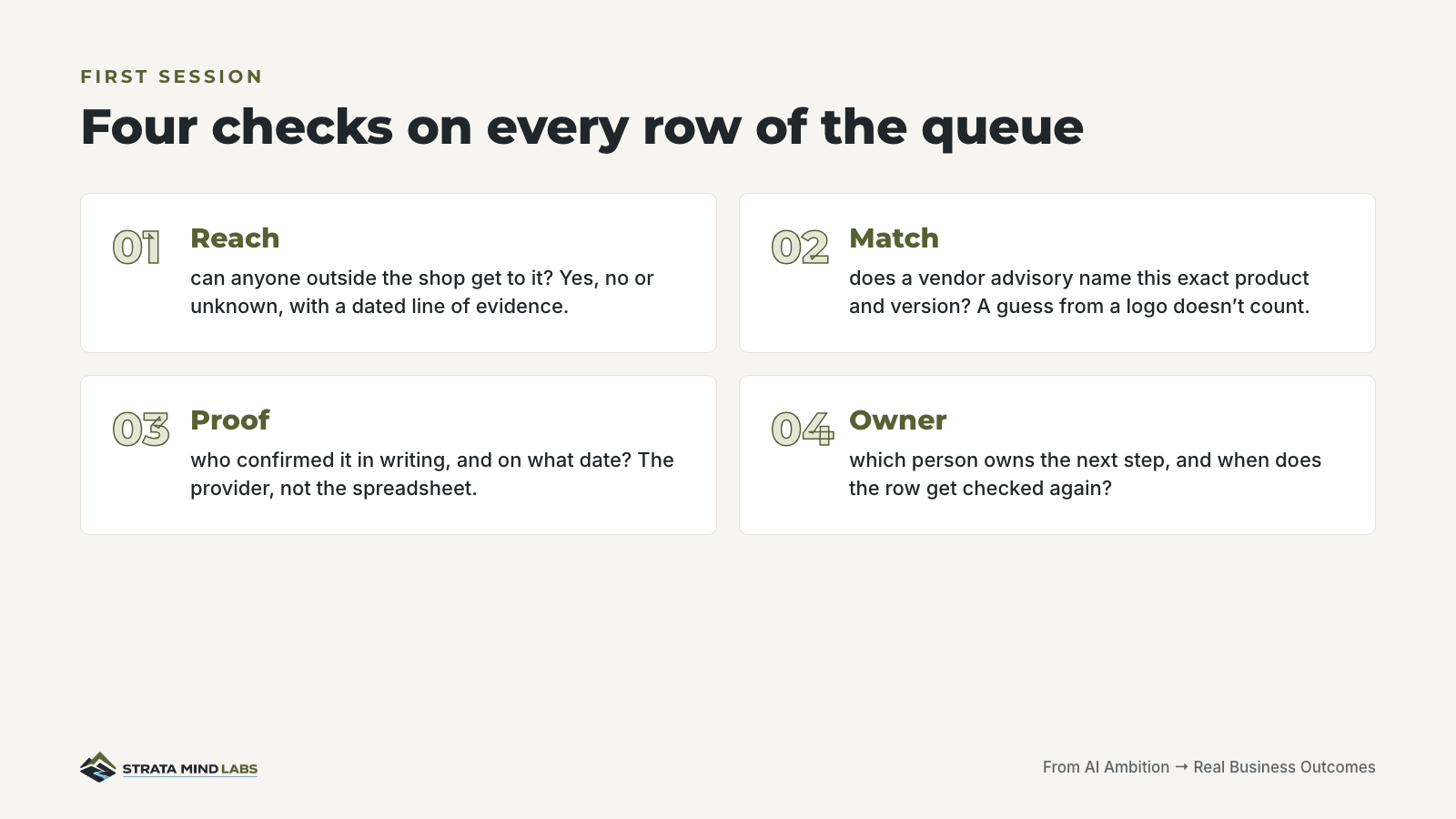
This is an operator aid. Nothing in the sources shows that it reduces risk, and the article doesn't claim it does.
Ninety minutes with a spreadsheet
The setup below is a reconstruction from public advisories, not a client deployment. You need the website bill, the remote-access contract, a list of equipment that has a login page, your office manager, the person or company that runs your web and IT, and a spreadsheet. Ninety minutes is a planning estimate for assembling the first view. No new subscription is required.
Start with the website, remote access, email administration and any shop device with a browser login. The office manager lists each one from invoices and contracts. The provider confirms the product, the version and whether the service is reachable from outside. The owner marks a KEV match only after a real product and a real advisory line up.
Mark unknowns as unknown. A blank never becomes a no. And ask for written confirmation instead of guessing from the logo on a login page.
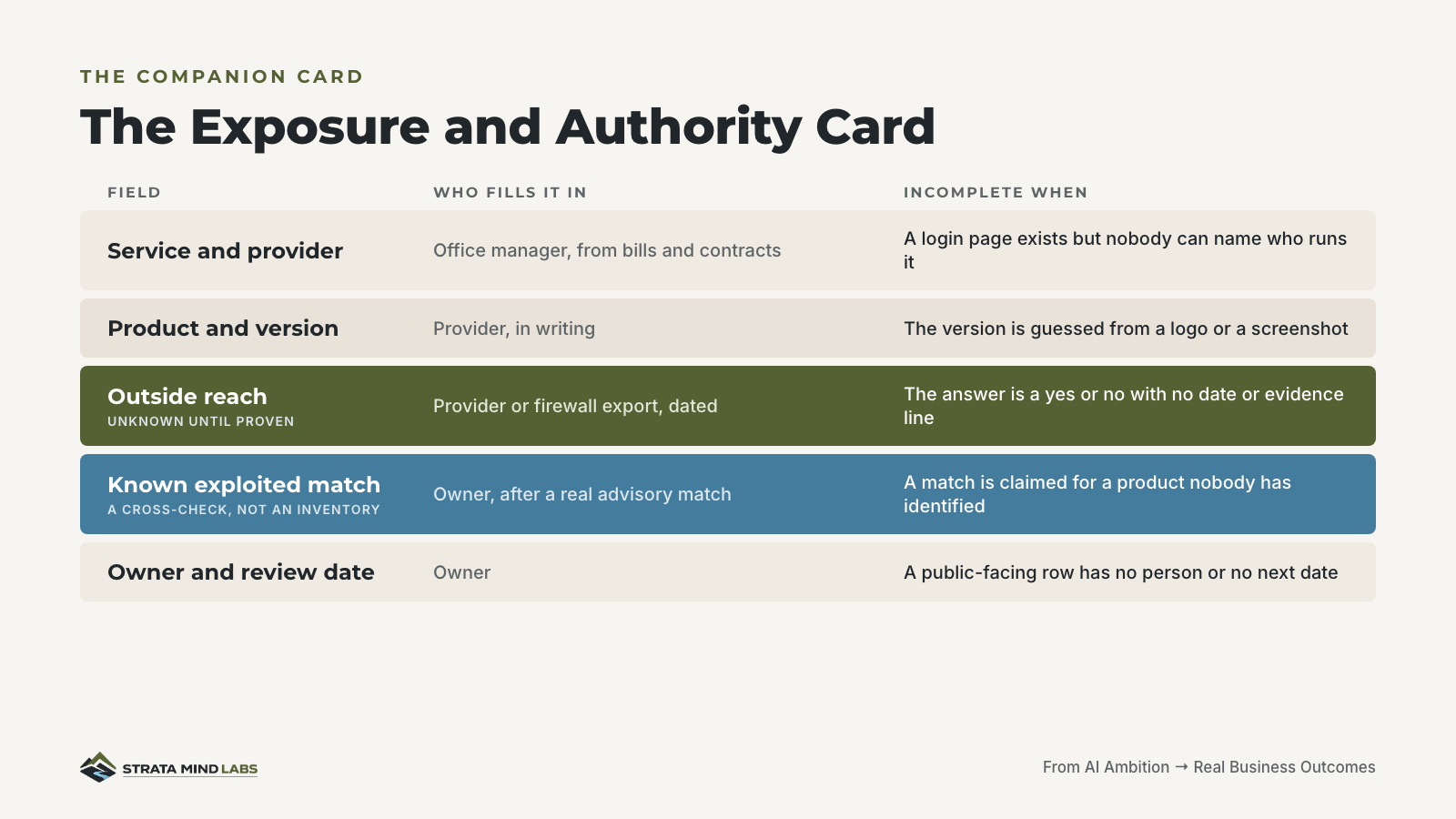
The full card has nine columns: service, provider and owner, software and version, public reach, KEV match, evidence and date, next action, decision owner and review date. The graphic groups them into five. Keep passwords and customer records off it.
Here is the sample row from the card, and it's synthetic. Service: sample shop website. Provider and owner: sample host, office manager. Version, public reach and KEV match: all Unknown. Evidence: hosting invoice only. Next action: ask the host for product, version, public reach and patch confirmation. Decision owner: the owner. Review date: set after the reply. Every cell is unknown and the next action is a question with a name on it. That's a normal first pass.
A passing first output is a sheet where every public-facing unknown has a named person, a written question and a review date. It doesn't certify that you've found every system, and it doesn't mean anything is patched.
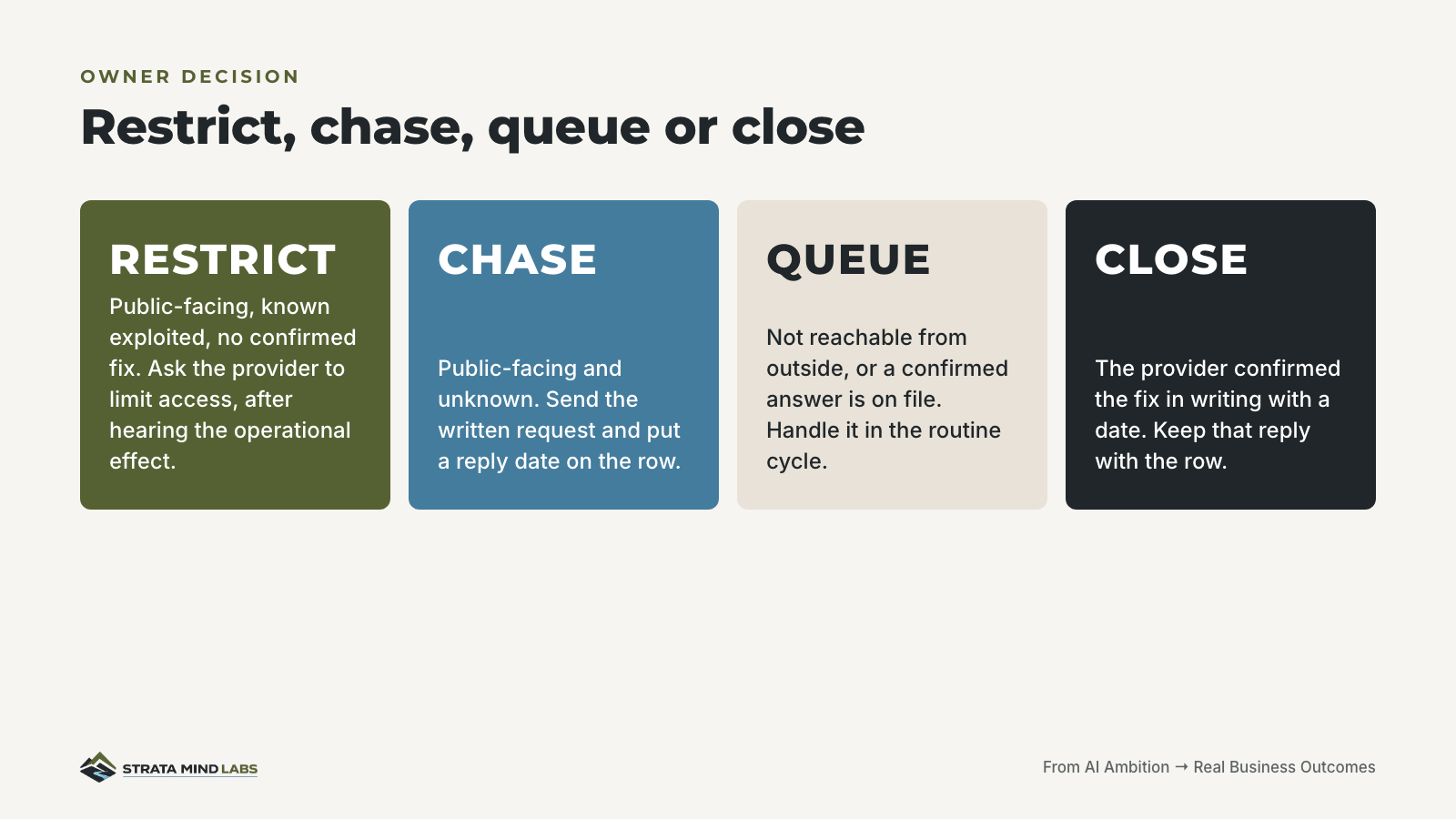
Stop the routine queue if a public-facing system has a confirmed KEV match and nobody can confirm a fix or mitigation. The owner asks the provider for a safe access restriction and writes down the business effect. A named person checks again on the review date.
Five prompts to run this week
Run these in order, using only redacted records you paste in and no passwords. Each one feeds the next. Nothing here scans or touches a live system.
List the systems
Copy this prompt
Using only the redacted inventory I paste below, create a table of website, remote access, email administration and equipment login pages. Include provider, named owner, known software and version, last written confirmation and unknown fields. Do not infer a product from a screenshot. Return source line references. Ask for missing records.
What this should tell you: Check that every row points to a line in the inventory you pasted. Flag any service with no owner or version and any product name the model invented. The gaps show where a provider reply is needed before anyone can make a patch decision, and the owner picks which provider to contact first, starting with the public-facing unknowns.
Mark outside reach
Copy this prompt
For the reviewed table from Prompt 1, add an outside-reach column using only the firewall export or provider confirmation I paste. Use yes, no or unknown. Include the exact evidence line and its date. Do not test or scan a live system. Return a separate list of unknowns.
What this should tell you: Every yes or no needs a dated evidence line, and missing firewall data counts as unknown. Reach changes the order of your requests. The provider confirms any unknown public-access row before anyone treats it as internal.
Check vendor fixes and KEV
Copy this prompt
For each reviewed software name and version, compare only the vendor advisory links and dated CISA KEV extract I provide. Add advisory URL, affected version range, fixed build, KEV match and uncertainty. Do not claim a product is affected when the component or version is unknown. Keep the source date beside each result.
What this should tell you: Look for a direct vendor link and an exact version match. Flag any KEV claim that lacks the catalog row you supplied. A known flaw matters to your shop only when the actual asset and configuration match, so the provider verifies uncertain versions and the owner approves the order of action.
Draft the owner queue
Copy this prompt
Build a one-page queue from the reviewed rows. Put public-facing KEV matches first, then public-facing unknowns, then the remaining rows. Show provider, evidence, proposed action, owner, due date and exception. Do not invent a deadline. Mark every proposed due date for owner approval.
What this should tell you: Check that the sort follows the reviewed columns and that no blank owner or invented deadline slipped in. The queue becomes a decision aid only when each item has someone accountable. The owner approves or changes the dates after the provider estimates the work.
Prepare the exception review
Copy this prompt
From the owner-approved queue, draft a brief exception note for every public-facing unknown or confirmed KEV match without a verified fix. Include the missing evidence, provider contact, proposed temporary restriction, review date and decision owner. Do not send messages or change systems. Leave the final decision blank for a person.
What this should tell you: Inspect each missing-evidence field and make sure the restriction reads as a proposal, not a completed action. An exception stays visible until a person accepts it, restricts access or resolves it. The owner and provider choose the access decision with a review date, and the result goes into the card.
Five prompts can sort what you supply. They can't scan a live system, confirm a version, install a patch or approve downtime.
The owner decision
Approve the first provider request and assign a review date. If a high-consequence row is still unknown, restrict access only after the provider confirms the operational effect. Record the answer in the same sheet.
The roles stay narrow. The office manager gathers the bills. The provider verifies technical status. The owner decides on downtime and access. No AI output sends a message, changes a setting or closes a row.
What to do this week
A fair limit on all this
One research project is not a frequency. The Microsoft write-up covers a Linux kernel effort by its own lab, and it says nothing about how often a small shop's patch queue stalls or how fast providers answer. Microsoft describes its own work, Apache publishes its own advisory and the sources here establish those advisories and prioritization factors, not an outcome from this sheet.
The directive and the FedRAMP notice are federal guidance. They don't apply to a private shop. The card, the sort order, the stop rule and the ninety-minute estimate are Strata Mind Labs proposed practice, and the time is a planning estimate, not a measured result. The prompts are drafts I haven't run against your records.
The Apache and KEV entries are examples of how a version check and a catalog cross-check work. Neither one shows that your shop runs the product. KEV is a cross-check and not an asset inventory. No return is assumed. What you get is a sheet with a person and a date on every public-facing unknown. To check the sources yourself, open the five pages below and compare the version range and catalog date to what your provider tells you.
CIO Question of the Day
Which public login in your shop is still waiting on a written answer, and whose name is next to it?
Sources
- Microsoft FORGE Lab. (2026, November 11). Lessons from 59 Linux kernel bug reports. Microsoft Security Blog. https://www.microsoft.com/en-us/security/blog/2026/11/11/lessons-from-59-linux-kernel-bug-reports/
- Apache Software Foundation. (2026, November 11). Apache HTTP Server 2.4 vulnerabilities. Retrieved November 15, 2026, from https://httpd.apache.org/security/vulnerabilities_24.html
- Cybersecurity and Infrastructure Security Agency. (2026, November 13). Known exploited vulnerabilities catalog [Official GitHub mirror, data file]. Retrieved November 15, 2026, from https://raw.githubusercontent.com/cisagov/kev-data/develop/known_exploited_vulnerabilities.json
- Cybersecurity and Infrastructure Security Agency. (2026, June 10). BOD 26-04: Prioritizing security updates based on risk. Retrieved November 15, 2026, from https://www.cisa.gov/news-events/directives/bod-26-04-prioritizing-security-updates-based-risk
- FedRAMP. (2026, June 16). FedRAMP response to CISA BOD 26-04 (prioritizing security updates based on risk). Retrieved November 15, 2026, from https://www.fedramp.gov/notices/0014/
An advisory can't see your server. Ask the provider what you actually run.
New briefings land as soon as the signal is worth your time.