
The Login List Hiding in Plain Sight
When public staff names meet weak sign-in, one afternoon and one spreadsheet tell the owner which accounts to check first

Executive decision: Approve a one-page account inventory led by the office manager. It maps the names on your website to live accounts and records whether each one has a second sign-in factor. The owner handles the exceptions and any decision to disable access.
Your website already lists the names. The question is how many of them still open a door.
The signal this week
On November 20, Amazon's security team published an investigation into AI agents run by an actor it describes as China-nexus. The campaign targeted universities in East Asia over about 48 hours starting September 8 (source 1).
One operation is the part worth a small business owner's attention. Amazon says the agents spent more than six hours on a university GPU server. First they built a list of about 80 real usernames from the university's public presence: faculty directories, lab websites, archived pages and academic papers. Then they tried more than 30,000 credential combinations against the server's remote login, plus an admin dashboard, a network storage device, a VPN server and the campus portal elsewhere on the network (source 1).
They never found a working login. Amazon's own summary is that neither of the two operations it describes succeeded, but the agents kept adapting for nearly a full day without human direction (source 1).
That failure is good news for the universities. For everyone else it's a clear look at the route. Public names went in at one end. Login attempts came out the other, and nobody had to steal a staff roster to get there.
What the report does and doesn't show
Amazon's post is primary evidence of what Amazon observed. The targets were universities. Nothing in it says this campaign touched a small business, and one failed operation tells you nothing about how often attacks like this succeed. Read it as a description of a mechanism, not a risk rate.
The control side comes from NIST. Its small business page on multi-factor authentication asks owners whether they've "completed an inventory of all our systems to determine which ones offer multi-factor authentication" and whether MFA is on for their most sensitive accounts. It calls enabling MFA on every account that offers it "essential for reducing the cybersecurity risks to your business" (source 2).
NIST's November 2 white paper goes further on priority. It recommends phishing-resistant MFA on all accounts that offer it, "especially on the most sensitive accounts," and names email, banking, sensitive file storage, the password manager and business-critical cloud services (source 3). That paper is written for owner-only firms, though NIST says it may help businesses with very few employees too.
NIST backs the control. It doesn't validate the card below or the time estimate.
The fair counterargument: some shops have no staff page and already enforce a second factor everywhere. Good. For them the inventory confirms the settings and stops. And account names leak from plenty of places besides a website, so scrubbing the staff page alone would buy false comfort.
The key ring problem
Think of every live account as a key on the office ring. The staff page tells an outsider whose name is stamped on each key. It doesn't tell anyone which keys still work.
That gap runs both ways. A name on the site may have no account behind it. A former dispatcher may still have one. The scanner login and the shared billing mailbox have no public person attached at all, and they're keys too.
The staff page gets updated when someone joins. The account list gets updated when someone remembers.
So the card starts from the public page and then goes past it. One row for every live business email, remote login and admin account, including service accounts with no person behind them. The columns are public name or role, live account, admin privilege, second factor, evidence checked and date, owner, exception and next action. That framework is Strata Mind Labs proposed practice, not a finding from Amazon or NIST.
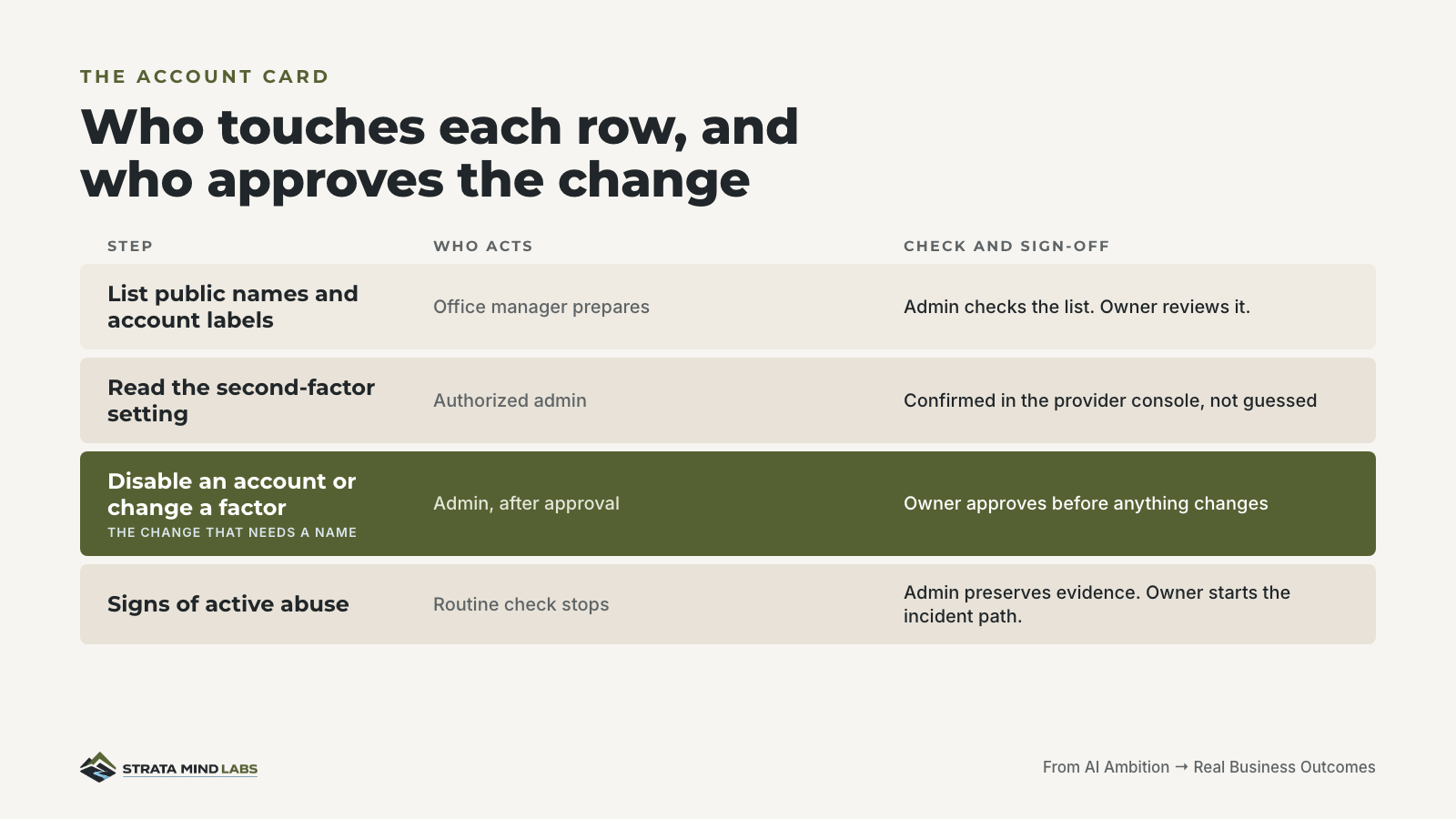
The data boundary matters as much as the columns. The card records whether a factor is on and what evidence someone checked. It never holds a password, a recovery code or a customer record. An AI assistant can format a synthetic sample. A person reads the real settings in the provider console.
A first session for the shop office
This is a labeled reconstruction for an owner and office manager, not a claim about client work. Set aside 45 minutes as a planning estimate. Nobody has measured it.
Gather the public staff page, a current roster and read-only access to your email and remote-access settings. Copy the eight columns into a spreadsheet. The office manager lists every name and role the website shows, then adds every live account, including the ones with no name.
Then the owner or an authorized admin opens the provider console and fills in the second-factor and evidence columns. Anything nobody can see gets marked unverified.
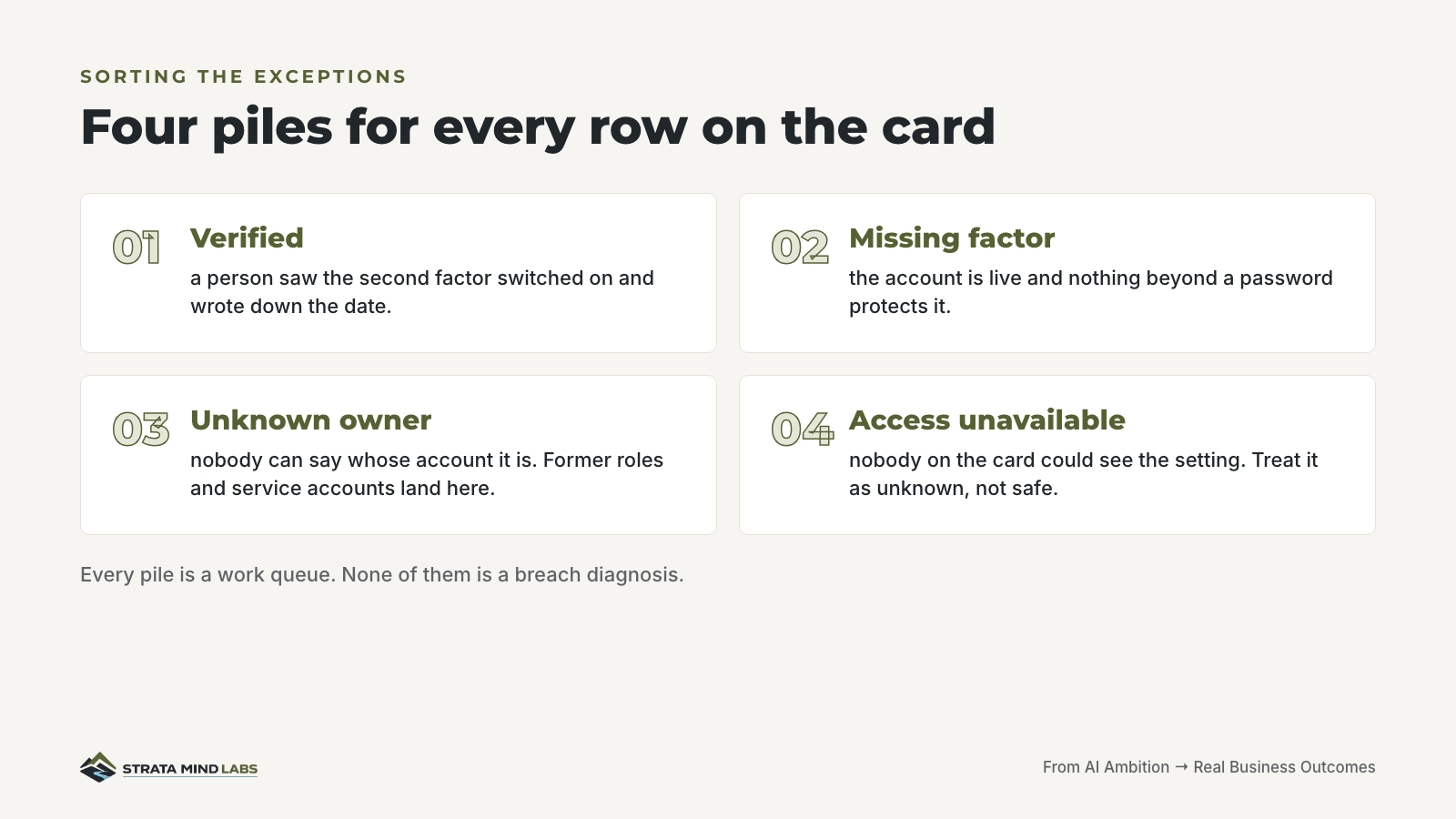
The first output is a short inventory with unknowns flagged. A blank factor or an unowned account is an exception to check. It isn't proof that anyone got in. If you see signs of active compromise, stop the exercise and follow your incident response path.
Five prompts to run this week
Use synthetic names or redacted account labels in all five. Check every live setting yourself. Each prompt feeds the next decision.
Build the account card
Copy this prompt
Create a blank CSV template for a small shop to review public staff names against business email and remote-access accounts. Columns must include public name or role, live account, admin privilege, second factor, evidence checked, owner, exception and next action. Use no real people or passwords. Explain what each column means in one plain sentence.
What this should tell you: Check the columns for a missing owner, factor or evidence field, and reject any suggestion to collect passwords or recovery codes. A good card makes the access question visible without moving secrets into a new tool. Approve it if the owner and evidence fields are clear, and revise it before any live data goes in if either is missing.
Test the matching logic
Copy this prompt
Using only synthetic names, add three example rows to the account card: one public name with a live email account, one former role with a live account and one service account with no public name. Mark all settings as unverified until a human checks the provider console. Do not invent a security result.
What this should tell you: The service account should still be on the list and every setting should still read unverified. Reject confident labels based on names alone. Keep this matching pattern only if it holds on to unmatched accounts and former roles.
Collect the setting evidence
Copy this prompt
Draft a read-only checklist for an office manager and authorized admin to verify each account's second factor in the existing email and remote-access consoles. Record the setting name, observation date and who checked it. Never ask for a password, code, screenshot containing secrets or a change to settings.
What this should tell you: Look for a clear read-only path and a place to mark access you don't have. Treat any setting value the model claims as unverified until a person sees it. Assign the check to someone with the right access, and send missing access to the owner.
Sort the exceptions
Copy this prompt
Given a redacted account card whose factor and owner fields were checked by a person, group rows into verified, missing factor, unknown owner and access unavailable. Do not label any account compromised. Return a short action list and cite the row that led to each action.
What this should tell you: Check every grouped row against the card. The two mistakes to catch are an unknown owner filed as verified and an unavailable setting treated as safe. The result is a work queue, not a breach diagnosis, and the owner decides which account gets fixed first and who makes the change.
Prepare the owner decision
Copy this prompt
Write a five-sentence decision note from the checked, redacted exception list. State the first account to review, the proposed action, the person authorized to act, the evidence still missing and a stop condition for suspected compromise. Do not claim a fix was completed.
What this should tell you: The note should name the actual exception and the evidence still missing. Reject one that treats a recommendation as a finished change. The owner approves or defers the change after checking access and business impact, records the call on the card and has the setting rechecked after someone acts.
What to do this week
A fair limit on all this
Amazon reported one investigation against universities. It's a single case, it failed and it says nothing about how often small businesses face the same thing. Treat it as a mechanism you can check against, not a frequency.
What Amazon says about its own investigation is Amazon's account. NIST supports inventory and multi-factor authentication, and its November paper is aimed at owner-only firms. Neither source measures this card. The card, the five prompts, the four piles and the 45-minute estimate are Strata Mind Labs proposed practice. No time saving or return is assumed, and a clean inventory doesn't prove nobody is trying.
CIO Question of the Day
When you lined your staff page up against your live accounts, which account had no name behind it?
Sources
- Moses, C. J. (2026, November 20). Chinese-nexus actor's Cairn AI agents found a zero-day on their own. AWS Security Blog. Retrieved November 21, 2026, from https://aws.amazon.com/blogs/security/chinese-nexus-actors-cairn-ai-agents-found-a-zero-day-on-their-own/
- National Institute of Standards and Technology. (2026, January 5). Multi-factor authentication. Small Business Cybersecurity Corner. Retrieved November 21, 2026, from https://www.nist.gov/itl/smallbusinesscyber/guidance-topic/multi-factor-authentication
- Eliot, D., Marron, J. A., & Thorn, S. (2026, November 2). Small business cybersecurity: Non-employer firms (NIST CSWP 50). National Institute of Standards and Technology. https://nvlpubs.nist.gov/nistpubs/CSWP/NIST.CSWP.50.pdf
The staff page is a starting list. The sign-in settings are the evidence.
New briefings land as soon as the signal is worth your time.