
The Invitation Needs an Owner
1Password says an attacker copied account records for a subset of its users and warns about invitation and recovery emails nobody asked for. The useful response for a small shop is a named approver and a known route into the account.
Executive decision: Decide who approves account invitations, where the office manager finds that person and which official route the shop uses when an account message seems wrong. Plan on about 20 minutes with account access and the approver in the room.
An invite email asks for one click. Somebody at your front desk should know whose click that is.
The signal this week
On November 25, 1Password published an update on a security incident in its backend systems (source 1). The company says it began investigating on November 19 after signs that an attacker had gained access to an employee's corporate GitHub account. According to 1Password, the attacker used that account to reach source code and push malicious code to backend services, which then downloaded administrative data about customers.
The company lists what was copied for a subset of users: names and the email addresses people sign in with, account and user identifiers, sign-in times, public keys and tokens in certain emailed invitation, provisioning and account recovery links. It says vault contents and the keys that protect them were never available to the attacker. It also says customers don't need to update anything in their accounts.
Then the part that lands on a front desk. 1Password recommends caution with "unexpected emails about 1Password, such as invitations or account recovery requests that you did not initiate." It says a leaked token alone can't open an account and that it has lengthened the emailed sign-in code. It says it will never contact you to ask for your account password or Secret Key, and its support guide says support will never ask for your password (source 2).
All of that is 1Password's own account of its incident, and we haven't seen it confirmed by an independent party. Nothing in the post says any particular business has received a fake invite.
Don't reset everything
A blanket password reset across the shop is the instinct. The vendor's own notice doesn't support it, and it creates an afternoon of lockouts for no stated reason.
The smaller job is to get ready for one specific message: an invite or recovery email that nobody at the shop expected. Picture an office manager who gets an invite to add a new office employee to the company password account, with no hire on the work list. That's an illustrative reconstruction, not a client case. Without a named approver, the answer to "is this real?" comes from whoever happens to be standing nearby.
Two public consumer guides already say what to do with the message itself. The FTC tells people to contact the company "using a phone number or website you know is real," not the information in the email (source 3). CISA's phishing page, now marked as archived, says the same thing in different words (source 4). Neither tells a shop who gets to say yes. That part is yours.
Four moves at the front desk
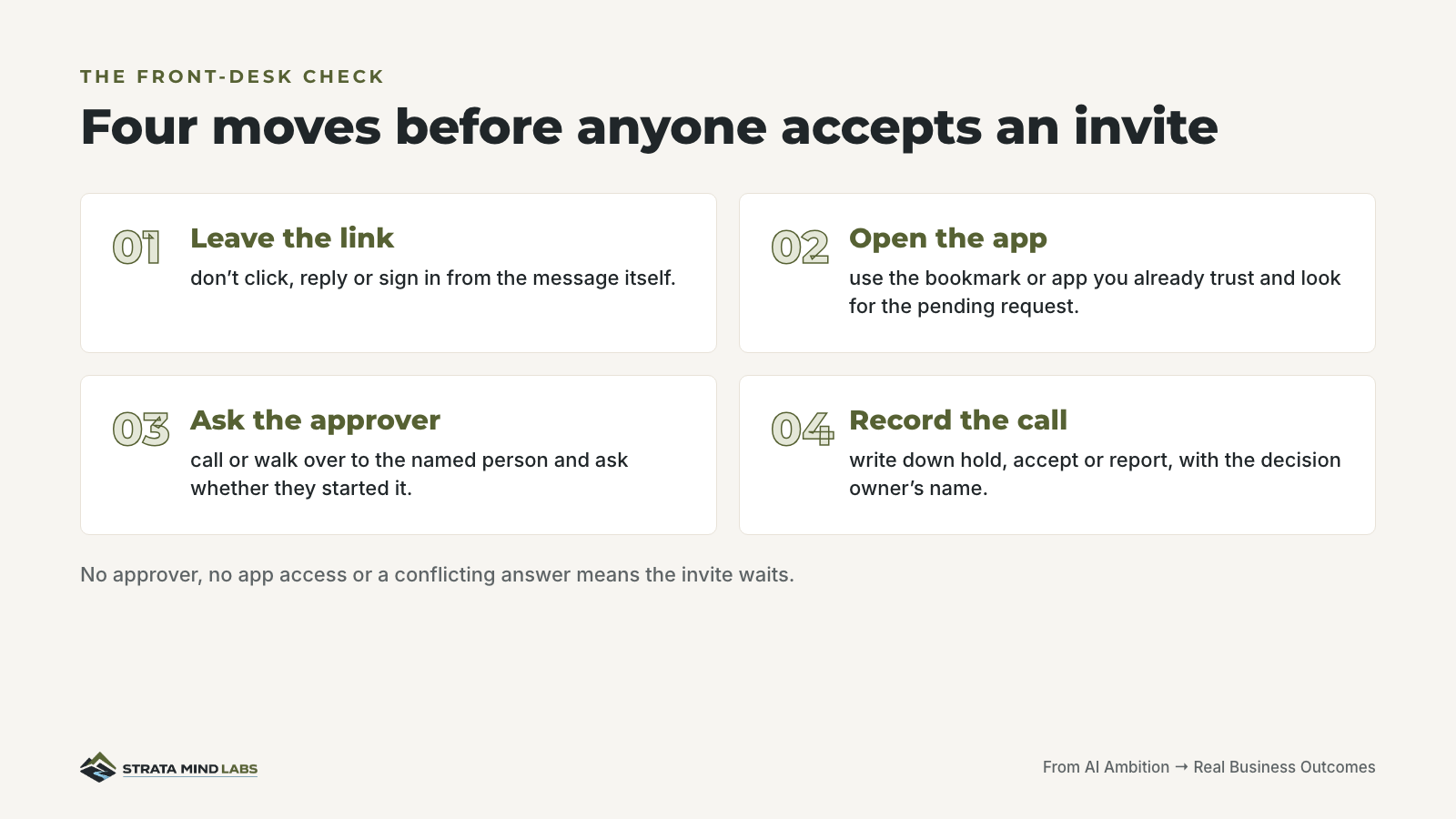
The roles are ordinary. The office manager receives the message. The owner or a designated administrator approves account invites. The vendor's app, opened the usual way, is where the request gets checked. A paper card or an existing spreadsheet holds the record, and the vendor's official support channel handles anything that won't reconcile.
The stop rule matters more than the four moves. A missing approver, no access to the app or an answer that conflicts with what the email says means nobody accepts anything. The invite waits.
One card per request
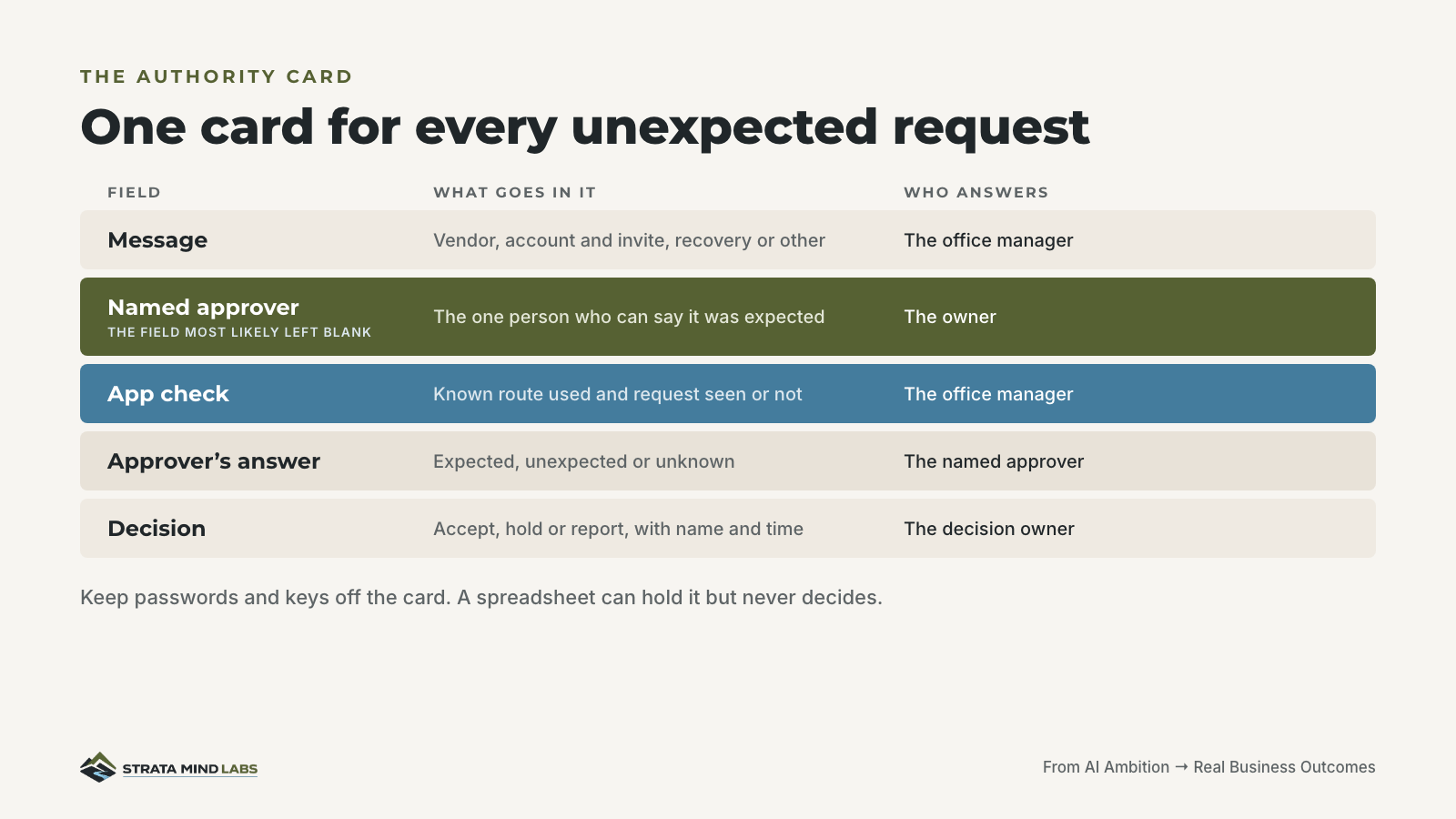
Run the first session on a synthetic request so no customer data goes near it: "An invite appears for a new office employee, but no hiring request is on the work list." Fill one card with the approver's name, the known app route and the support route. Have the approver call the decision.
Then read the card. Does it show how the request was checked and who decided? If either line is blank, fix the route before you treat the process as usable. A completed dry-run card proves the shop can run the check once. It doesn't prove anyone will spot a fake.
Five prompts to run this week
Run these in order in the AI tool you already use, with the synthetic scenario only and no passwords, keys or customer data.
Map the request path
Copy this prompt
Using only this synthetic scenario, map the path of an unexpected account invitation in a small shop. Roles are office manager, owner and account administrator. The office manager receives an invite for a new employee but finds no matching work request. List the next checks in order. Do not assume the email is genuine. Do not ask for passwords or customer data. Mark any missing role or account access.
What this should tell you: Look at the role list and the order of checks, and flag any step that clicks the email link, treats the message as proof or leaves the approver unnamed. The path works only when someone can find the approval owner and reach the account by a known route. If the owner or the app route is missing, pause and fill that gap first.
Define the record
Copy this prompt
Build a one-page record for the synthetic invitation. Include date, vendor, message type, expected requester, named approver, independent app check, direct approver answer, decision, decision owner and escalation case. Leave unknown values blank. Do not include passwords or Secret Keys.
What this should tell you: Check the fields for gaps, especially the independent route and the human decision, and treat any filled-in guess as missing evidence. Pick paper or a spreadsheet you already have for the dry run. Don't buy a system to capture ten fields.
Test the exception
Copy this prompt
Apply the record to this synthetic case: the email says an invite was approved, the account app shows no pending request and the named approver cannot be reached. Give the office manager a safe holding action and state exactly what must be confirmed before acceptance. Label all unknowns.
What this should tell you: You want a hold decision and an independent support route. Reject any answer that accepts the invite on the strength of the email. This is the case that matters, because the pressure shows up when the approver is on a job site, so decide who covers and whether the access can wait.
Write the desk instruction
Copy this prompt
Draft a short internal instruction for an office manager who receives an unexpected vendor invite or recovery message. Use this exact policy: leave the link alone, open the app by the known route, ask the named approver directly, record the decision and contact official vendor support for an unexplained request. State that the worker must never enter a password or Secret Key from a message prompt. Do not imply an actual incident at this shop.
What this should tell you: Check for one clear stop point and one direct human contact, and strip out any invented incident or guarantee. The owner approves the wording and puts it where the office manager already looks for procedures.
Challenge the dry run
Copy this prompt
Review the synthetic authority card and desk instruction as a skeptical shop owner. Identify missing evidence, unclear authority, steps that depend on a message link and the situation where the process must stop. Return a short correction list. Do not claim a security outcome or assign a risk score.
What this should tell you: Every correction should point to a field, a role or an action the shop can fix. Generic reassurance means the review is incomplete. The owner decides whether the card is ready now or whether access and coverage get fixed first.
What to do this week
A fair limit on all this
The incident facts here are 1Password's own statements in its own post. One vendor disclosure tells you what that vendor says happened. It doesn't tell you how often anyone is getting fake invites, and it doesn't show that your shop has received one.
The four moves, the card, the prompts and the 20-minute estimate are Strata Mind Labs proposed practice. They haven't been measured at a client. No reduction in incidents or time saved is assumed, and a completed card says nothing about phishing detection accuracy. If a message asks for a password or a Secret Key, the answer is already no.
CIO Question of the Day
When you ran the dry run, how long did it take the office manager to reach the named approver?
Sources
- 1Password. (2026, November 25). Update on a security incident involving 1Password's backend systems. 1Password Blog. Retrieved November 26, 2026, from https://1password.com/blog/update-on-nov-2026-security-incident
- 1Password. (2026, March 16). How to keep your 1Password account secure. 1Password Support. Retrieved November 26, 2026, from https://support.1password.com/account-security/
- Federal Trade Commission. (2022, September). How to recognize and avoid phishing scams. Consumer Advice. Retrieved November 26, 2026, from https://consumer.ftc.gov/articles/how-recognize-and-avoid-phishing-scams
- Cybersecurity and Infrastructure Security Agency. (n.d.). Recognize and report phishing [Archived content]. Retrieved November 26, 2026, from https://www.cisa.gov/secure-our-world/recognize-and-report-phishing
The email can ask. Only a person you can name gets to say yes.
New briefings land as soon as the signal is worth your time.