
The AI Spend Brake Needs a Restart Plan
A paper check for what a Google Cloud spend cap can pause, who hears the alert and who gets the work moving again
Executive decision: Google Cloud now offers spend caps for eligible services. A cap can pause usage at a threshold, but the owner still needs to know what keeps billing and who can restore service. Approve the paper check now. Approve a supervised sandbox test only after the charge map, the alert recipient and the exception path are complete. This is a proposed operating recommendation, not a documented customer outcome.
A spend cap that pauses your AI work on a busy afternoon is an outage you scheduled. Someone should know how to end it.
The signal this week
On October 30, 2026, Google Cloud announced that spend caps in its budgets tool are generally available. The post, by Google senior product manager Shruthi Nambi, says a cap protects workloads from runaway costs without deleting resources. For AI services, Google says a cap triggers within minutes of usage, based on estimated live costs. That timing is Google's claim, and this briefing found no independent test of it.
Google's documentation names four eligible services today: the Gemini API, Gemini Enterprise Agent Platform (formerly Vertex AI), Cloud Run and Cloud Run functions. It says more will follow. A cap covers one project and one of those services.
Now hold that against a company card statement. A statement mixes per-seat subscriptions with usage-based charges, and the two need different controls. Google's documentation puts subscription costs outside what a cap covers. If your AI spend is mostly seats, a Google cap touches none of it. Other vendors' controls differ and weren't reviewed for this briefing.
What the sources show and don't
Two Google pages carry the facts: the announcement and the product documentation. Both are the vendor describing its own product. IT Brief UK covered the July public preview, and its product details match Google's with no independent testing cited. No source this briefing opened reports a customer result or a measured saving.
The documentation is useful mainly for what a cap leaves running. Enforcement isn't instant, and it uses estimated gross cost, which excludes savings and credits. Requests already in flight finish and accrue charges. Fixed usage on persistent resources keeps going, and the announcement says requests on reserved Provisioned Throughput keep serving traffic. Google says you remain responsible for overage costs from reporting latency.
Alerts go by email at 50%, 80% and 100% of the cap to billing administrators and project owners. Google says the alerts and recipients can't be customized.
One more detail comes from Google's March 16 post on caps inside AI Studio. It describes a delay of about ten minutes and says users are responsible for overages in that window. The documentation adds that a Gemini API cap covers both AI Studio and the Cloud Billing console for a project, and whichever sees the cost first triggers.
Map the charges first
The charge map comes before any console setting. Pull the last company card statement and the current list of AI tools. The owner and the office manager put each charge in one row. A subscription goes on the sheet even though no cap can stop it.
Unknowns stay marked unknown. A guessed amount or owner is worse than a blank, because someone will trust it.
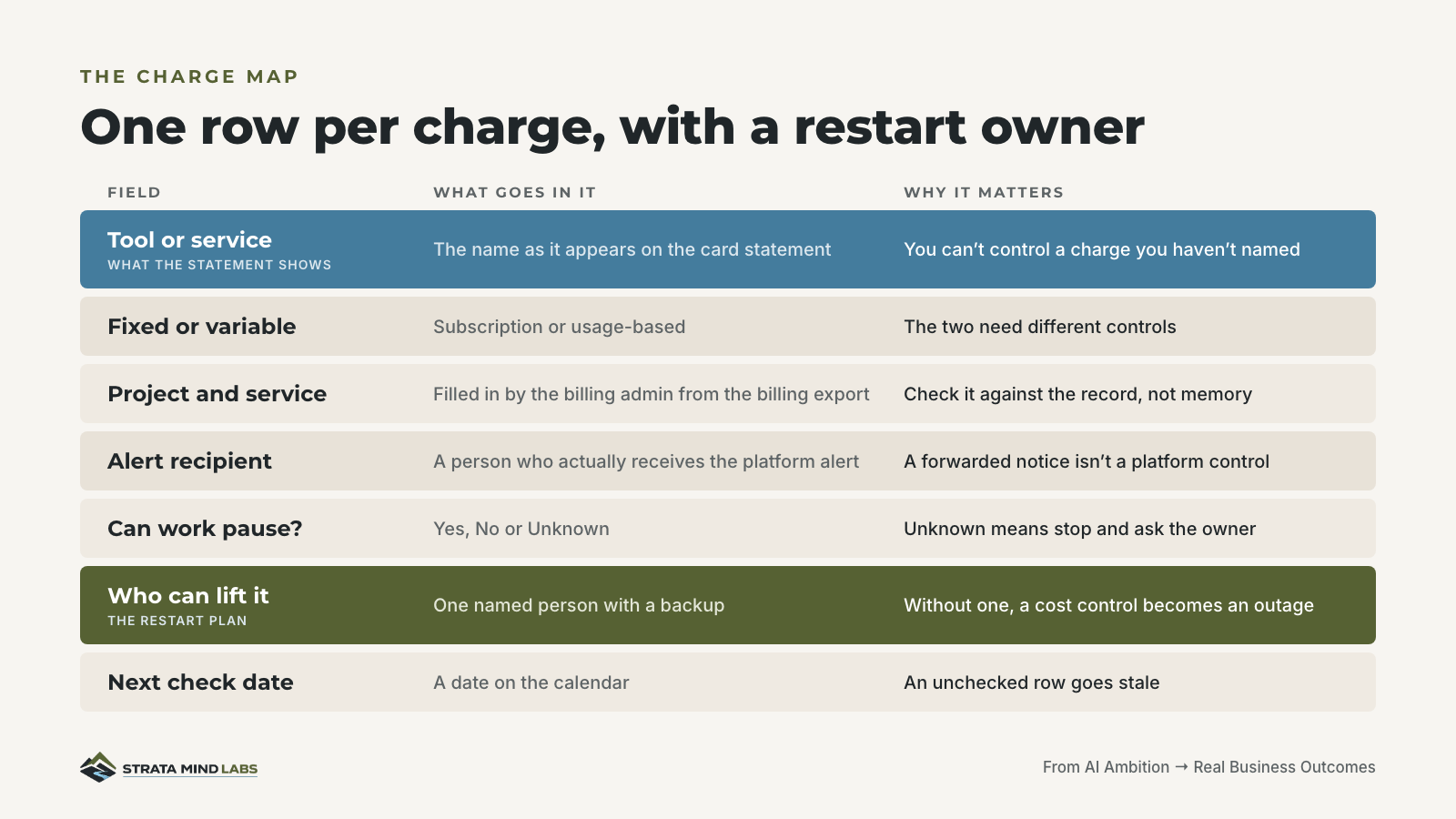
Then the billing admin takes each usage-based charge and checks it against the billing export: which project, which service and whether that service is on Google's current eligibility list. The list is short and Google says it will grow, so read the current page and not this one.
Who restarts the work
Pausing is the easy half. Google says a triggered cap halts new usage of that service in that project and leaves resources and data in place. Getting back takes one of two paths. The cap resets on its own at the start of the next budget period, which is typically the first of the month. Or a person lifts it by hand.
On a manual lift, the documentation says service returns right away, though it can take up to an hour to fully normalize. It also says a lifted cap won't trigger again for the rest of the period unless someone raises the amount. That rule matters more than it looks. After a lift, the brake is off until month-end. Whoever lifts the cap should write down the estimated spend at that moment, the reason and the next time anyone will look. Until the amount is raised, that note is the only brake left.
Three people each have a job here. The billing admin checks eligibility and receives the platform alert. The office manager records which work would stop and calls the decision maker. The owner decides whether a sandbox cap is worth the interruption risk. This is Strata Mind Labs proposed operating practice, not an external standard.
The office manager may keep the sheet, but the alert has to reach someone Google actually sends it to. If the person who would act isn't a billing administrator or project owner, set up a handoff with someone who is. A forwarded email works as a handoff. Don't record it as a platform control.
The person named to lift the cap also needs the billing permission to do it, and Google's documentation names the specific permission. Check it against the real role list and not the job title.
The first session
Plan on 45 minutes for the paper check. That's a planning estimate, not a measured result. It's long enough to expose the unknowns and too short to claim a deployment or a saving. You need the card statement, the AI tool list and access to the billing console.
The first action is to fill one row for every AI charge, with the columns shown in the graphic above and a next check date on each. Mark what you don't know. Don't fill gaps from memory.
If the paper check comes back clean, choose one noncritical sandbox that uses one eligible service. Google's own advice is to start with strict, low-dollar caps on developer sandboxes, testing clusters and experimental AI agent playgrounds. The billing admin sets a small cap from the shop's own test budget, watches the 50%, 80% and 100% alerts arrive and records the pause. The amount is a local decision, not a vendor benchmark.
Keep customer work out of it. A customer workflow is a poor place to find out whether recovery works. If the project already has a budget, note its settings before changing anything, because Google says deleted budgets can't be recovered.
A pass is a complete row, a reachable alert recipient and an observed pause with a documented recovery path. Record the actual time and the actual charges after the test. A missed alert or a surprise fixed charge becomes an exception owned by a named person.
Five prompts to run this week
Run these in order and hand each one redacted records only, such as the card statement and a billing export with customer names removed. A person checks every result against the source. The sequence below shows how each step feeds the next.
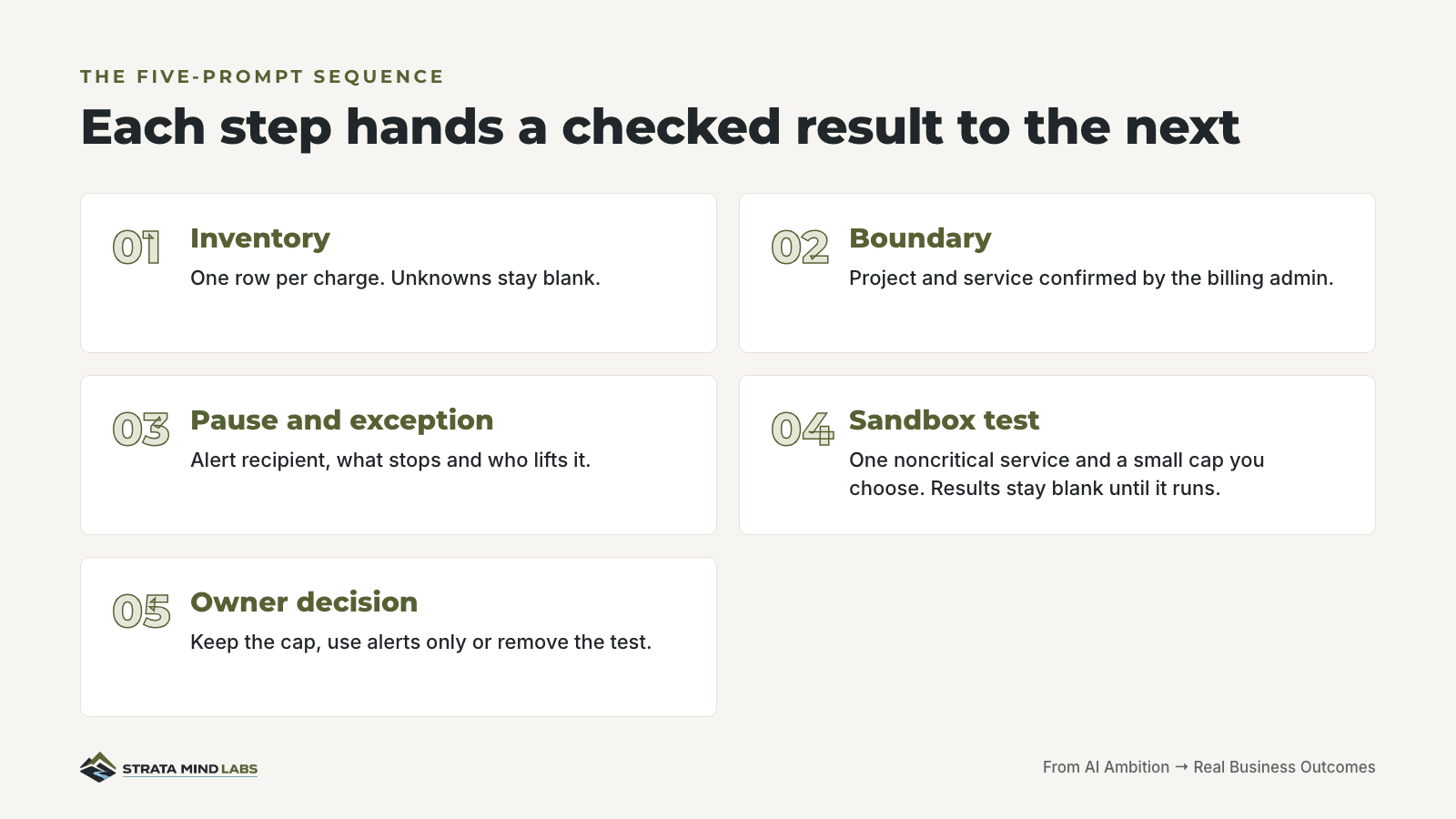
Inventory the charges
Copy this prompt
From this redacted card statement and AI tool list, create one row per charge with tool, monthly amount or usage basis, fixed or variable billing, user and unknown fields. Do not infer an amount or owner. Mark missing evidence.
What this should tell you: which charges need a platform control and which need a subscription decision. Check every row against the statement and flag duplicate charges or a missing owner or billing type. Decision: continue only when the statement lines reconcile or the missing lines are assigned to someone to check.
Map the control boundary
Copy this prompt
For each variable charge, use the supplied redacted billing export to identify project, service and whether the service appears on Google's current spend cap eligibility list. Cite the export row. Leave unknowns blank. Do not treat a subscription as capped.
What this should tell you: a cap covers a narrow billing boundary, so a broad tool name tells you nothing. Check project and service IDs against the export and Google's current documentation, and flag any eligibility claim the sources don't support. Decision: test only a line whose project and eligible service the billing admin has verified.
Name the pause and exception
Copy this prompt
For the verified sandbox line, draft a one-page authority card listing the default alert recipient, what work pauses, the person allowed to lift the cap and a manual continuation path. Use only the supplied roles and procedures. Mark unknown roles.
What this should tell you: whether the recipient is really a billing administrator or project owner and whether the restart role holds the permission. Flag missing backup coverage. A cost control becomes an outage when nobody owns the exception. Decision: don't set a production cap while the recipient or the restart authority is unknown.
Plan a supervised sandbox test
Copy this prompt
Draft a supervised test plan for one noncritical sandbox. Include a locally approved cap amount, observation of the 50%, 80% and 100% alerts, pause behavior, actual charges and recovery time. Label all values to be measured. Do not invent results.
What this should tell you: whether the plan uses an eligible service, avoids customer work and leaves every measurement blank until the test runs. Documentation describes intended behavior, and only a supervised test shows how your account behaves. Decision: run the test after the owner approves the amount and the interruption path.
Make the owner decision
Copy this prompt
Using only the completed charge map, authority card and observed sandbox test, prepare three options: keep the sandbox cap, use alerts only or remove the test. State what fixed charges remain and what customer work would be interrupted. Separate observed facts from inference. Recommend a next review date without inventing savings.
What this should tell you: whether each observation traces to the test record. Flag any savings claim that lacks invoices or usage evidence. The owner is choosing a control with an interruption cost, not buying a spending guarantee. Decision: the owner picks an option after reviewing the actual alert and recovery record, then assigns the next billing review and records who may change the cap.
The sequence has paid off when the charge map exposes a usage-based charge you can control and a named person who owns the exception. Missing billing data is uncertainty to resolve, not a verdict. The next decision is whether to run one supervised sandbox test or stay on alerts only until the gaps close.
The owner decision
Authorize the paper check now. A sandbox cap follows once the eligible service, the default alert recipient and the restart path are verified. Customer-facing use is a separate decision about interruption cost.
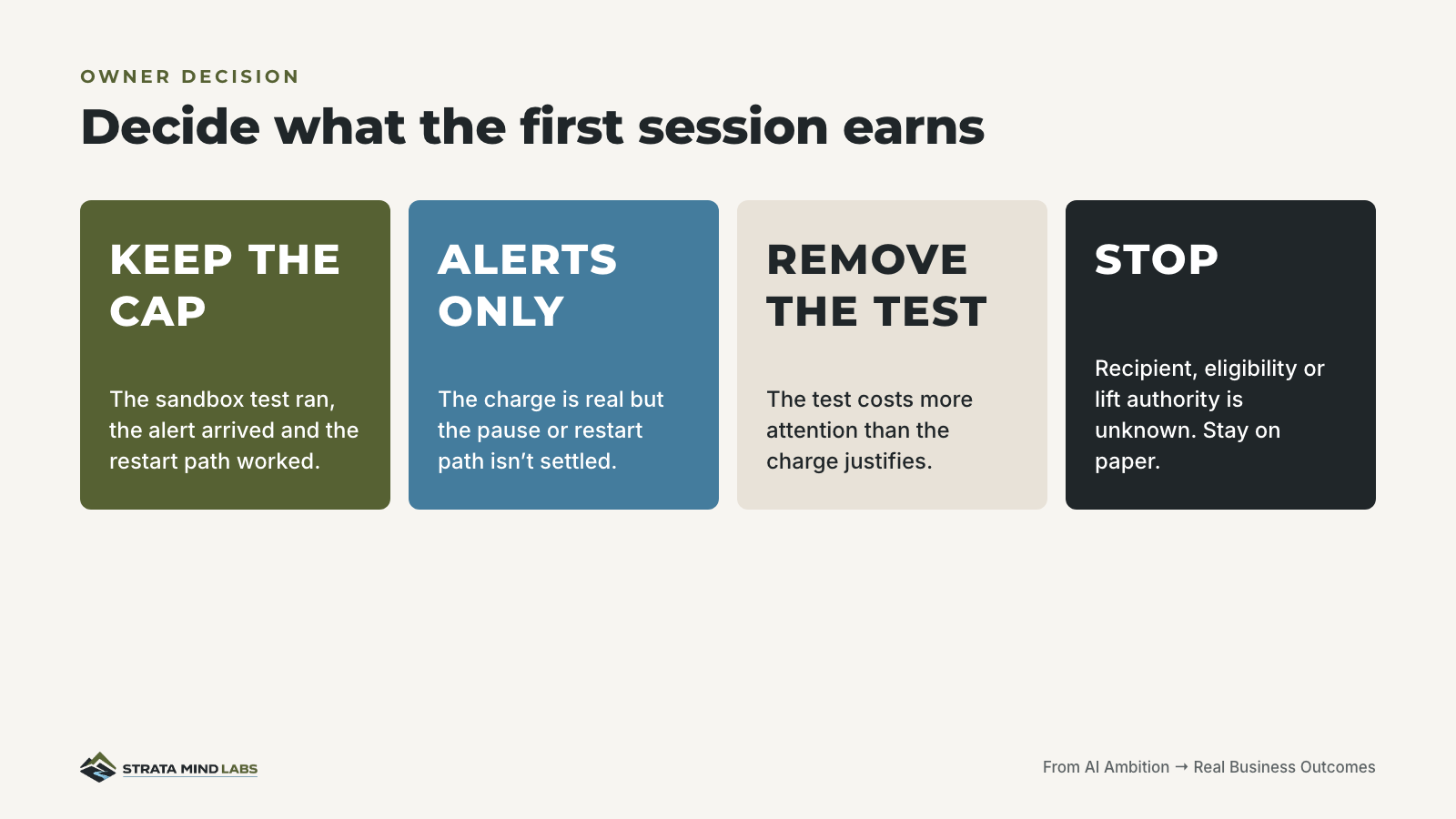
The strongest counterargument is interruption risk plus possible overage. A cap pauses work you may need, and Google's documentation says overage costs from reporting latency stay with you. A cap is no guarantee that the final invoice stops at the threshold.
What to do this week
A fair limit on all this
Everything about how a cap behaves comes from Google's announcement and documentation. Both are the vendor describing its own product. This briefing found no independent test, no customer outcome and no measured saving, and IT Brief UK's July coverage matches Google's details without adding testing. The eligible service list will change as Google adds services, so check the current page.
Cap amounts are local choices and the 45-minute figure is a planning estimate. The charge map, the authority card and the five prompts are Strata Mind Labs proposed practice with no external validation. No return on any of this is assumed.
CIO Question of the Day
Which charge on your last company card statement could a platform cap pause, and who would you call to lift it?
Sources
- Nambi, S. (2026, October 30). Google Cloud spend caps now generally available. Google Cloud Blog. https://cloud.google.com/blog/topics/cost-management/google-cloud-spend-caps-now-generally-available
- Google Cloud. (n.d.). Manage spend cap budgets. Cloud Billing documentation. Accessed November 3, 2026. https://docs.cloud.google.com/billing/docs/how-to/budgets-spend-caps
- Stephen, J., & Babar, N. (2026, March 16). More transparency and control over Gemini API costs. Google. https://blog.google/innovation-and-ai/technology/developers-tools/more-control-over-gemini-api-costs/
- Mitchell, S. (2026, July 29). Google Cloud adds AI spend caps & early anomaly alerts. IT Brief UK. https://itbrief.co.uk/story/google-cloud-adds-ai-spend-caps-early-anomaly-alerts
Know who can lift the cap before the cap needs lifting.
New briefings land as soon as the signal is worth your time.