
Give the AI Helper an Owner and a Stop Path
A practical stop drill for small business operators
Executive decision: A stop control has a reach. The owner needs to know which helper actions it can interrupt and who handles work left half-done. For one helper, approve a draft-only map this afternoon. Authorize a live test only after the action permissions and stop route are shown.
Pressing stop on an AI helper is easy. Knowing what it leaves behind takes a drill.
The signal this week
On November 3, 2026, CrowdStrike published a post introducing AI Kill Switch, a control inside its Falcon Guardian product. According to the post, a security team activates it and connected AI gateways then block agents' access to the AI models that drive their decisions and actions. The gateway can be CrowdStrike's own Falcon AI Gateway or a third-party one.
That is the current mechanism. It cuts the helper off from the model. The post also describes a wider plan to contain agents at the endpoint, in the cloud, through identity, inside SaaS apps and in the browser. CrowdStrike labels that plan as coming, and its own disclaimer says unreleased features are still in development and customers should base purchase decisions on what's available now.
All of this is the vendor describing its own product. It isn't a measured result from a small business.
The gap matters to an owner who hears "kill switch" and pictures one button that unsends an email or undoes a changed booking. Our reading of a gateway-level control is that it stops what the helper decides next. A message already sent or a record already changed may need its own recovery. That's an inference from how the control is described, not a statement from CrowdStrike.
What the evidence adds, and where it stops
In May 2026 six national cyber agencies from Canada, Australia, the United States, New Zealand and the United Kingdom put out joint guidance on the careful adoption of agentic AI services. The Canadian Centre for Cyber Security's summary page says the guidance recommends a layered defence and strict access controls. That page doesn't spell out approvals, stopping or recovery, and we read only the summary page, not the full document.
Dynamic Business reported on October 21 that the guidance warns against giving an agent broad or unrestricted access. Its two examples are a calendar bot that sees all meeting data and an email assistant that can write to any inbox. The same article says the guidance favors staged rollouts that begin with clearly defined, low-risk tasks. It also reports that Australia's National AI Centre asks for clear points where a person can pause, override, roll back or shut a system down.
That's one outlet's account. To check it, read the guidance itself on the Australian Cyber Security Centre's site at cyber.gov.au. Two of its pages did not load when we tried them for this piece, so nothing here rests on them.
The strongest argument against all this is fair. A shop that uses only a drafting assistant doesn't need a gateway project. If the tool can't act, keep the card short and keep the helper draft-only. The decision changes the day it can send, delete, pay or edit records.
Authority first, then reach
What follows is a proposed Strata Mind Labs operating framework. Start with authority, then map reach.
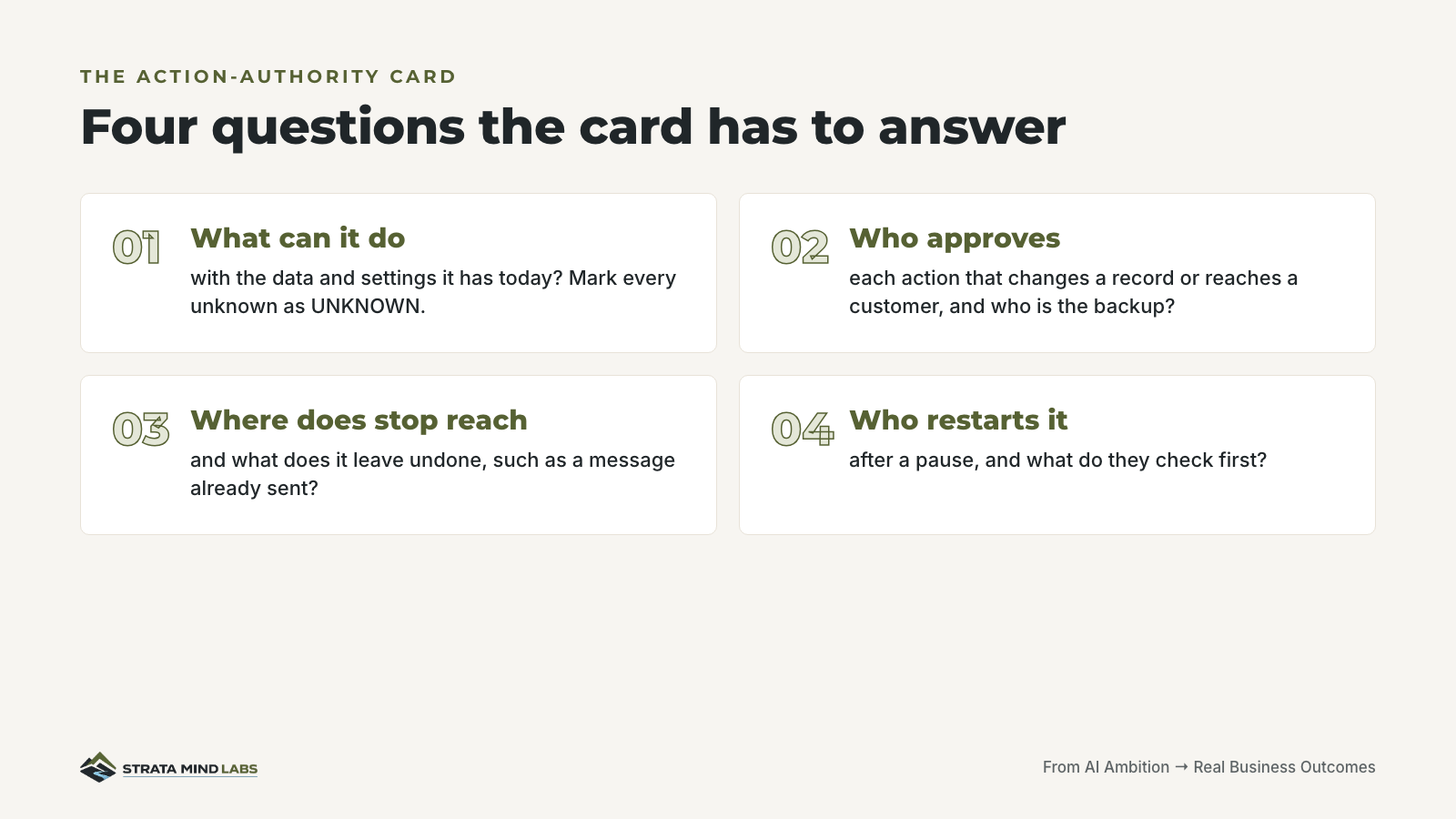
The action-authority card is one page. It records the helper's task, the data it can see, the actions it may take, the approver, the stop control, the backup person and the restart owner. An unknown route goes on the list of things to chase down. It isn't a reason to guess.
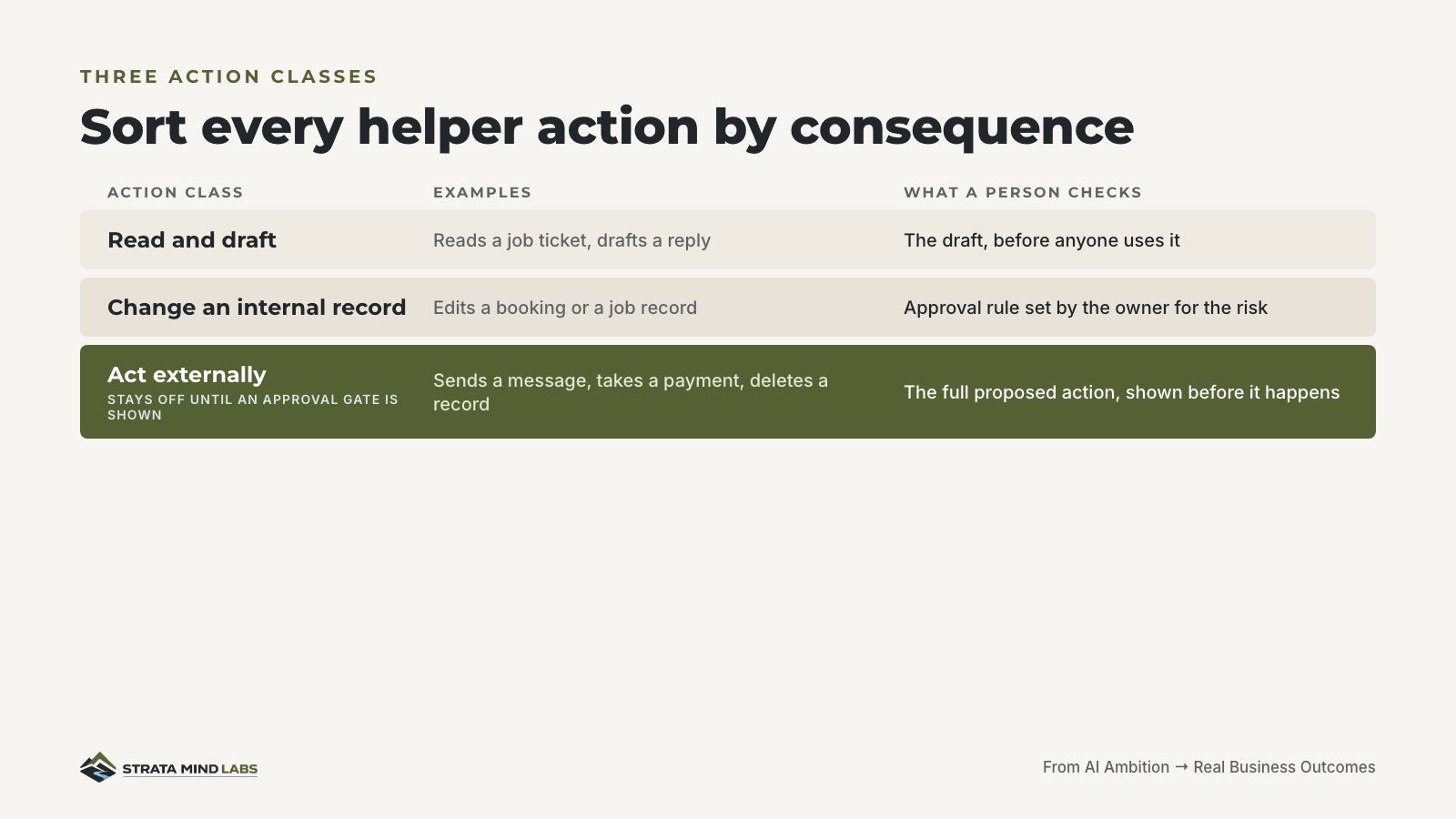
For the first pass, sort every action into one of three classes: read and draft, change an internal record, or act externally. The owner picks the exact approval rule based on business risk. A person reviews the full proposed action before any send, payment or deletion.
Those card fields boil down to four questions. If you can't answer one of them from the tool's own settings, write UNKNOWN and go find out.
A first session for this afternoon
What follows is a proposed reconstruction, not a client deployment. An independent service shop uses one helper to draft appointment replies from a redacted job ticket. Nothing here describes a real shop or a measured result.
You need the helper's permissions page, a blank spreadsheet and one ordinary job ticket with the customer details removed. No new software. Put the owner and whoever configures the tool in the same room. Forty-five minutes is a planning estimate, not a timing anyone has measured.
Open the permissions page and fill the card from what it actually says. The expected output is a permissions map with the unknowns marked. It is not proof of safety.
Test later and only with synthetic data in a non-production task. Pause the helper, check what completed (sent mail, changed records) and write down any half-finished work. Stop if you can't verify the permission screen, the route or the approver. The exception owner contacts the provider before anyone tries a live test.
Five prompts to run this week
Paste only redacted settings and notes. Each prompt feeds the next one.
Inventory one helper
Copy this prompt
Using only the redacted settings and task description I paste, list the helper's data sources, tools and possible actions. Label every missing setting UNKNOWN. Do not assume access. Return a table with source evidence for each entry.
What this should tell you: Read the action list and the evidence column. Any inferred or missing permission should say UNKNOWN. You're finding out whether this is a drafting helper or a tool that can change operations. Decide which settings need checking directly in the tool before the card can be filled, then move to prompt 2.
Sort actions by consequence
Copy this prompt
From the verified action list I paste, classify each action as read or draft, internal change, or external action. For each change or external action, specify the exact human approval preview needed. Mark unsupported classifications UNKNOWN.
What this should tell you: Check that sends, payments, deletes and record edits sit in the higher-risk classes, each with a named approval preview. A draft can be reviewed before it touches a customer. A live action can create rework or loss. Decide which actions stay disabled until an approval gate is demonstrated, enter the approved classes on the card and move to prompt 3.
Map the stop route
Copy this prompt
Using the provider documentation and settings excerpts I paste, draw the helper's model-call route and action route. Identify each stop control, the person with access and what that control does not reverse. Label unproven paths UNKNOWN.
What this should tell you: Look for route evidence and for any direct call to the provider. Be wary of a generic claim that one switch reaches all systems, because gateway blocking applies only where traffic is connected. Decide whether a non-production stop test is safe to run. If the route is known, go to prompt 4. If it isn't, ask the provider to show it.
Design a safe pause test
Copy this prompt
Design one non-production pause test using synthetic job data. List starting state, expected action, pause point, observations, exception owner and restart rule. Do not run the test or claim a result.
What this should tell you: The plan should use synthetic data, name a checker and record half-finished work. A stop instruction helps only if people can see its effect and recover safely. Approve or reject the plan before anyone runs it. Then a person runs the approved test and writes down what actually happened.
Read the drill record
Copy this prompt
Using only the human-recorded test notes I paste, compare expected and observed behavior. List completed actions, unfinished work, missing evidence and a proposed restart checklist. Do not mark the drill passed without observed evidence.
What this should tell you: Look at the gap between expected and observed behavior and at any missing log or screenshot. That gap shows whether the stop path and the handoff to the exception owner work. Decide between draft-only, repair and retest, or a limited pilot with named approval. The owner signs the decision and schedules a permissions review after any configuration change.
How to read the full result
The value here is fewer avoidable customer-facing mistakes and a clearer recovery path. That is a proposed value, not a measured saving. Unknown permissions, missing logs and incomplete routes stay uncertain until someone verifies them.
The owner makes the call.
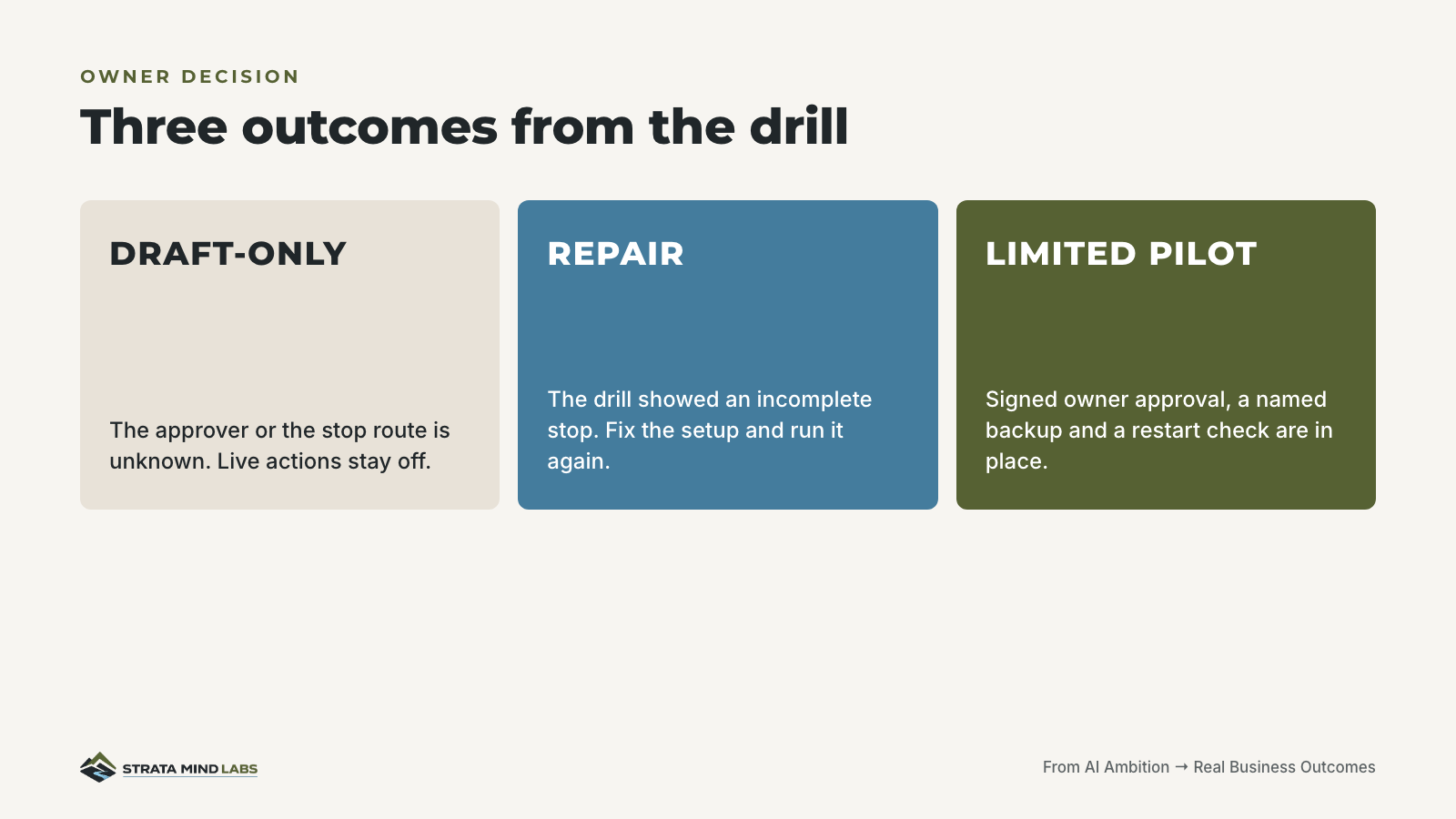
Keep live actions off if the approver or the stop route is unknown. If the non-production drill shows an incomplete stop, repair and retest. A limited pilot needs the owner's signed approval, a named backup and a restart check.
What to do this week
A fair limit on all this
One announcement is not a frequency. CrowdStrike's post tells us what it built. It doesn't tell us how often an AI helper in a small business sends the wrong message or edits the wrong record, and the sources we read contain no such data.
Vendor claims stay vendor claims until a shop tests them against its own setup.
The three action classes, the card, the 45-minute estimate and the five prompts are Strata Mind Labs proposed practice. No standard requires them and nobody has measured them. And no return is assumed. Fewer mistakes and a clearer recovery path are what the drill is for, not savings anyone can put a number on.
CIO Question of the Day
Which action could one of your AI helpers take today that you couldn't reverse from your own desk?
Sources
- Devins, M. (2026, November 3). Introducing AI Kill Switch: Taking control when AI agents go rogue. CrowdStrike. https://www.crowdstrike.com/en-us/blog/crowdstrike-introduces-ai-kill-switch/
- Canadian Centre for Cyber Security. (2026, May 1). Joint guidance on the careful adoption of agentic artificial intelligence services. https://cyber.gc.ca/en/news-events/joint-guidance-careful-adoption-agentic-artificial-intelligence-services
- Gupta, Y. (2026, October 21). Letting AI act for you? Australian guidance says start small. Dynamic Business. https://dynamicbusiness.com/news/letting-ai-act-for-you-australian-guidance-says-start-small
A stop control has a reach. Find out where it ends.
New briefings land as soon as the signal is worth your time.