
Give Every AI Action a Human Owner
A one-row authority check for the AI tools that can send, change or delete
Executive decision: An AI draft can wait for review. An AI action can reach a customer or change a record while the owner is doing something else. Choose one live action this week and record who approves it, what login it uses and who can stop it. Keep that action approval-required if those answers are missing.
A draft sits in a folder until somebody reads it. A quote that has already gone to the customer doesn't.
The signal this week
Deloitte published a survey on October 29, 2026. It spoke with 3,500 business and IT leaders from director to C-suite level across 25 countries and six industries. According to Deloitte's press release, 40 percent of companies now allow AI to execute decisions without human approval, at least to a moderate degree. Another 23 percent say accountability remains unclear when an AI system produces a negative outcome.
Read those numbers with their limits. They are self-reported by enterprise leaders. The survey didn't study small shops, so the percentages are context and not an estimate of your exposure. To check them, open the press release on Deloitte's site and read its methodology note.
The finding that matters to an owner is narrower. It points at the moment an action leaves the tool. A generated estimate is a draft. Sending it to a customer, changing the job total or closing a work order is an action with a consequence, and it can happen while the person who set the tool up is on a roof somewhere.
What the evidence adds, and where it stops
NIST's AI Risk Management Framework, version 1.0 from 2023, gives the discipline without a price tag. Its GOVERN 1.6 reads: "Mechanisms are in place to inventory AI systems and are resourced according to organizational risk priorities." GOVERN 3.2 calls for policies that define and separate the roles and responsibilities for human and AI configurations and for oversight of AI systems. NIST says framework users may apply its functions as best suits their needs. It doesn't measure a return, and neither do we. NIST's own page notes that a revised version is in progress.
Andreessen Horowitz adds a mechanism. In a piece posted October 28, 2026, its authors write that agents run on employee devices with the user's own permissions. That means a review has to include the actual account and every system it's connected to, not just the vendor's feature list. The same piece reports a survey of 100 CISOs at companies with more than 1,000 employees. 46 percent cite agents exceeding their permissions or being compromised among their biggest worries. That's a small sample of large companies, so it transfers to a shop loosely at best. a16z is also an investor in security companies and says so in the article.
The strongest counterargument is practical. Many shop tools only prepare a draft for a person to check, and a full register for every drafting feature would be paperwork with little payoff. Fair. Start with actions that reach customers, move money or alter job records. If a tool only drafts and a person sends, write that boundary down and move on.
One row per action
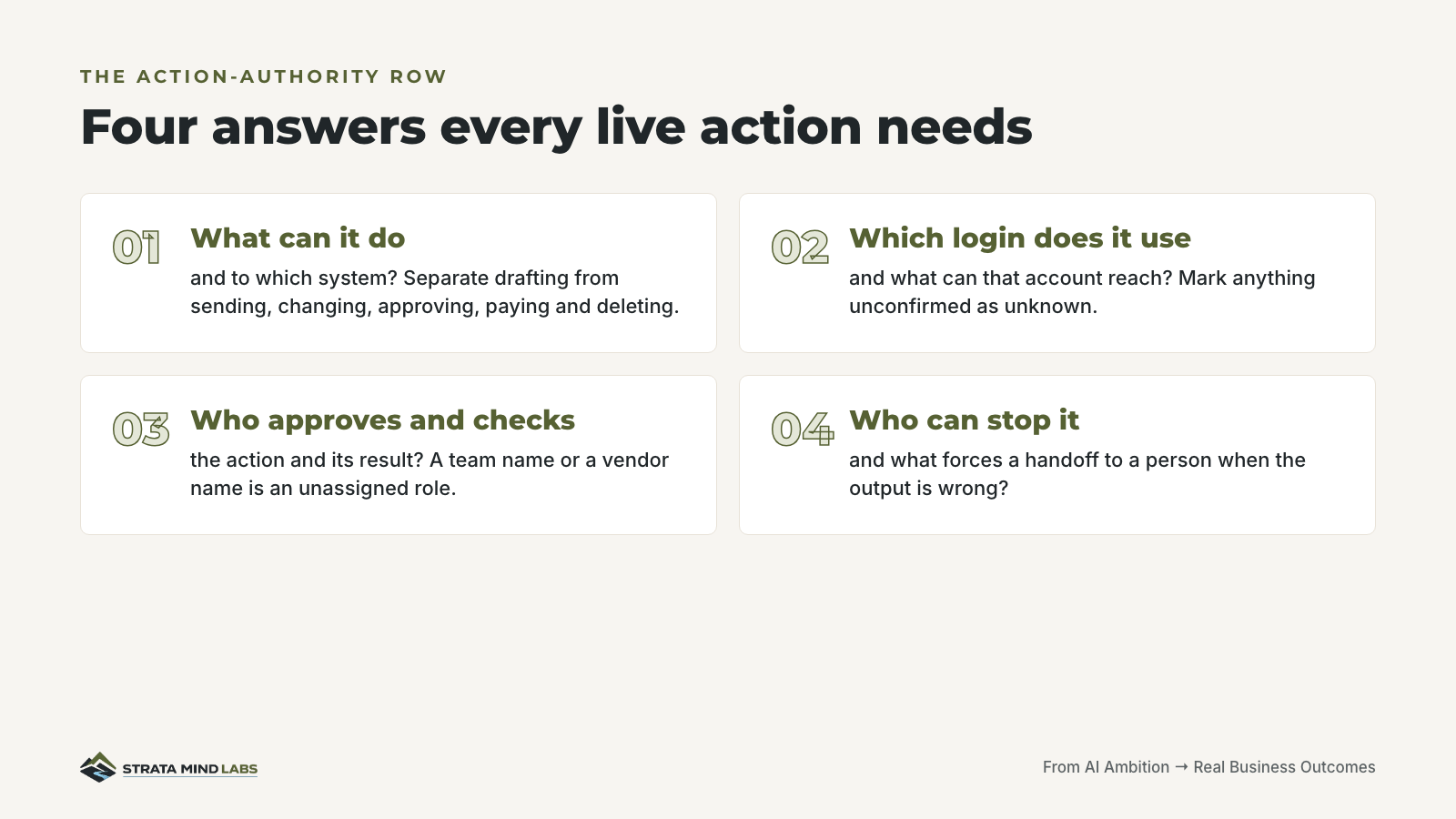
What follows is a proposed Strata Mind Labs operating framework, not a standard. For each action, record the tool, the action and its target, the login, the approving person, the person who checks the result and the stop route. Add one example of an exception that would force a handoff to a human.
The sorting question comes first.
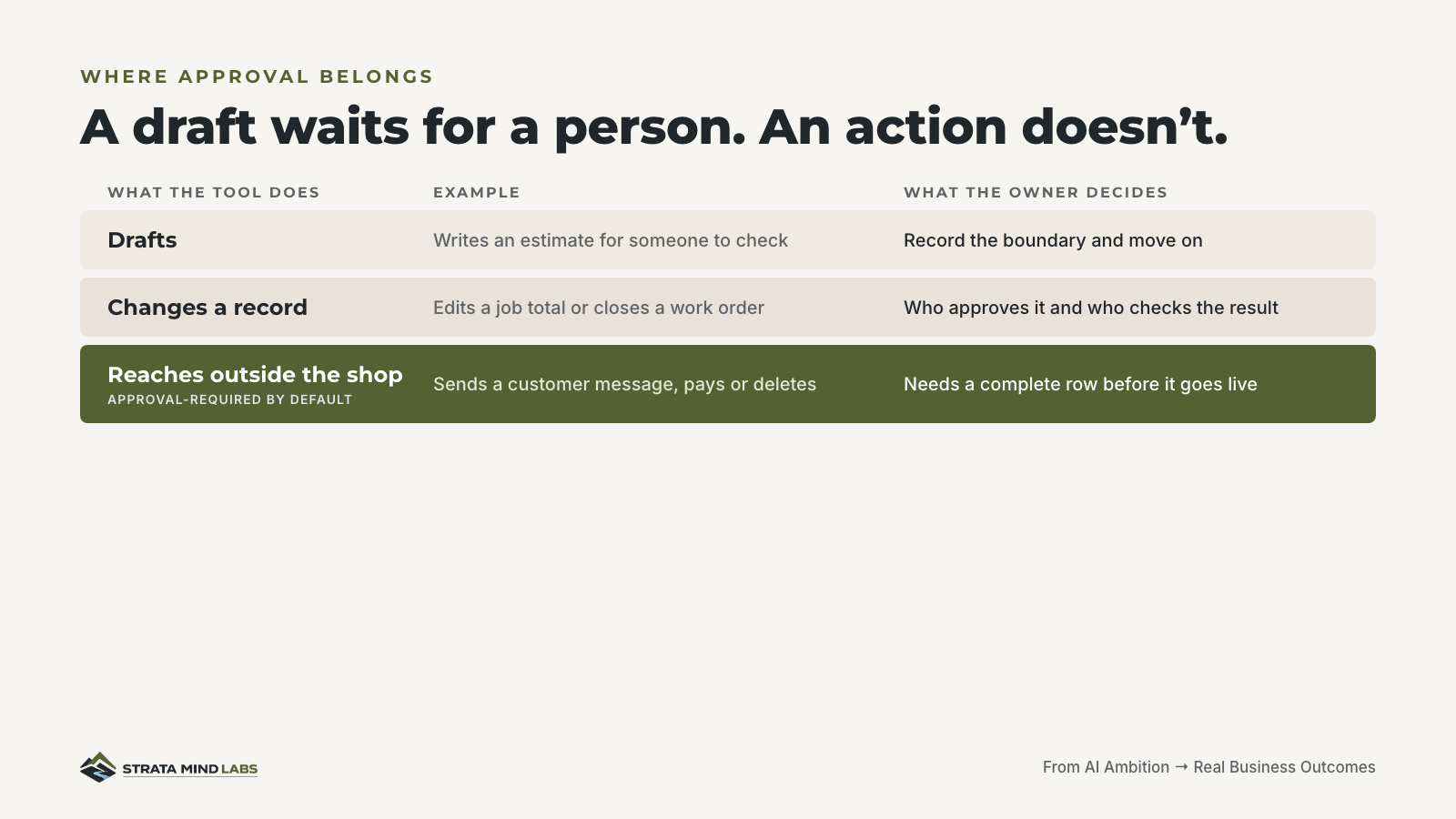
A vendor's approval setting helps only if the owner knows which action it covers and can test that it holds. A toggle labeled "require approval" tells you nothing about whether it applies to the job total or only to the outgoing email.
Every row has to answer four things.
Here's a labeled reconstruction, an illustration and not a client deployment. An HVAC dispatcher receives a draft estimate from an assistant. The office manager checks the parts and price, then sends it through the existing job system. Fine. Now suppose the assistant can send directly or change the total in the job record. The owner records that permission and sets a human approval step. Nothing here is a reported result.
A first session for this afternoon
Open the settings for one tool that touches customer messages, quotes or job records. Use a blank sheet. Write one row with these fields: action and target, login, approval point, accountable person, checker, stop route and exception.
To see what the tool can do, use a made-up job request or a redacted record. Don't expose customer data to a new service for this exercise. A first pass takes about 90 minutes as a planning estimate, not a measured time.
The first useful output is a completed row plus a screenshot or note of the actual setting. Treat an unknown permission, an unnamed stopper or an untested approval as an open item to chase down, not something to guess. A completed row is an inventory for a human decision. It doesn't prove the risk has gone down.
Then the owner decides whether to keep the action live, require approval or turn it off until the gap is closed. The office manager handles routine exceptions and escalates a wrong customer-facing action to the owner.
Five prompts to run this week
Paste only redacted settings and made-up job requests. Each prompt hands its result to the next one.
Map one action
Copy this prompt
Using this redacted description of one shop AI tool and its connected systems, list each action it can take. Separate drafting from sending, changing a record, approving, paying or deleting. For each action, name the target system and quote the exact supplied line that proves the capability. Mark anything missing as unknown. Do not infer permissions from a product name. Do not take any action.
What this should tell you: Read the action list, the quoted evidence and the unknowns. A generic feature list with no configured permission behind it is a warning. The boundary between a draft and a live action shows where an approval decision belongs. Pick one action that reaches a customer, moves money or changes a record. If none exists, document the draft-only boundary. Take the chosen action to prompt 2.
Trace the login
Copy this prompt
Given the selected action, a redacted settings screenshot description and the account list, identify the login or service account used, connected systems and available permission scope. Keep confirmed settings separate from assumptions. Flag any missing audit trail. Do not request credentials or change a setting.
What this should tell you: Look for the named account, the target systems and evidence for each permission. An unknown login or a missing audit record needs a person to go check it in the tool. The login defines what the action can reach and who can inspect what happened. Decide whether the permission is narrower than the job requires. An unknown or broad permission goes to human review before you move to prompt 3.
Assign approval and exception
Copy this prompt
Using this action boundary, propose a one-row handoff with the approving person, result checker, on-call contact and person authorized to stop the action. Include an exception path for a wrong customer message or changed job total. Label any role not supplied as unassigned. Make no changes.
What this should tell you: Read every role name and the exception route. A team label, a vendor name or a blank contact is an unassigned role. An approval box with nobody to handle the bad result is a paper control. The owner names the people or keeps the action approval-required. Carry the completed role row to prompt 4.
Test the stop route
Copy this prompt
Using only a synthetic job request and the described settings, write a tabletop test for a wrong estimate that has not been sent. State who spots it, what action stops the send, where the incident is logged and who tells the customer if it already went out. Include evidence to capture. Do not send a message or operate the tool.
What this should tell you: Check the steps and the evidence fields. A stop route that makes someone guess where the setting lives is incomplete. A dry run shows whether the named person can step in before the customer sees the error. The owner then chooses a supervised test in the real tool or leaves approval required while access gets fixed. Bring the confirmed controls and the open gaps to prompt 5.
Make the owner decision
Copy this prompt
From the completed action row, permission evidence, role handoff and tabletop test, prepare a decision note with three options: keep human approval, allow this specific action under stated limits or disable it. List missing evidence, ongoing review work and the condition that would reverse each option. Do not claim a test was run unless supplied evidence says so.
What this should tell you: Read the conditions under each option and the missing evidence. A recommendation to turn on autonomy without a named stopper or a verified permission fails review. The right level of authority follows the consequence and the shop's ability to correct an error. The owner signs one bounded decision and sets the next review date. A human then checks the real setting and keeps the evidence.
How to read the full result
The five prompts produce a decision packet, not a deployment. The business value is a clearer path to stopping a wrong action and less time spent reconstructing who was responsible. Those benefits stay unmeasured until the shop tests its own workflow.
Unknown permissions, missing names and untested stop routes stay open. The owner makes the next call.
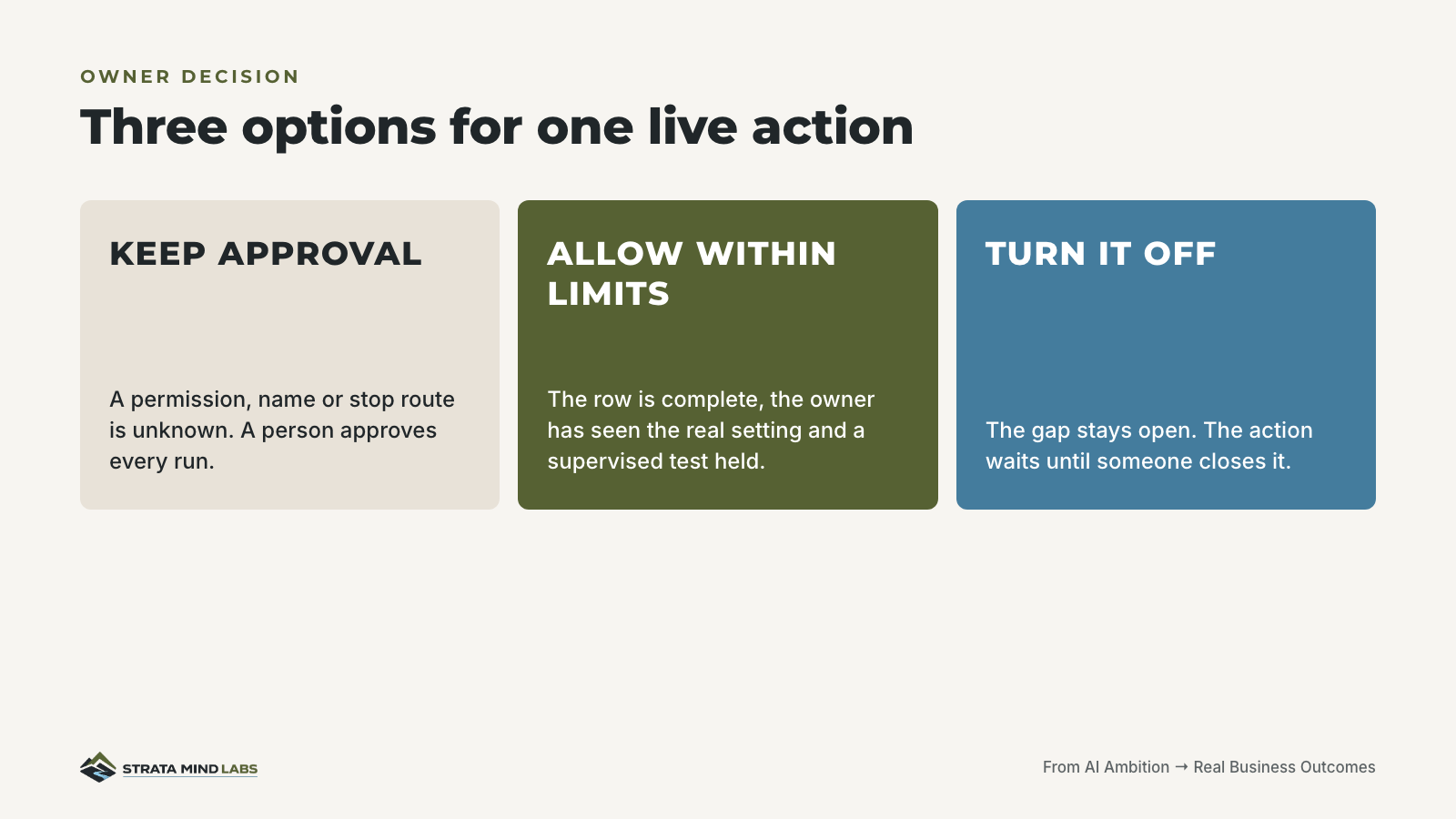
Choose one action this week and keep it approval-required unless the action, login, human owner, exception path and stop route are documented and tested. Revisit the decision after a real supervised test. No purchase is needed for the first row.
What to do this week
A fair limit on all this
One survey isn't a frequency for your shop. Deloitte tells us what enterprise leaders reported. It doesn't tell us how often an assistant in a small business sends the wrong quote or edits the wrong record, and nothing we read contains that number.
Vendor claims stay vendor claims until you test them against your own settings. The a16z piece comes from an investor and its survey covers large companies.
The one-row card, the seven fields, the 90-minute estimate and the five prompts are Strata Mind Labs proposed practice. No standard requires them and nobody has measured them. The HVAC dispatcher is an illustration. And no return is assumed. A clearer stop route and less time spent working out who was responsible are what the exercise is for, not savings anyone can put a number on.
CIO Question of the Day
Which tool in your shop can send, change or delete something today, and whose name is on that action?
Sources
- Deloitte. (2026, October 29). Enterprise AI enters an ROI reckoning: More use, uneven value, reveals Deloitte survey [Press release]. https://www.deloitte.com/us/en/about/press-room/enterprise-ai-enters-an-roi-reckoning.html
- National Institute of Standards and Technology. (2023). AI RMF core (AI Risk Management Framework 1.0). NIST AI Resource Center. https://airc.nist.gov/airmf-resources/airmf/5-sec-core/
- Zhang, S., & Colby, O. (2026, October 28). The new security agenda. Andreessen Horowitz. https://a16z.com/the-new-security-agenda/
An AI draft can wait for review. An AI action needs a human owner.
New briefings land as soon as the signal is worth your time.