
Decide What the Desktop Agent Can Open
A one-task authority card for the shop office: which Mac, which account, which apps and which person watches the first run
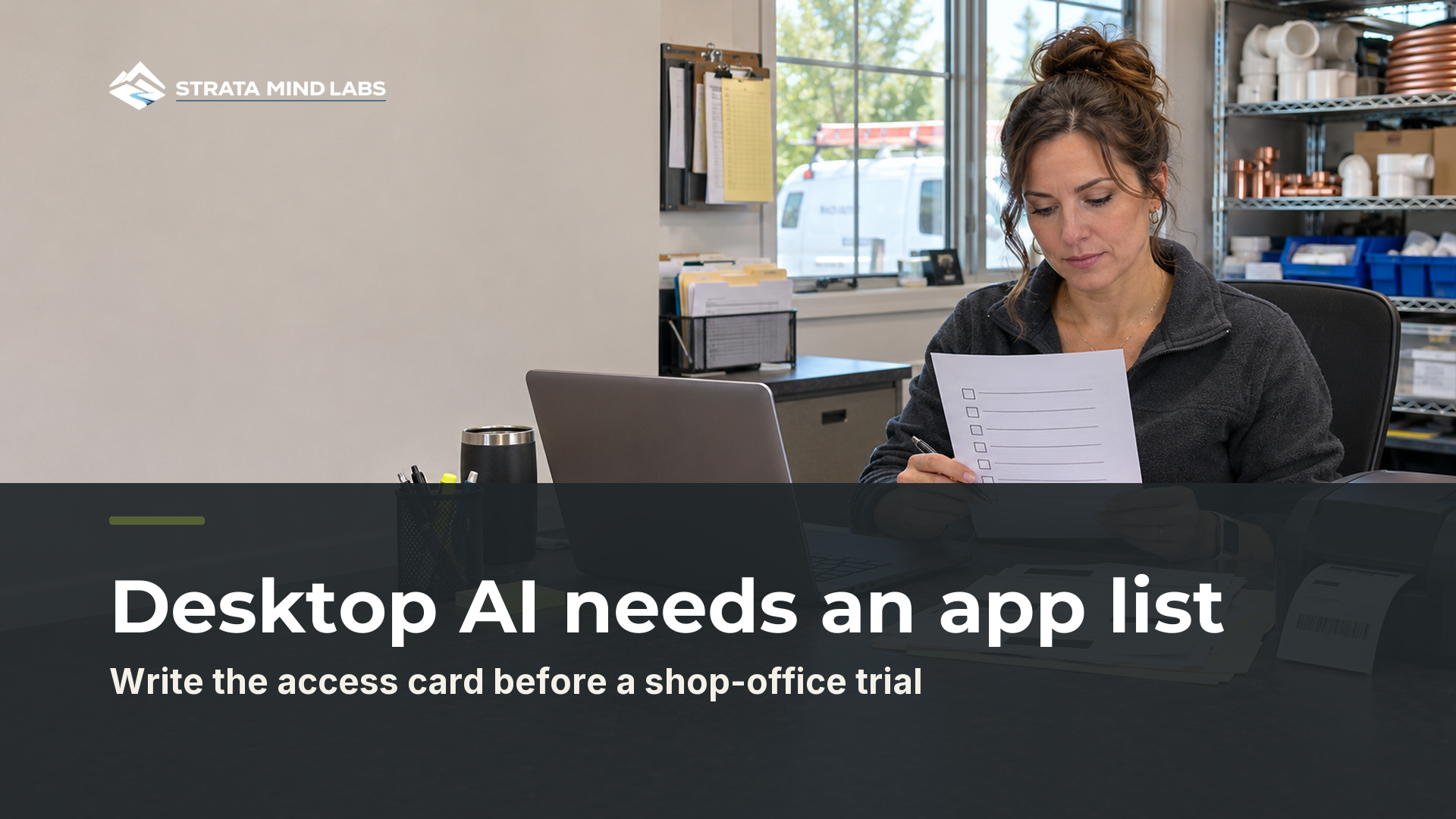
Executive decision: Google now offers a Mac assistant that can work inside your files, desktop apps and the web. Allow one supervised paperwork trial only after the device, the account, the reachable apps and the human reviewer are written down.
The quote file and the payroll app live on the same laptop. The agent only needs one of them.
The signal this week
On November 19, Google announced computer use in the Gemini app for Mac. In Google's description, Gemini can carry out repetitive tasks across local files, desktop apps and the web. It runs in an isolated background window, with a live preview in the chat, while your own screen and cursor stay free (source 1).
One of Google's own examples is squarely shop-office work. Pull weights, dimensions and addresses out of local PDFs and use them to fill in multi-box shipping quotes (source 1).
Google lists four controls. You choose which apps Gemini can access, watch every step live, pause at any time and "approve key actions before they happen." The feature is rolling out in English in the U.S. The post's footnote limits it to personal Google accounts for people 18 and over on Google AI Plus, Pro or Ultra, running an Apple Silicon Mac on macOS Sequoia 15.0 or later (source 1).
Those controls are real choices someone has to make. In most shops, the person making them is whoever installs the app. That's rarely the owner.
What the announcement does and doesn't settle
Google's post is primary evidence of what Google offers. It's vendor evidence for how the controls are described. None of the sources here tests how well they hold up, and the post reports no business results.
The account question deserves care. The Mac app itself launched in April, and Google's Workspace team said then that it's governed by the Generative AI settings in the Workspace Admin console and is on by default for organizations with Gemini enabled (source 2). Google's help page says the Mac app works with a personal account or with a work or school account your administrator has enabled (source 3). Neither page mentions computer use. The November footnote names personal accounts only. So don't assume your company Workspace login can run this feature, and don't assume it can't. Check the plan and the admin console before the trial.
The fair counterargument is that app permissions plus key-action approval may already be enough control for a small task. That can be true. The card still earns its place when the person setting up the feature isn't the person who owns the risk. Its value is a visible decision. It doesn't promise a lower risk.
Treat it like a temp at the counter
You wouldn't hand a temp the office keys and the bank login on day one. You'd hand them a job ticket: here's the quote, here's the form, ask me before you send anything.
The authority card is that ticket on one page. It names the task, the starting file and whether its data is synthetic or redacted, the destination form, the device and signed-in account, who checked eligibility, the allowed apps, the excluded apps, the write or submit step that needs a person, the first-run reviewer, the exception contact and the stop condition. A last line holds the manual baseline time and corrections, if anyone knows them.
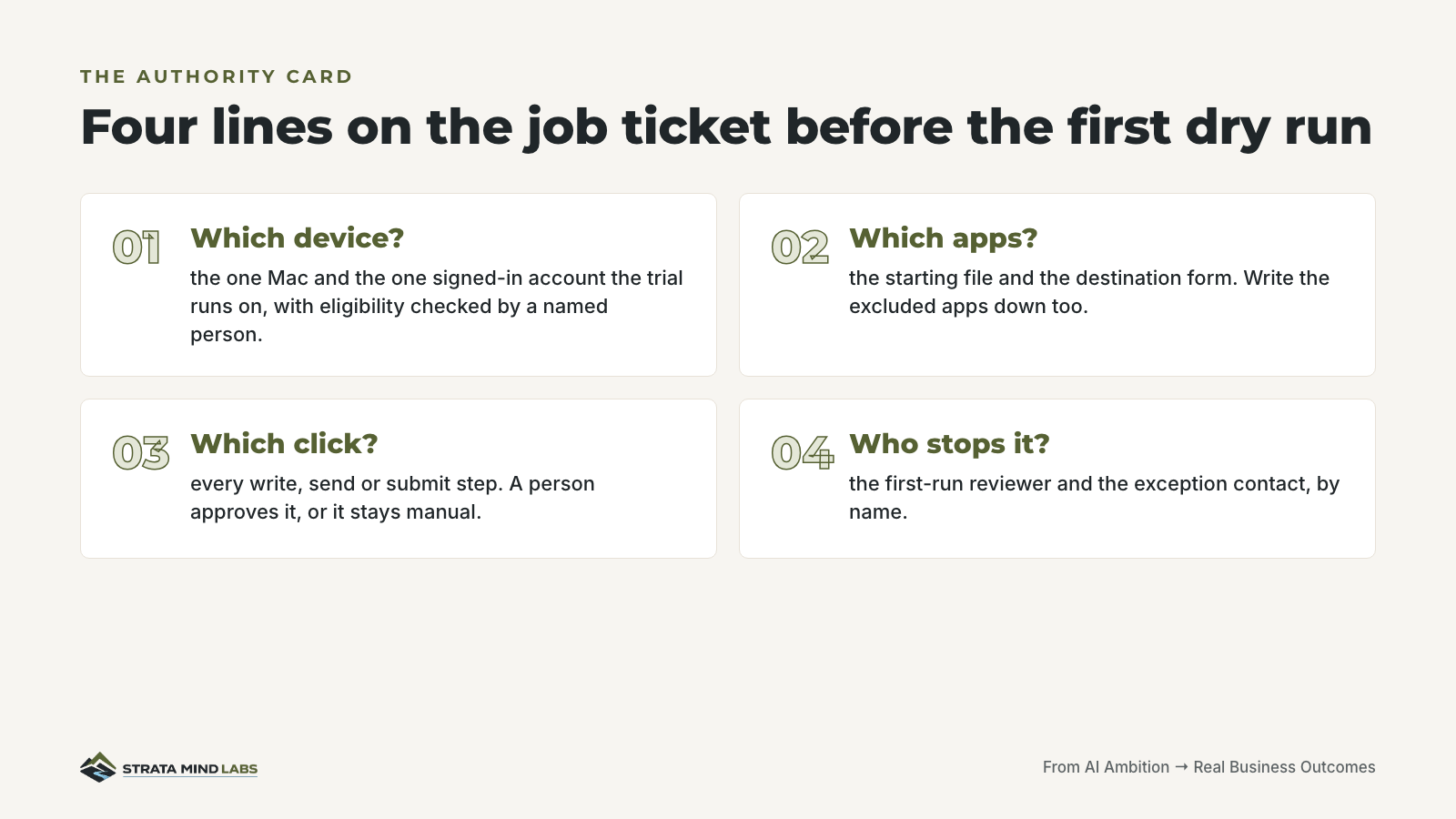
For the shipping-quote job, the boundary is short. Two things open. A lot stays closed.
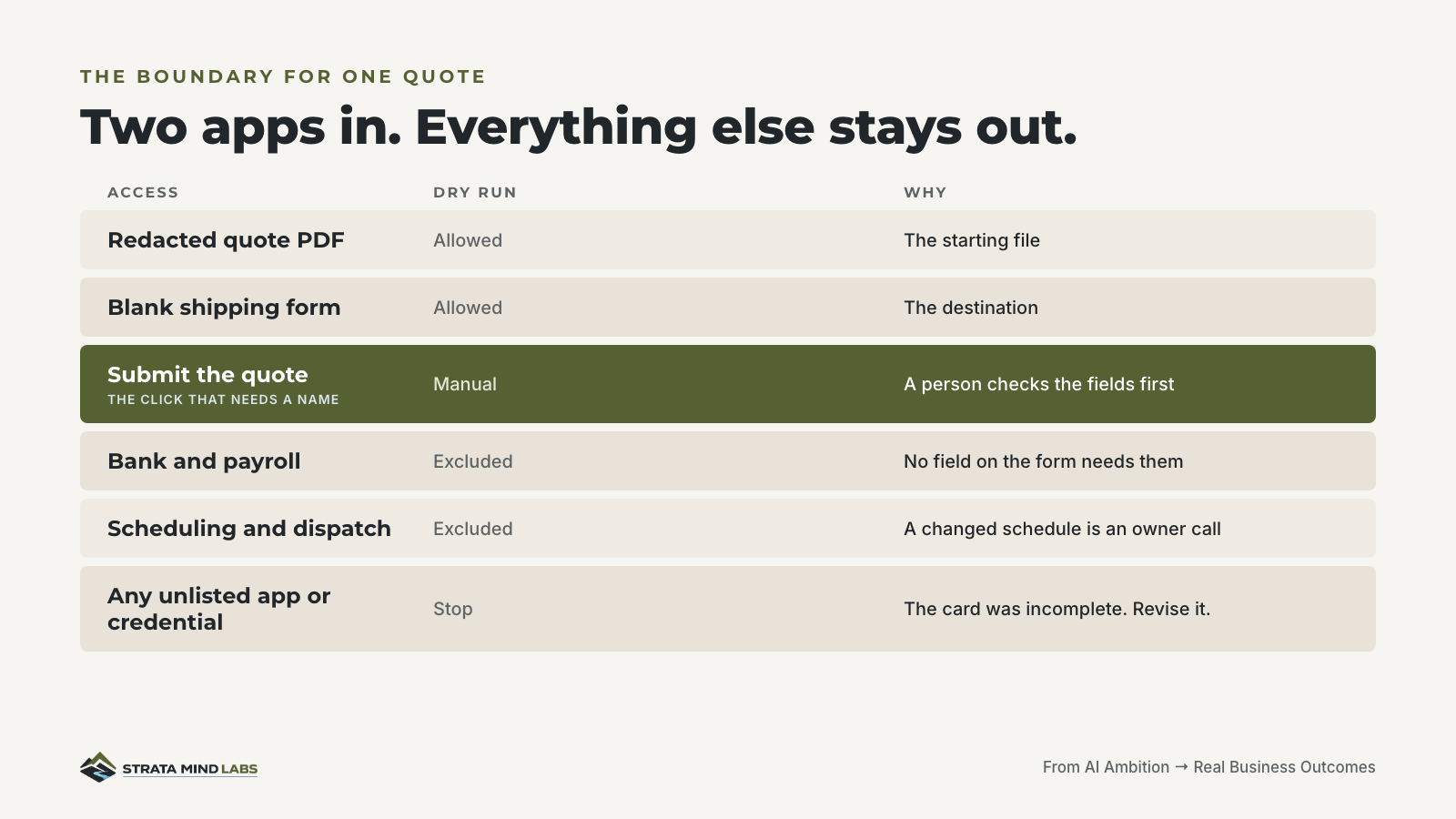
The card is Strata Mind Labs proposed practice. Google doesn't ask for it and it hasn't been validated as a control standard. The owner or office manager stays responsible for the first run and for anything that touches customer data, money or the schedule.
A 30-minute dry run
This is a labeled reconstruction built on Google's documented feature. No shop trial was run for this briefing. The 30 minutes is a planning estimate for filling the card and watching one supervised dry run, assuming an eligible Mac and account already exist. Buying a plan, installing the app and rolling it out across the business aren't in that number.
Pick one low-risk job: a quote that has to become a shipping form. Use a redacted or made-up quote. Confirm the account is eligible, write down the two apps the job needs and take banking, payroll and scheduling out of the trial. Then watch the dry run without submitting anything real.
You walk away with a completed card and an exception list. A blank owner field or a request for an unlisted app means stop. So does the tool reaching outside its allowed apps, pausing at an action nobody expected or asking for live credentials. The owner then decides whether to tighten the scope, add a human step or drop the idea.
Five prompts to run this week
Run these on redacted or synthetic details. The machine drafts. A person checks every row against the real task and makes each call.
Define the job boundary
Copy this prompt
Using only this redacted quote and blank shipping form description, list the fields to transfer. Return a table with source field, destination field, required human check and missing information. Do not infer values that are absent. Do not submit or open any account.
What this should tell you: Inspect every source-to-destination match and every empty source field. A guessed weight or address is a warning sign. A narrow job can be described without granting broad app access, and the office manager decides whether the mapping is clear enough for a supervised dry run after correcting it.
List necessary access
Copy this prompt
From the approved field mapping, list the minimum local files, apps and websites needed for a dry run. Return allowed, excluded and uncertain access in separate rows. Treat bank, payroll and scheduling as excluded unless the owner explicitly changes that decision. Do not claim to inspect the actual device.
What this should tell you: Look hard at the uncertain row and at any app added without a field-level reason. The permission list is an operating choice. Read it before anyone accepts it. The owner approves the access list or stops the trial, and the approved list goes on the card.
Place the human approval
Copy this prompt
Given this approved access list and redacted task, identify every action that would write, send, submit, purchase, delete or change a customer record. Return the action, expected screen, approver and evidence to capture. Mark uncertain actions for manual handling.
What this should tell you: Look for a missing submit step and any action with no approver. A live preview only helps if the person watching knows what to check. Decide which actions stay manual for the first trial and record the approval point on the card.
Build the dry-run observation sheet
Copy this prompt
Create a one-page observation sheet for a supervised dry run using synthetic or redacted quote data. Include expected field values, observed values, extra app requests, pauses, reviewer initials and a stop reason. Leave all observed-result cells blank.
What this should tell you: Confirm the observation cells are blank and that a mismatch has somewhere to go besides the margin. The sheet exists to catch what actually happened. The office manager decides whether the dry run can start.
Read the exception record
Copy this prompt
Using the completed human observation sheet, separate observed facts, unresolved questions and suggested changes. Do not invent missing observations. Return a recommendation for another supervised test, a narrower scope or stopping. Cite the sheet row behind each suggestion.
What this should tell you: Hold every recommendation against an actual recorded row. Any claim of time saved or fewer errors is a warning sign, because one dry run can expose scope mistakes and can't establish production value. The owner chooses another trial, a manual workflow or a measured pilot with a stated baseline.
The owner decision
Approve a supervised, redacted trial only when the card has a named owner, an eligible device and account, a bounded app list and a person ready to review the first run. A blank field or an unexpected access request means stop and revise the card.
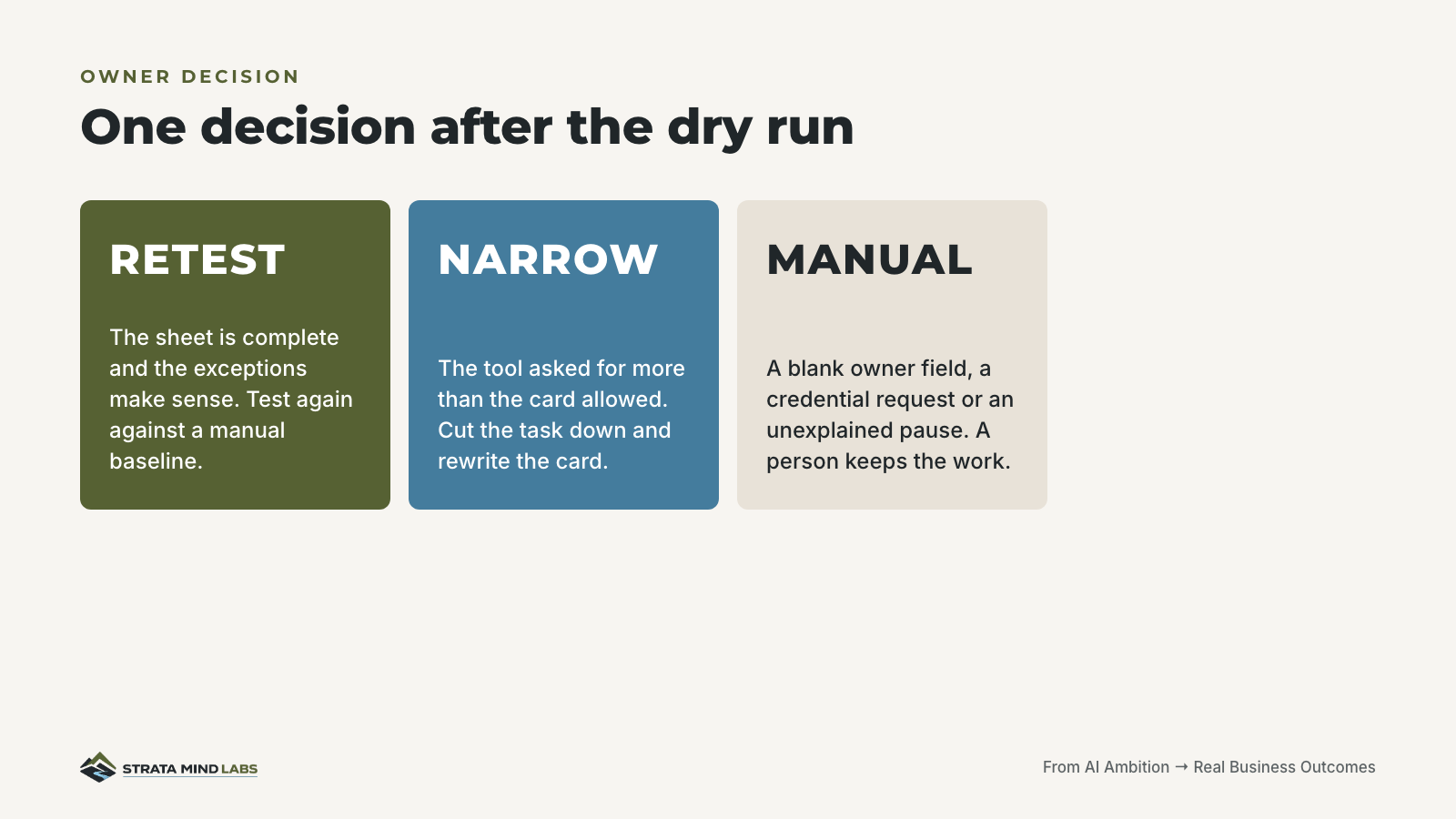
Missing fields, new app requests and reviewer interventions are part of the result. Don't hide them. They're the evidence the owner needs to widen the scope or stop.
What to do this week
A fair limit on all this
Everything here about the feature comes from Google. The controls are Google's description of its own product. None of the sources used here tests them independently, and the post reports no outcomes. Whether the feature reaches work accounts isn't stated in Google's public documentation that was checked for this briefing. Ask your administrator or Google before you assume either way.
No shop ran this trial. The card, the five prompts and the 30-minute estimate are Strata Mind Labs proposed practice, and one dry run is a single case. It can't tell you how often anything goes right or wrong. No time saving or return is assumed. If you want a real number, measure the manual task first and compare a later pilot against it.
CIO Question of the Day
Which apps on your office laptops would you take off the list before any desktop agent gets a first run?
Sources
- Friedman, M. (2026, November 19). Let Gemini tackle repetitive chores on your Mac. Google. Retrieved November 20, 2026, from https://blog.google/innovation-and-ai/products/gemini-app/computer-use-mac/
- Google Workspace Updates. (2026, April 15). Now available: The Gemini app for Mac. Retrieved November 20, 2026, from https://workspaceupdates.googleblog.com/2026/04/now-available-gemini-app-for-mac.html
- Google. (n.d.). Use the Gemini app on Mac. Gemini Apps Help. Retrieved November 20, 2026, from https://support.google.com/gemini/answer/17011627
The agent gets a job ticket. The owner keeps the keys.
New briefings land as soon as the signal is worth your time.