
AI Booking Calls at Your Front Desk
A booking rule for small service shops: one card, five prompts and an owner decision on who makes a slot final
Executive decision: Approve a small front desk test of one booking rule: record the request, keep the slot provisional and confirm through a contact path the shop already uses. The first useful output is a blank call log and a written rule, about 45 minutes with the office manager as a planning estimate. After a review period the owner reads the real call records and decides whether the rule stays, changes or goes.
The assistant can ask for a Tuesday slot. Only your front desk should be able to say yes.
The signal this week
On November 17 Google published a post by Josh Woodward, its vice president for Labs and the Gemini app. He describes asking Gemini to call the two nearest dealerships and find an early Friday service appointment for his minivan. In his account, Gemini called both at once, sat through the hold music, booked an appointment at the shop that accepts appointments rather than walk-ins only and put it on his calendar. He writes that Gemini told the dealership it was an AI, that businesses can opt out and that Gemini won't give out his payment or private account information unless he says so (source 1).
That's one author's account of one errand, told by the company that makes the product. It shows the capability exists. It says nothing about how often a booking works.
Google's help page for the calling feature says Gemini can book, confirm and manage appointments and reservations. It also says every call starts with a disclosure that Gemini is an AI assistant from Google, calling on a recorded line on the user's behalf and stating the user's name (source 2).
The same page lists who can use it, and the list is narrow. The user must be 18 or older and in the US, with a Pixel 10 or Pixel 11 phone, a Google AI subscription, the public beta of the Phone by Google app and English set as the device language. Gemini can only call US numbers. The page says the feature is reaching eligible users gradually. The announcement adds that calling isn't available in Indiana, Louisiana, Minnesota, Montana and Nebraska (source 1).
My read: few callers fit all of that today, so many shops will hear none of these calls for a while. That's an inference. Neither page counts users or calls. The announcement covers the wider Tasks update and the help page lists the narrower calling conditions, and the two don't reconcile that difference.
Two details on the help page matter at a front desk. Gemini places calls from the user's own phone and number (source 2), so the number on your screen is probably the customer's. A callback would then reach the customer. I haven't tested that, and the drill below does. The page also says Gemini can't complete financial transactions or relay sensitive personal information such as social security numbers, passwords or health information. A caller asking for any of that has stepped outside what Google says the feature does.
On the business side, Google's Business Profile help page describes calls Google may place to a business for customers, including appointment bookings, and says those calls are monitored and recorded (source 3). That page doesn't name Gemini. The announcement's "opt out" link points to it, so it's the nearest public documentation for a shop.
Four steps from call to slot
The rule starts with the call note, not with a purchase. When a caller identifies itself as an assistant, the front desk writes down the customer's name, a callback number, the service requested and the proposed time. The slot is held and marked as not final. The shop confirms with the customer through a contact path it already uses. Only then does the slot become final, and any mismatch goes to the office manager.
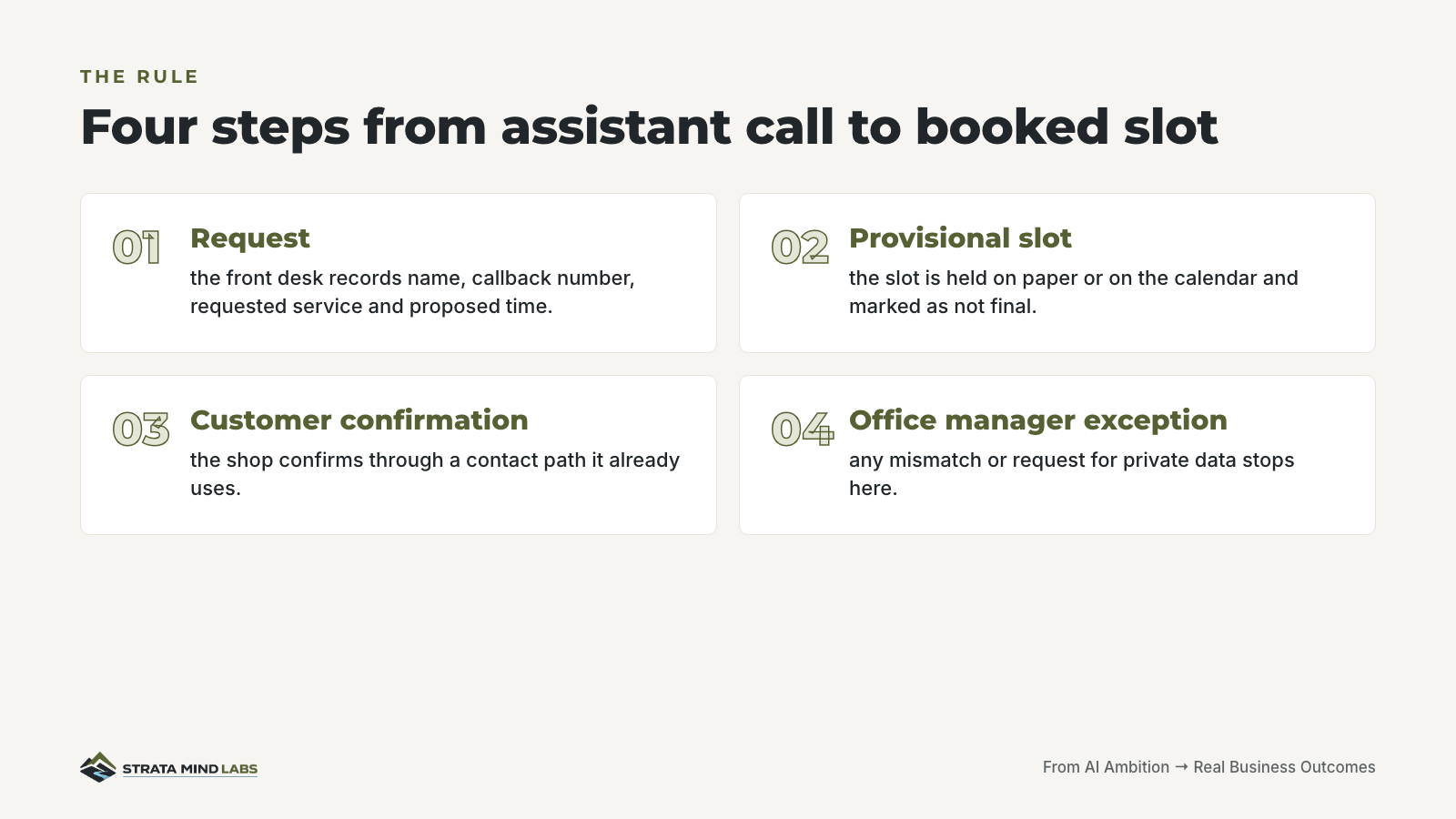
This is Strata Mind Labs proposed practice. Google doesn't describe it and no source measured whether it works.
The strongest argument against it is practical. Many shops will hear no assistant calls, and an added check could slow ordinary bookings. So the rule applies only when the caller says it's an assistant. Normal calls stay on the path you already run. If the test adds work without producing useful records, retire it.
Who holds the pen
The appointment book is the shop's operating system, and the card says so in a table. An assistant may supply a name and a request and may ask for a slot. It can't vouch for the customer and it can't finalize anything alone. The front desk records the request, proposes a slot from the current schedule and finalizes after confirmation. The office manager takes every mismatch. Anything involving private or payment data stops there.
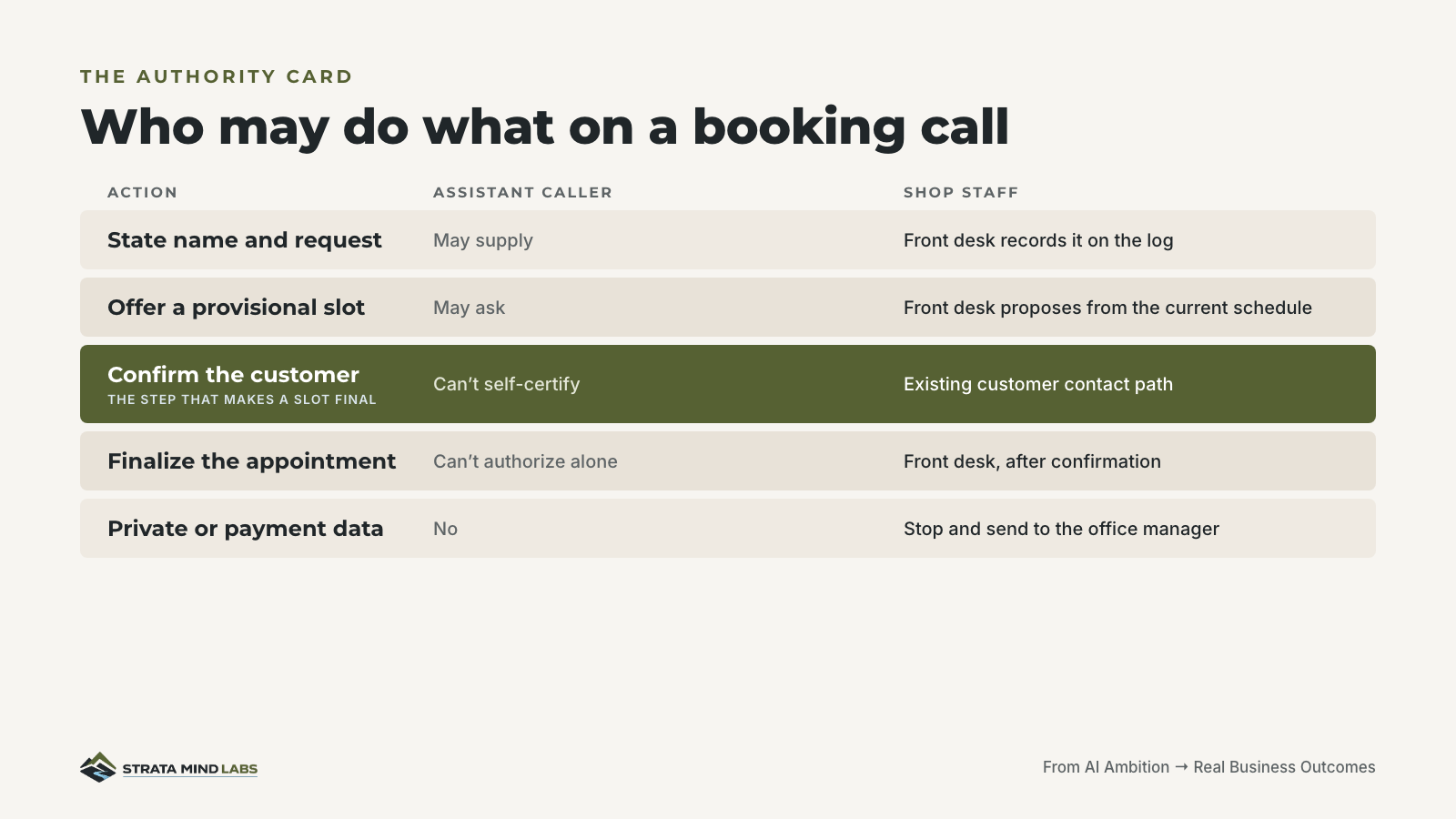
The card is shop policy. It makes no claim about what any assistant can or can't do.
One judgment call belongs to the owner: what counts as the customer's existing contact path. For a returning customer it can be the number on file. For a new one, my suggestion is to write down the rule before the first call, not during it.
Forty-five minutes at the front desk
This is a reconstruction with made-up data. It's an exercise, not client work and not a measured result. Bring the current appointment book or spreadsheet, recent call notes and the person who answers the phone. Forty-five minutes is a planning estimate.
Copy these fields onto a blank sheet: received time, assistant disclosed, customer name, callback number, requested service, proposed slot, customer confirmation, exception and office manager decision. Then walk through one clearly labeled synthetic request, such as a customer asking for a furnace tune-up next Tuesday. It's rehearsal data, not an observed call. Check that staff know where to record the callback, how to mark a slot provisional and who takes a mismatch.
Pass means the office manager can read the record and make the next decision without guessing. Stop means the caller asks for private account or payment details, or the customer can't be confirmed. In either case the booking stops and goes to the office manager.
After the review period the owner sets, count the real assistant calls, the rows with missing fields, the confirmed appointments and the staff time spent on the extra check. A count of zero is evidence about this shop in that period. It isn't proof that no call will ever arrive. Don't estimate jobs saved from a provisional slot.
Five prompts to run this week
Use these with redacted or made-up notes. The machine drafts and counts. It doesn't make the booking decision.
Map the present booking path
Copy this prompt
Using the redacted booking notes I provide, list each step from incoming call to final appointment. Name the person who owns each step. Mark any missing information as UNKNOWN. Do not infer a customer identity or create a result we did not observe.
What this should tell you: Check the step list for the real calendar owner and any missing handoff. Invented names or times are a warning sign. A clear current path shows where an assistant request can enter without rewriting normal bookings, and the office manager decides where the provisional status belongs.
Design the intake row
Copy this prompt
From this current path and a synthetic assistant-call record, draft one spreadsheet row with received time, assistant disclosure, customer name, callback, service, proposed slot, confirmation status, exception and owner decision. Leave unknown cells blank. Do not finalize an appointment.
What this should tell you: Check that each field fits the shop's current notes and that blanks stay blank. Flag any invented confirmation. A usable row shows what staff need from the call before a slot can be held, and the office manager approves or edits it against the real appointment book.
Find the stop conditions
Copy this prompt
Review the approved intake row and this proposed rule: no final booking until customer confirmation through an existing shop contact path. List requests that need office manager review, including mismatched callback details, missing service information and requests for private or payment data. Do not invent legal duties.
What this should tell you: Match each exception to an actual field. An exception with no observable trigger needs a human rewrite. The stop rule keeps a plausible-sounding caller from taking over the booking process, and the owner decides which exceptions pause a request and who receives them.
Rehearse one request
Copy this prompt
Write a clearly labeled synthetic call note for a routine appointment request. Use only these fields: customer name, callback, service and proposed time. Then show how the front desk records it, marks the slot provisional and routes a mismatched callback to the office manager. Mark all outcomes as simulated.
What this should tell you: Look for a complete note, a provisional label and a visible handoff. Reject any script that calls the booking final before the customer confirms. The rehearsal tests whether a person can use the rule in the middle of a busy call, and the office manager decides whether the wording works or needs a shorter card.
Read the actual log
Copy this prompt
Using this redacted real call log, count assistant-disclosed calls, rows with missing fields, customer-confirmed appointments and exceptions. Separate observed counts from assumptions. Do not estimate lost jobs or revenue. List any row that needs a human review before a decision.
What this should tell you: Check the counts against the underlying log. Missing records, double counts and inferred conversions are warning signs. The log shows whether this shop met the new call type at all and what work it created, and the owner decides to keep, revise or retire the rule from the counts and the staff time.
The owner decision
Authorize the test with the current calendar and a blank log. Name the office manager for exceptions. Set the hold period for a provisional slot and a review date from current shop practice. Then make one call from the records.
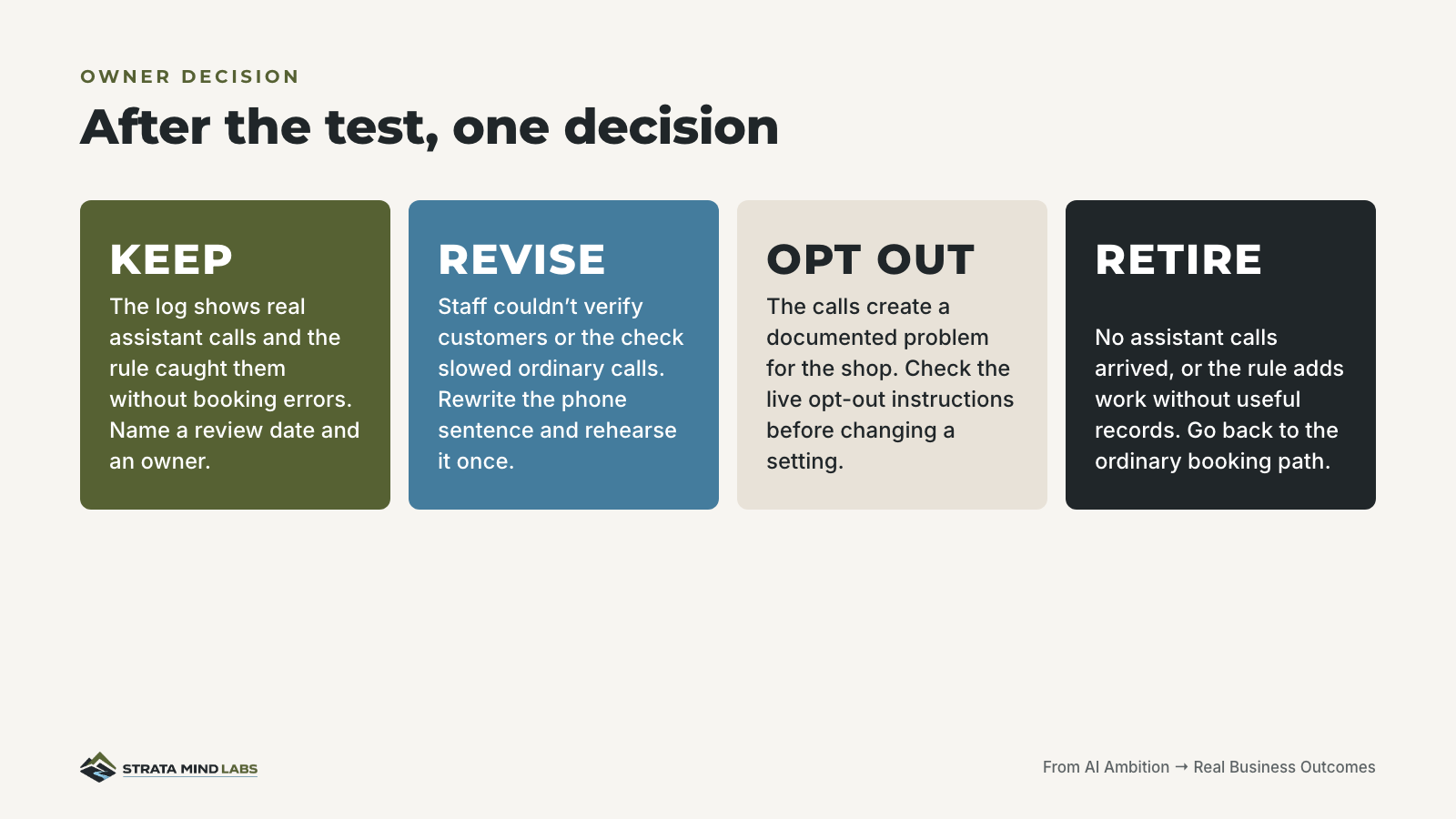
If a staff member finalized a slot without customer confirmation, treat that as a process defect and fix the rule before going on. If no assistant calls arrived, archive the blank rule and use the ordinary booking path.
Opting out is the owner's call if the calls create a documented problem. Google's Business Profile page describes two routes. You can tell the caller to stop calling your business. Or a verified business can open Business Profile settings, then Advanced settings, and turn off "Bookings and inquiries from customers" under the Google automated calls and text messages heading. The page says that after opting out you may still get occasional manual calls from Google to confirm business information (source 3). It doesn't mention Gemini, so check the live page before you rely on it for these calls.
What to do this week
A fair limit on all this
One announcement is one account. The author is a Google vice president describing a personal errand, and Google's help pages describe Google's own feature. Nothing here is independent evidence of how well booking works, how many assistant calls a shop will receive or whether a missed call would have become a job. The access list can change as the rollout continues, so reread the help page before you plan around it.
The card, the 45-minute estimate, the pass and stop rules and the five prompts are Strata Mind Labs proposed practice. No source measured their benefit and no return is assumed. The prompts are drafts that haven't been run against your records.
To check this yourself, open the help page and compare its conditions with the customers you serve. Then open the Business Profile page and see whether your profile shows the booking setting.
CIO Question of the Day
When an AI assistant calls to book a customer, who at your shop decides the slot is final, and has anyone told them?
Sources
- Woodward, J. (2026, November 17). How to use Tasks in Gemini for personal assistance. Google. https://blog.google/innovation-and-ai/products/gemini-app/tasks-in-gemini-free-new-features/
- Google. (n.d.). Ask Gemini to handle your everyday phone calls. Gemini Apps Help. Retrieved November 18, 2026, from https://support.google.com/gemini/answer/18336420?hl=en
- Google. (n.d.). About automated calls and texts from Google to your business. Google Business Profile Help. Retrieved November 18, 2026, from https://support.google.com/business/answer/7690269
The assistant can ask for the slot. The shop decides when it’s final.
New briefings land as soon as the signal is worth your time.